
ReceiptIA: OCR Expense Tracker
Monumint Labs Finance In-app purchases Contains ads
AI-powered multi-currency expense tracker with receipt scanner and smart stats.
- Downloads
- 479+
- on Google Play
- Price
- Free
- In-app purchases
- Updated
- Oct 9
- 2026 · v1.4.0
Screenshots



About ReceiptIA: OCR Expense Tracker
ReceiptIA – AI Receipt Scanner & Expense Tracker
ReceiptIA is your smart companion for managing receipts and tracking expenses effortlessly. With advanced AI-powered OCR, the app scans receipts, extracts key information automatically, and organizes your spending across categories and currencies. Perfect for personal budgeting, business expenses, or keeping your financial life in order.
SMART RECEIPT SCANNING
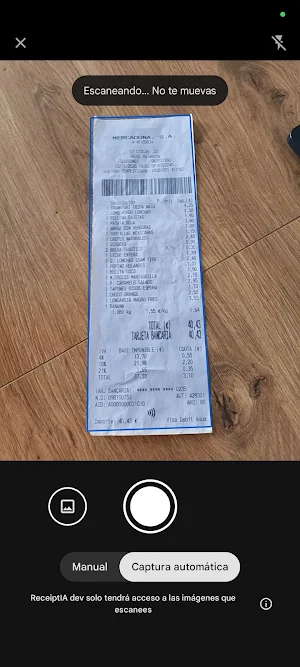
• Capture receipts with your camera or import images from your gallery
• Supports PDF receipts and invoices
• Multi-engine OCR delivers highly accurate text recognition
• Image enhancement improves scan clarity
• Multi-version OCR analysis increases confidence and accuracy
AI-POWERED RECEIPT ANALYSIS
• Automatic extraction of shop name, date, items, totals, and taxes
• Intelligent expense categorization
• Multi-currency support with automatic exchange rate conversion
• Detects discounts, taxes, and fees
• Recognizes payment methods for better financial insights
COMPLETE EXPENSE MANAGEMENT
• Dashboard showing monthly and yearly expense overviews
• Detailed statistics with category breakdowns and spending trends
• Edit receipt fields, items, and currency values
• Add or remove items from receipts to correct OCR data
• Track expenses across multiple currencies effortlessly
USER-FRIENDLY INTERFACE
• Intuitive and modern design
• Real-time expense updates
• Visual charts and analytics for clear financial insights
• Quick access to recent expenses
• Smooth workflow for scanning, reviewing, and tracking expenses
ACCOUNT & SETTINGS
• Secure login with email or Google Sign-In
• Cloud sync ensures your data is safe and accessible across devices
• Multi-language support
• Customizable default currency and app preferences
PERFECT FOR
• Business expense tracking
• Personal budgeting and financial organization
• Tax reporting and compliance
• Reimbursement and accounting workflows
• Daily, travel, or multi-currency spending management
HOW IT WORKS
1. Capture a receipt or import an image/PDF
2. AI analyzes and extracts all relevant details, translates items names to your language
3. Review and edit fields if needed
4. Track your expenses automatically with categorized insights
WHY CHOOSE ReceiptIA
• Industry-grade OCR accuracy powered by multiple recognition engines
• AI-based data extraction saves time and reduces manual input
• All-in-one platform for scanning, organizing, and tracking expenses
• Secure cloud backup keeps your expenses safe
• Designed for both personal and professional use
• Multi-currency support for international travelers and remote workers
• Continuous updates and improvements for better performance
Start managing your expenses the smart way.
Download ReceiptIA and transform how you scan, organize, and track your receipts.
ReceiptIA is your smart companion for managing receipts and tracking expenses effortlessly. With advanced AI-powered OCR, the app scans receipts, extracts key information automatically, and organizes your spending across categories and currencies. Perfect for personal budgeting, business expenses, or keeping your financial life in order.
SMART RECEIPT SCANNING
• Capture receipts with your camera or import images from your gallery
• Supports PDF receipts and invoices
• Multi-engine OCR delivers highly accurate text recognition
• Image enhancement improves scan clarity
• Multi-version OCR analysis increases confidence and accuracy
AI-POWERED RECEIPT ANALYSIS
• Automatic extraction of shop name, date, items, totals, and taxes
• Intelligent expense categorization
• Multi-currency support with automatic exchange rate conversion
• Detects discounts, taxes, and fees
• Recognizes payment methods for better financial insights
COMPLETE EXPENSE MANAGEMENT
• Dashboard showing monthly and yearly expense overviews
• Detailed statistics with category breakdowns and spending trends
• Edit receipt fields, items, and currency values
• Add or remove items from receipts to correct OCR data
• Track expenses across multiple currencies effortlessly
USER-FRIENDLY INTERFACE
• Intuitive and modern design
• Real-time expense updates
• Visual charts and analytics for clear financial insights
• Quick access to recent expenses
• Smooth workflow for scanning, reviewing, and tracking expenses
ACCOUNT & SETTINGS
• Secure login with email or Google Sign-In
• Cloud sync ensures your data is safe and accessible across devices
• Multi-language support
• Customizable default currency and app preferences
PERFECT FOR
• Business expense tracking
• Personal budgeting and financial organization
• Tax reporting and compliance
• Reimbursement and accounting workflows
• Daily, travel, or multi-currency spending management
HOW IT WORKS
1. Capture a receipt or import an image/PDF
2. AI analyzes and extracts all relevant details, translates items names to your language
3. Review and edit fields if needed
4. Track your expenses automatically with categorized insights
WHY CHOOSE ReceiptIA
• Industry-grade OCR accuracy powered by multiple recognition engines
• AI-based data extraction saves time and reduces manual input
• All-in-one platform for scanning, organizing, and tracking expenses
• Secure cloud backup keeps your expenses safe
• Designed for both personal and professional use
• Multi-currency support for international travelers and remote workers
• Continuous updates and improvements for better performance
Start managing your expenses the smart way.
Download ReceiptIA and transform how you scan, organize, and track your receipts.
What’s new
Version 1.4.0 · Updated October 9, 2026
- Added tags support. - Added tax-included total calculation. - Improved file upload flow and error handling. - Fixed PDF thumbnail background color.
Alternatives to ReceiptIA: OCR Expense Tracker
Looking for apps like ReceiptIA: OCR Expense Tracker? Here are 3 similar Android apps on Google Play. The highest rated is Pack your suitcase! (4.3/5), and all 3 are free to download.



| App | Rating | Price | Installs | Last updated | Compare |
|---|---|---|---|---|---|
| ReceiptIA: OCR Expense Tracker | – | Free | 100+ | Oct 9, 2026 | |
| Numsense | – | Free | 10+ | – | Compare |
| French numbers | – | Free | 500+ | Jul 25, 2026 | Compare |
| Pack your suitcase! | 4.3 / 5 | Free | 50,000+ | Jul 22, 2026 | Compare |