

Hightail: Share files and review content
OpenText Corp. Productivity
Share, preview and leave feedback on multimedia files in one application
- Rating
- 3.5
- 152 ratings
- Downloads
- 40.3K+
- on Google Play
- Price
- Free
- No in-app purchases
- Updated
- Jan 21
- 2025 · v24.4.1
Screenshots




About Hightail: Share files and review content
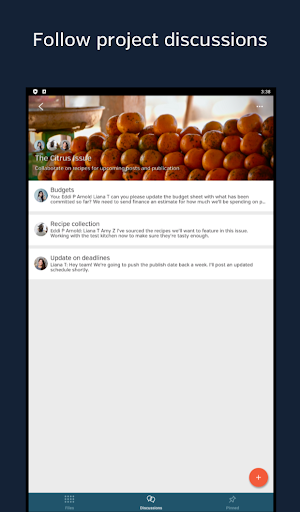
Designed to streamline collaboration content reviews, especially when on the go, the Hightail app lets you quickly preview and stream multimedia files that are shared with you. If you need to leave feedback or respond to next steps, you can add comments through the Hightail app. Need to share photos, videos or documents from your device? All you need is your recipient’s email address to send large files through the app. They will receive an email notification automatically, letting them know files are available for preview, review or download without requiring a Hightail account.
Download the Hightail app to:
- Preview files that have been sent to you or shared via Hightail Spaces
- Check status updates for the projects you're working on
- Know what actions you need to do next
- Review and add comments when you're on the go
- Upload photos, videos and other large files for sharing from your device
- Get notifications in real time when attention is needed
- Discuss next steps for a project
- Send files that are stored in your Google Drive, Dropbox or Microsoft OneDrive account to anyone
Keep your creative projects moving with anytime, anywhere access to files in the Hightail app for Android and go from first share to final assets faster.
For plans and pricing, visit www.hightail.com/pricing
For support, please contact [email protected]
Privacy Policy: https://www.hightail.com/terms
Download the Hightail app to:
- Preview files that have been sent to you or shared via Hightail Spaces
- Check status updates for the projects you're working on
- Know what actions you need to do next
- Review and add comments when you're on the go
- Upload photos, videos and other large files for sharing from your device
- Get notifications in real time when attention is needed
- Discuss next steps for a project
- Send files that are stored in your Google Drive, Dropbox or Microsoft OneDrive account to anyone
Keep your creative projects moving with anytime, anywhere access to files in the Hightail app for Android and go from first share to final assets faster.
For plans and pricing, visit www.hightail.com/pricing
For support, please contact [email protected]
Privacy Policy: https://www.hightail.com/terms
What’s new
Version 24.4.1 · Updated January 21, 2025
- General security and stability improvements.
User reviews

Able to sign up and login now. Previously was not working at all.

Liked collaboration concept

Useful to share files

Good

Previously was not able to sign up. Commenting feature is good.

Previously Google SignIn was not working. Its working.
Alternatives to Hightail: Share files and review content
Looking for apps like Hightail: Share files and review content? Here are 6 similar Android apps on Google Play. The highest rated is OpenText Core Share (4.5/5), and all 6 are free to download.
-
OpenText Core Share 4.5
-
OpenText Content Server Mobile
-
XMediusFAX
-
OpenText Core Content Mobile
-
OpenText World 2022
-
CSMobile for use with Intune
| App | Rating | Price | Installs | Last updated | Compare |
|---|---|---|---|---|---|
| Hightail: Share files and review content | 3.5 / 5 | Free | 10,000+ | Jan 21, 2025 | |
| OpenText Core Share | 4.5 / 5 | Free | 10,000+ | – | Compare |
| OpenText Content Server Mobile | – | Free | 10,000+ | Sep 29, 2026 | Compare |
| XMediusFAX | – | Free | 1,000+ | Oct 5, 2026 | Compare |
| OpenText Core Content Mobile | – | Free | 500+ | Aug 4, 2026 | Compare |
| OpenText World 2022 | – | Free | 100+ | Sep 20, 2022 | Compare |
| CSMobile for use with Intune | – | Free | 1,000+ | – | Compare |
Similar apps on Google Play
- OpenText Core Share
- OpenText Content Server Mobile
- XMediusFAX
- OpenText Core Content Mobile
- OpenText World 2022
- CSMobile for use with Intune
- OpenText eDOCS InfoCenter for
- OpenText Self Declaration
- OpenText Documentum D2 Mobile
- OpenText Active Orders
- XM SendSecure
- OpenText eDOCS InfoCenter
- OpenText Tempo Box 16
- OpenText AppWorks CE
- CX-E Voice