

wallet manager
Oni App Finance In-app purchases Contains ads
Track spending, budgets, and bills. Private — data stays on your phone.
- Downloads
- 19+
- on Google Play
- Price
- Free
- In-app purchases
- Updated
- Sep 10
- 2026 · v1.1.6
Screenshots


About wallet manager
Wallet Manager is a personal money tracker for your own accounts. Record income, expenses, and transfers. Data stays on this device. There is no account sign-in and no bank login.
WHAT YOU CAN DO
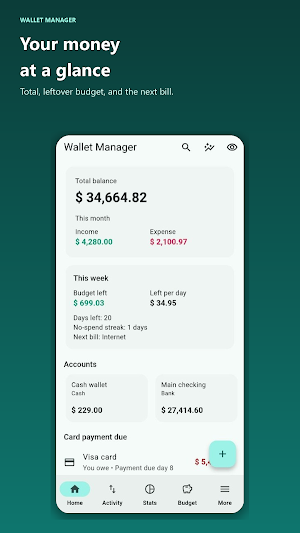
• Accounts — cash, bank, e-wallet, credit card, and savings. Credit cards count as money you owe.
• Transactions — category, payee, notes, tags, splits, and optional receipt photos.
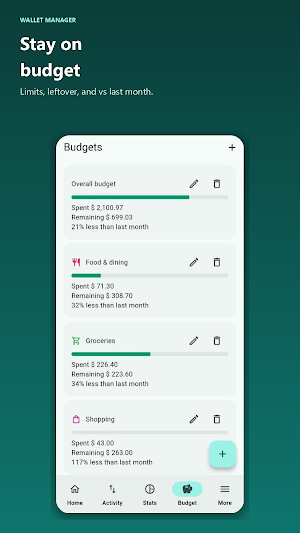
• Budgets — monthly limits, leftover budget, and over-budget warnings.
• Bills — due dates, reminders, and mark as paid.
• Goals — savings targets and progress.
• Debts — money you owe others or they owe you.
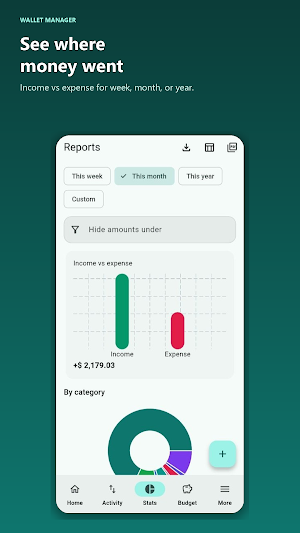
• Reports — spending by category, income vs expense, and net worth over time.
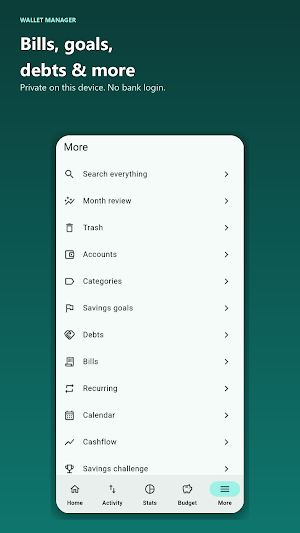
• Recurring items, calendar, templates, and backup/restore on the device.
PRIVACY
Your ledger is stored on the phone. We do not run a Wallet Manager cloud for your transactions. Optional PIN and biometrics lock the app on the device.
You can export a local backup. Optional Browser access (Premium) lets you open the same data in a computer browser while the phone stays awake. You control when that server is on.
LANGUAGES
English, Malay, Indonesian, Thai, Vietnamese, Japanese, Chinese, Russian, French, Arabic, Hindi, and Urdu.
ADS AND PREMIUM
A banner ad may show. A one-time Premium purchase removes ads and unlocks Browser access. Purchases go through Google Play.
Wallet Manager is for personal bookkeeping. It is not a bank, wallet for sending money, or investment advisor.
WHAT YOU CAN DO
• Accounts — cash, bank, e-wallet, credit card, and savings. Credit cards count as money you owe.
• Transactions — category, payee, notes, tags, splits, and optional receipt photos.
• Budgets — monthly limits, leftover budget, and over-budget warnings.
• Bills — due dates, reminders, and mark as paid.
• Goals — savings targets and progress.
• Debts — money you owe others or they owe you.
• Reports — spending by category, income vs expense, and net worth over time.
• Recurring items, calendar, templates, and backup/restore on the device.
PRIVACY
Your ledger is stored on the phone. We do not run a Wallet Manager cloud for your transactions. Optional PIN and biometrics lock the app on the device.
You can export a local backup. Optional Browser access (Premium) lets you open the same data in a computer browser while the phone stays awake. You control when that server is on.
LANGUAGES
English, Malay, Indonesian, Thai, Vietnamese, Japanese, Chinese, Russian, French, Arabic, Hindi, and Urdu.
ADS AND PREMIUM
A banner ad may show. A one-time Premium purchase removes ads and unlocks Browser access. Purchases go through Google Play.
Wallet Manager is for personal bookkeeping. It is not a bank, wallet for sending money, or investment advisor.
Alternatives to wallet manager
Looking for apps like wallet manager? Here are 3 similar Android apps on Google Play. All of them are free to download.


| App | Rating | Price | Installs | Last updated | Compare |
|---|---|---|---|---|---|
| wallet manager | – | Free | 10+ | Sep 10, 2026 | |
| ParcelCam | – | Free | 1,000+ | Oct 13, 2026 | Compare |
| Survival Wasteland | – | Free | 100+ | – | Compare |
| Guild Manager: Medieval | – | Free | 500+ | – | Compare |
Compare wallet manager with the top alternatives: ratings, updates, ASO score and keyword gaps →