
HT Shift
Personalization Contains ads
Manage Your Shifts and Work List Easily!
- Downloads
- 30+
- on Google Play
- Price
- Free
- No in-app purchases
- Updated
- Oct 19
- 2025 · v1.1.5
Screenshots

About HT Shift
Intuitive Calendar and Calendar: Easily view your tasks and tasks in a clear and organized calendar view.
Comprehensive Seizure Management: Update your schedule instantly with the actions of adding, editing and deleting single or collective seizures.tuitive Calendar and Calendar: Easily view your tasks and tasks in a clear and organized calendar view.
Comprehensive Seizure MIntuitive Calendar and Calendar: Easily view your tasks and tasks in a clear and organized calendar view.
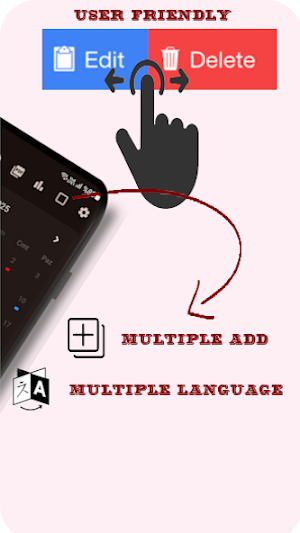
Comprehensive Seizure Management: Update your schedule instantly with the actions of adding, editing and deleting single or collective seizures.
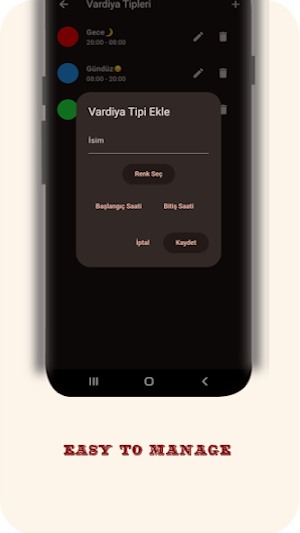
Customizable Shift Types: Customize your own shift types (for example, Day, Night, Leave) with colors, names, and time December.
Smart Alarm Reminders: Never miss important shifts! Receive timely notifications with adjustable alarms before shift start. Choose which shift types to set alarms for.
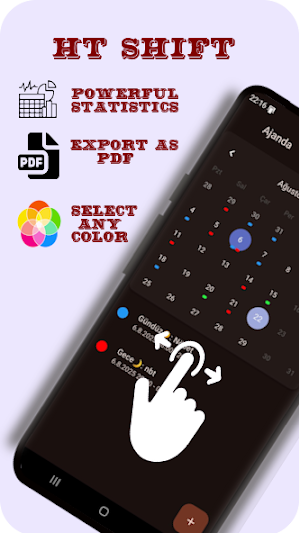
Detailed Statistics: Gain valuable insights into your schedule by viewing your monthly shift counts and total working hours by shift type.
PDF Export: Easily export your schedule and shift information asetailed Statistics: Gain valuable insights into your schedule by viewing your monthly shift counts and total working hours by shift type.
PDF Export: Easily export your scheduled Statistics: Gain valuable insights into your schedule by viewing your monthly shift counts and total working hours by shift type.
PDF Export: Easily export your schedule and shift information as PDF. Customize and share your reports.
Multi-Language Support: Use the app in your preferred language.
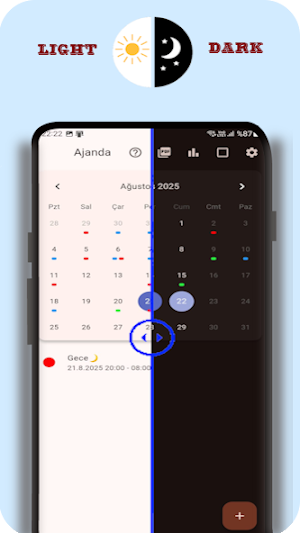
Dark Mode Support: Enable dark mode to reduce eye strain and save battery life.
User-Friendly Interface: Start using the application easily thanks to its simple and understandable design.
Organizing your schedule has never been easier with HT Shift. Download now and start managing your shifts without any problems!
Comprehensive Seizure Management: Update your schedule instantly with the actions of adding, editing and deleting single or collective seizures.tuitive Calendar and Calendar: Easily view your tasks and tasks in a clear and organized calendar view.
Comprehensive Seizure MIntuitive Calendar and Calendar: Easily view your tasks and tasks in a clear and organized calendar view.
Comprehensive Seizure Management: Update your schedule instantly with the actions of adding, editing and deleting single or collective seizures.
Customizable Shift Types: Customize your own shift types (for example, Day, Night, Leave) with colors, names, and time December.
Smart Alarm Reminders: Never miss important shifts! Receive timely notifications with adjustable alarms before shift start. Choose which shift types to set alarms for.
Detailed Statistics: Gain valuable insights into your schedule by viewing your monthly shift counts and total working hours by shift type.
PDF Export: Easily export your schedule and shift information asetailed Statistics: Gain valuable insights into your schedule by viewing your monthly shift counts and total working hours by shift type.
PDF Export: Easily export your scheduled Statistics: Gain valuable insights into your schedule by viewing your monthly shift counts and total working hours by shift type.
PDF Export: Easily export your schedule and shift information as PDF. Customize and share your reports.
Multi-Language Support: Use the app in your preferred language.
Dark Mode Support: Enable dark mode to reduce eye strain and save battery life.
User-Friendly Interface: Start using the application easily thanks to its simple and understandable design.
Organizing your schedule has never been easier with HT Shift. Download now and start managing your shifts without any problems!
What’s new
Version 1.1.5 · Updated October 19, 2025
Some bugs have been fixed. Additional features added.
Alternatives to HT Shift
Looking for apps like HT Shift? Here are 6 similar Android apps on Google Play. The highest rated is PER72 Hybrid Watch Face (4.3/5), and 4 of the 6 are free to download.
-
Digital Panel WS10 Watch Face
-
PER72 Hybrid Watch Face 4.3
-
Porsche 911 Wallpaper
-
Valentines Week Photo Frame
-
Potter harry 4k Wallpapers
-
Cute Capybara Wallpapers
| App | Rating | Price | Installs | Last updated | Compare |
|---|---|---|---|---|---|
| HT Shift | – | Free | 10+ | Oct 19, 2025 | |
| Digital Panel WS10 Watch Face | – | 0.99 USD | 100+ | Feb 15, 2026 | Compare |
| PER72 Hybrid Watch Face | 4.3 / 5 | 2.99 USD | 1,000+ | Sep 17, 2026 | Compare |
| Porsche 911 Wallpaper | – | Free | 5,000+ | Feb 3, 2026 | Compare |
| Valentines Week Photo Frame | – | Free | 100+ | Oct 3, 2026 | Compare |
| Potter harry 4k Wallpapers | – | Free | 1,000+ | Mar 9, 2026 | Compare |
| Cute Capybara Wallpapers | – | Free | 100+ | Feb 9, 2026 | Compare |
Compare HT Shift with the top alternatives: ratings, updates, ASO score and keyword gaps →
Similar apps on Google Play
- Digital Panel WS10 Watch Face
- PER72 Hybrid Watch Face
- Porsche 911 Wallpaper
- Valentines Week Photo Frame
- Potter harry 4k Wallpapers
- Cute Capybara Wallpapers
- Vaporwave Watch Face GTG1
- Eshine
- Dark Wallpapers 4K
- RadarWars
- DF089
- Color Fusion Watch Face - GTG3
- Custom Control Panel Simple
- Cute Anime Girl Wallpaper
- Italian Brainrot Wallpapers
- Lamo
- SamWatch Basic 3 2026
- GBL Logistics
- TacticleMission Watchface GTG2
- Key WF91 Classic Watch Face
- Flork Wallpaper
- Rapidios
- Firecracker Sounds • Ringtones
- Neon Wallpaper
- Weather Hybrid Watch Face A6