
RTA SPL - Audio Analyzer Pro
Olivier ADAM Tools In-app purchases Contains ads
Measure SPL and RTA spectrum in real time with professional-grade accuracy
- Downloads
- 829+
- on Google Play
- Price
- Free
- In-app purchases
- Updated
- Sep 2
- 2026 · v1.16.0
Screenshots
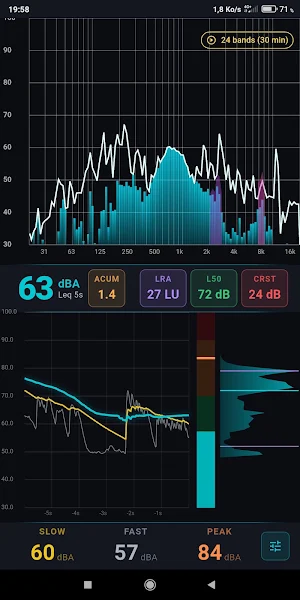
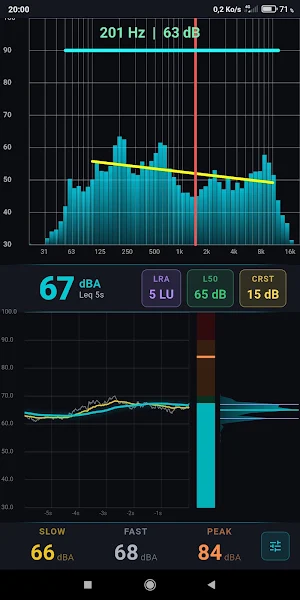
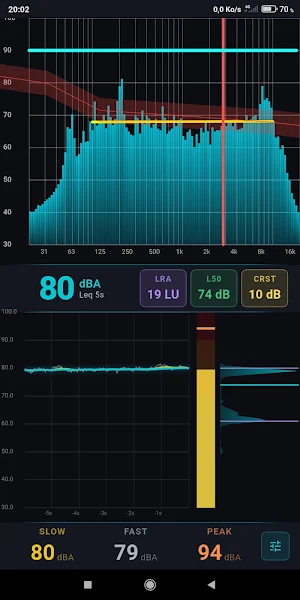

About RTA SPL - Audio Analyzer Pro
Assessing a sound level or diagnosing a spectral imbalance normally requires a separate sound meter and spectrum analyzer, often expensive or imprecise on mobile — this audio analyzer combines both functions in a native Rust computing engine, with no garbage-collection latency.
🔒 100% Ad-Free • Pro Precision • Zero Data Collection
Enjoy a clean, distraction-free professional tool. The app contains no ads, requires no login, and collects no personal data.
Who is it for, and in what situations?
For a live sound engineer, the audio analyzer lets you fine-tune an equalizer by comparing the measured curve to a target curve (Harman, JBL House) and pinpoint the exact frequency of feedback using the high-resolution mode. For a car audio technician, the app offers dedicated calibration curves (Audiofrog, B&K Optimum, Step-Down) to tune the frequency response of a vehicle cabin. For a health and safety officer, the SLOW/FAST history with NIOSH/OSHA thresholds helps document prolonged noise exposure.
What you gain
Spot a tonal imbalance at a glance thanks to the colored spectral tilt line
Assess listening fatigue in a mix thanks to psychoacoustic sharpness (ACUM, Zwicker model)
Calibrate an audio system with precision thanks to target curves and their ±3.5 dB tolerance corridor
Track noise exposure over time thanks to L10/L50/L90 statistics and LRA
Catch clipping instantly thanks to real-time saturation detection
Key Features
📊 RTA spectral analysis
IIR constant-Q filter bank, resolution from 3 to 24 bands per octave
Live spectral centroid and bandwidth display
Sharpness (ACUM) overlay on high frequencies
🎚️ Professional SPL measurement
A-weighting compliant with IEC 61672, FAST (125 ms) and SLOW (1 s) integration
VU meter with color-coded safety zones and clipping badge
Time history, histogram, and L10/L50/L90 percentiles
🎯 Calibration and target curves
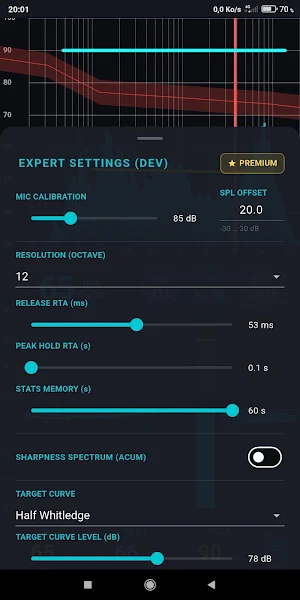
Reference curves: Harman, Audiofrog, JBL House, B&K Optimum, Half Whitledge
Two dynamic range modes: Studio (30–100 dB) and Live (50–120 dB)
Manual microphone calibration (RTA offset, SPL offset)
📘 Built-in learning
Explanatory tooltip on every parameter (theory, typical values, use cases)
A differentiating technical approach
Unlike tools that rely on a fixed-resolution FFT, this audio analyzer uses a constant-Q filter bank (CQT), which better matches human frequency perception. The constant-Q transform delivers better resolution in low frequencies than a classic FFT, whose resolution stays fixed regardless of where in the spectrum you're analyzing — a decisive advantage for precisely identifying a room mode or an EQ issue in the bass range. The signal processing engine, written entirely in Rust, avoids the garbage-collector latency found in competing apps built in Java or Dart.
Transparent pricing & privacy
The app accesses the microphone solely for real-time acoustic analysis. No audio is recorded or transmitted.
100% Ad-Free: No banners, no pop-ups, no interruptions.
Free core features: Essential functions remain available (3/6-band RTA, complete SPL measurement).
Pro Features: Unlock high-resolution 24-band RTA, pro target curves, and Live mode via a simple one-time lifetime purchase — no subscription, no recurring fees.
Install this audio analyzer to measure, calibrate, and understand the sound behavior of your environment starting with your next session.
🔒 100% Ad-Free • Pro Precision • Zero Data Collection
Enjoy a clean, distraction-free professional tool. The app contains no ads, requires no login, and collects no personal data.
Who is it for, and in what situations?
For a live sound engineer, the audio analyzer lets you fine-tune an equalizer by comparing the measured curve to a target curve (Harman, JBL House) and pinpoint the exact frequency of feedback using the high-resolution mode. For a car audio technician, the app offers dedicated calibration curves (Audiofrog, B&K Optimum, Step-Down) to tune the frequency response of a vehicle cabin. For a health and safety officer, the SLOW/FAST history with NIOSH/OSHA thresholds helps document prolonged noise exposure.
What you gain
Spot a tonal imbalance at a glance thanks to the colored spectral tilt line
Assess listening fatigue in a mix thanks to psychoacoustic sharpness (ACUM, Zwicker model)
Calibrate an audio system with precision thanks to target curves and their ±3.5 dB tolerance corridor
Track noise exposure over time thanks to L10/L50/L90 statistics and LRA
Catch clipping instantly thanks to real-time saturation detection
Key Features
📊 RTA spectral analysis
IIR constant-Q filter bank, resolution from 3 to 24 bands per octave
Live spectral centroid and bandwidth display
Sharpness (ACUM) overlay on high frequencies
🎚️ Professional SPL measurement
A-weighting compliant with IEC 61672, FAST (125 ms) and SLOW (1 s) integration
VU meter with color-coded safety zones and clipping badge
Time history, histogram, and L10/L50/L90 percentiles
🎯 Calibration and target curves
Reference curves: Harman, Audiofrog, JBL House, B&K Optimum, Half Whitledge
Two dynamic range modes: Studio (30–100 dB) and Live (50–120 dB)
Manual microphone calibration (RTA offset, SPL offset)
📘 Built-in learning
Explanatory tooltip on every parameter (theory, typical values, use cases)
A differentiating technical approach
Unlike tools that rely on a fixed-resolution FFT, this audio analyzer uses a constant-Q filter bank (CQT), which better matches human frequency perception. The constant-Q transform delivers better resolution in low frequencies than a classic FFT, whose resolution stays fixed regardless of where in the spectrum you're analyzing — a decisive advantage for precisely identifying a room mode or an EQ issue in the bass range. The signal processing engine, written entirely in Rust, avoids the garbage-collector latency found in competing apps built in Java or Dart.
Transparent pricing & privacy
The app accesses the microphone solely for real-time acoustic analysis. No audio is recorded or transmitted.
100% Ad-Free: No banners, no pop-ups, no interruptions.
Free core features: Essential functions remain available (3/6-band RTA, complete SPL measurement).
Pro Features: Unlock high-resolution 24-band RTA, pro target curves, and Live mode via a simple one-time lifetime purchase — no subscription, no recurring fees.
Install this audio analyzer to measure, calibrate, and understand the sound behavior of your environment starting with your next session.
What’s new
Version 1.16.0 · Updated September 2, 2026
What's new in this release: • Added full GDPR & ePR compliance with the integrated User Messaging Platform (UMP) consent system. • Added a "Privacy Options" menu in settings to easily manage ad preferences at any time. • Full Google Play Billing integration for the Lifetime Premium Unlock. • Improved real-time audio processing performance and stability. • Bug fixes and UI optimizations.
Alternatives to RTA SPL - Audio Analyzer Pro
Looking for apps like RTA SPL - Audio Analyzer Pro? Here are 4 similar Android apps on Google Play. All of them are free to download.
-
SoberClock : Calcul Alcoolémie
-
MelSpectrum - Audio Analyzer
-
OmniRTA - Spectrum Analyzer
-
ChromaVector - Chord Detector
| App | Rating | Price | Installs | Last updated | Compare |
|---|---|---|---|---|---|
| RTA SPL - Audio Analyzer Pro | – | Free | 500+ | Sep 2, 2026 | |
| SoberClock : Calcul Alcoolémie | – | Free | 10+ | Jul 30, 2026 | Compare |
| MelSpectrum - Audio Analyzer | – | Free | 50+ | Aug 18, 2026 | Compare |
| OmniRTA - Spectrum Analyzer | – | Free | 100+ | Aug 15, 2026 | Compare |
| ChromaVector - Chord Detector | – | Free | 10+ | Aug 17, 2026 | Compare |