
AppLink Alarm
oldogz7358 Tools In-app purchases Contains ads
A smart alarm that launches your chosen app instantly when the alarm rings
- Downloads
- 173+
- on Google Play
- Price
- Free
- In-app purchases
- Updated
- Aug 10
- 2026 · v1.1.2
Screenshots


About AppLink Alarm
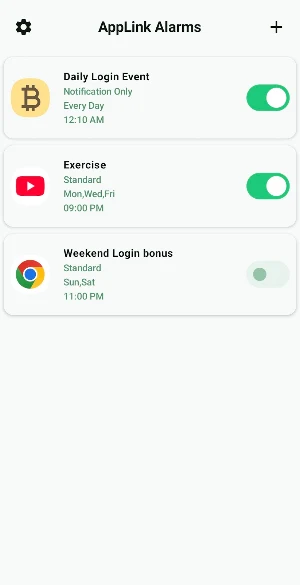
AppLink Alarm offers a new alarm experience by adding an “app link” feature to the standard alarm function, allowing you to launch a designated app immediately when the alarm goes off. By linking frequently used apps (routine, schedule management, Daily login event, etc.) to your alarms, you can save time or get important reminders by jumping straight to the app you need.
Alarm Settings
- Set alarms for any time and day of the week, with repeat options
- Choose alarm mode (notification only, standard alarm)
- Supports ringtone, vibration, and volume settings
App Linking
- Select an app to launch for each alarm
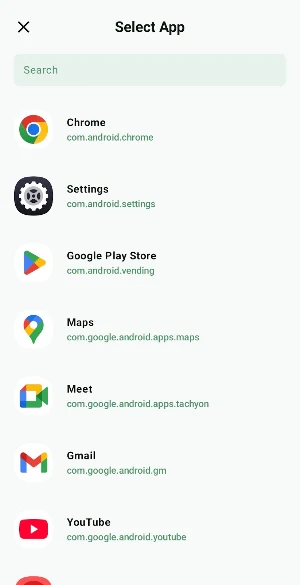
- Freely select and link any app installed on your device
Quick Launch
- Instantly launch the linked app via a notification when the alarm rings
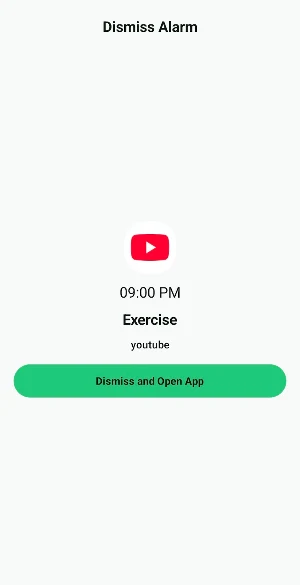
- Automatically open the linked app upon dismissing the alarm
Alarm Modes
- Notification Only: Provides a notification without sound. Launch the app flexibly at any time after the scheduled time.
- Standard Alarm: Rings with a sound, and the linked app launches automatically when you dismiss the alarm.
How to Use
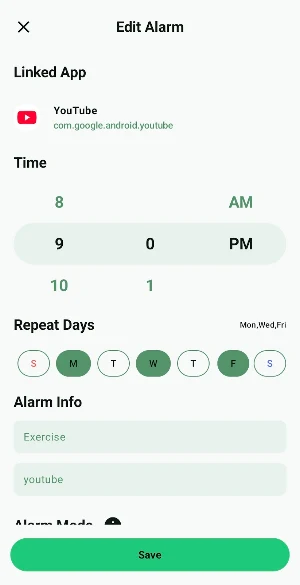
1. Add an alarm: Tap the ‘+’ button at the top right to create a new alarm.
2. Select linked app: Choose the app to launch when the alarm rings in the “Linked App” menu.
3. Set time and repeat: Select your desired time and days.
4. Write alarm details: Enter the alarm title and description to display in the notification.
5. Save and use: When the alarm goes off, tap the notification to dismiss and instantly launch the linked app.
Alarm Settings
- Set alarms for any time and day of the week, with repeat options
- Choose alarm mode (notification only, standard alarm)
- Supports ringtone, vibration, and volume settings
App Linking
- Select an app to launch for each alarm
- Freely select and link any app installed on your device
Quick Launch
- Instantly launch the linked app via a notification when the alarm rings
- Automatically open the linked app upon dismissing the alarm
Alarm Modes
- Notification Only: Provides a notification without sound. Launch the app flexibly at any time after the scheduled time.
- Standard Alarm: Rings with a sound, and the linked app launches automatically when you dismiss the alarm.
How to Use
1. Add an alarm: Tap the ‘+’ button at the top right to create a new alarm.
2. Select linked app: Choose the app to launch when the alarm rings in the “Linked App” menu.
3. Set time and repeat: Select your desired time and days.
4. Write alarm details: Enter the alarm title and description to display in the notification.
5. Save and use: When the alarm goes off, tap the notification to dismiss and instantly launch the linked app.
What’s new
Version 1.1.2 · Updated August 10, 2026
- Improved alarm reliability on the latest Android versions to ensure your alarms ring on time.
Alternatives to AppLink Alarm
Looking for apps like AppLink Alarm? Here are 4 similar Android apps on Google Play. All of them are free to download.




| App | Rating | Price | Installs | Last updated | Compare |
|---|---|---|---|---|---|
| AppLink Alarm | – | Free | 100+ | Aug 10, 2026 | |
| Fill Sketch - Prince | – | Free | 10+ | – | Compare |
| Fill Sketch - Fairy | – | Free | 10+ | – | Compare |
| Fill Sketch - Princess | – | Free | 10+ | Jul 2, 2025 | Compare |
| Ear Alarm (Earphone Alarm) | – | Free | 1,000+ | Aug 10, 2026 | Compare |
Compare AppLink Alarm with the top alternatives: ratings, updates, ASO score and keyword gaps →