
Scribe Animator: Whiteboard
ohotech Art & Design In-app purchases
Create whiteboard videos with offline AI voiceover in 31 languages
- Downloads
- 5.7K+
- on Google Play
- Price
- Free
- In-app purchases
- Updated
- Oct 12
- 2026 · v2.0.0
Screenshots



About Scribe Animator: Whiteboard
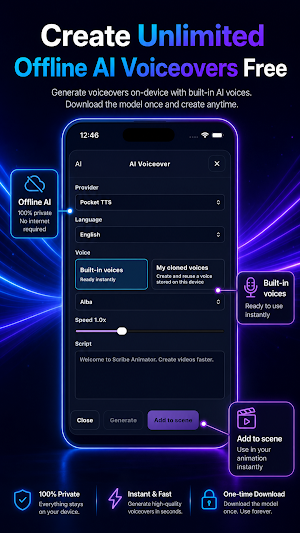
Choose from built-in AI voices or create and reuse your own cloned voice for personal narration. Adjust voice speed and quality for lessons, explainers, product demos, onboarding videos, presentations, training content, social clips, and more.
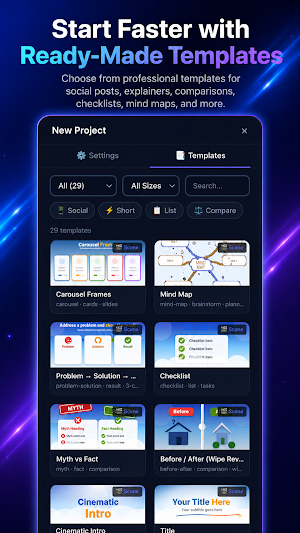
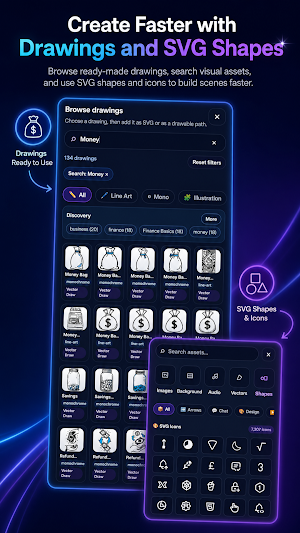
Start with a ready-made template or build from scratch using drawings, text, SVGs, images, backgrounds, and editable shapes. Animate artwork stroke by stroke, auto-plan hand-drawn sequences, add camera movement, and fine-tune timing with motion presets, keyframes, and curve controls.
Create on your phone or tablet, then continue in the desktop editor when you want a larger workspace. Save projects locally or to your account and keep your workflow moving across devices.
AI VOICEOVER
• Generate offline AI voiceovers in 31 languages
• Download a voice model once and generate narration on-device
• Create narration without cloud credits or per-generation limits
• Choose from multiple built-in AI voices
• Create and reuse your own cloned voice
• Preview narration before adding it to a scene
• Adjust voice speed and quality
• Add generated narration directly to your project
• Record voiceover and import music or audio files
SUPPORTED AI VOICEOVER LANGUAGES
English, Arabic, Bulgarian, Croatian, Czech, Danish, Dutch, Estonian, Finnish, French, German, Greek, Hindi, Hungarian, Indonesian, Italian, Japanese, Korean, Latvian, Lithuanian, Polish, Portuguese, Romanian, Russian, Slovak, Slovenian, Spanish, Swedish, Turkish, Ukrainian, and Vietnamese.
Available voices, voice engines, and quality options may vary by language and device.
ANIMATION AND EDITING
• Animate drawings, text, SVGs, and traced images
• Reveal artwork stroke by stroke
• Import raster images and trace them into drawable artwork
• Build multi-scene projects
• Use Shot Planner to auto-plan draw steps
• Choose from a growing library of hands and drawing tools
• Mirror hands and tools
• Apply hand and tool overrides to individual objects
• Add object-camera and draw-step-camera zooms and pans
• Animate with motion presets, a timeline, keyframes, and curve editing
• Add custom backgrounds and style text with typography controls
• Create multilingual text, including RTL scripts
TEMPLATES AND VISUAL ASSETS
• Start faster with ready-made templates
• Create and manage reusable templates
• Browse a growing library of drawings and SVG icons
• Use Smart Line, Smart Arrow, and Smart Connector for diagrams
• Build explainers, mind maps, process flows, comparisons, checklists, and presentation visuals
EXPORT AND CROSS-DEVICE WORKFLOW
• Create unlimited exports
• Export MP4 videos and save project files locally
• Save projects to your account for cross-device access
• Start on mobile and continue in the desktop editor
• Use the same project across phone, tablet, and desktop workflows
MADE FOR
Scribe Animator is built for teachers, marketers, founders, freelancers, agencies, businesses, and creators making:
• Whiteboard explainer videos
• Educational lessons and course visuals
• Product demos and app walkthroughs
• Training and onboarding videos
• Business presentations and client pitches
• YouTube videos, social clips, and ad creatives
• Sales videos and brand stories
Scribe Animator combines a simple starting experience with deeper creative control when you need it. Plan, animate, narrate, edit, and export from one hand-drawn animation studio.
VOICE CLONING
Voice cloning is intended for your own voice or voices you have permission to use.
What’s new
Version 2.0.0 · Updated October 12, 2026
Explore 66 cloud-powered templates with editable text, colors and curated visuals. Faster native video export, now preferred in Auto mode on supported devices. Improved 9:16 editing controls and a more compact project menu. Fixed missing Shapes/SVG icons and Add as Drawing issues. Clearer loading feedback when browsing and applying templates. Lighter visuals in the “Why Habits Feel Hard” example.
User reviews

Great 👌

Great app for creating animated and whiteboard videos. Easy to use, smooth performance, and plenty of customization options. The videos look professional, and the interface is beginner-friendly. Highly recommended!

Powerful app with impressive animation features on mobile. It feels better and cleaner after recent updates, and the core workflow is easier to use now.

Really helpful and amazing app.
Alternatives to Scribe Animator: Whiteboard
Looking for apps like Scribe Animator: Whiteboard? Here are 6 similar Android apps on Google Play. The highest rated is Brother Artspira (4.1/5), and all 6 are free to download.
-
Easy Draw Animals 3.1
-
Brother Artspira 4.1
-
AI Journal Notebook - Reflectr 4.0
-
GOGH: Animated Drawings
-
WOMBO Elections: AI Memes 4.0
-
touchnotes 3.5
| App | Rating | Price | Installs | Last updated | Compare |
|---|---|---|---|---|---|
| Scribe Animator: Whiteboard | – | Free | 5,000+ | Oct 12, 2026 | |
| Easy Draw Animals | 3.1 / 5 | Free | 50,000+ | Jul 27, 2026 | Compare |
| Brother Artspira | 4.1 / 5 | Free | 500,000+ | Oct 9, 2026 | Compare |
| AI Journal Notebook - Reflectr | 4.0 / 5 | Free | 100,000+ | – | Compare |
| GOGH: Animated Drawings | – | Free | 10,000+ | Oct 23, 2025 | Compare |
| WOMBO Elections: AI Memes | 4.0 / 5 | Free | 1,000,000+ | Dec 3, 2024 | Compare |
| touchnotes | 3.5 / 5 | Free | 1,000,000+ | Oct 24, 2026 | Compare |
Similar apps on Google Play
- Easy Draw Animals
- Brother Artspira
- AI Journal Notebook - Reflectr
- GOGH: Animated Drawings
- WOMBO Elections: AI Memes
- touchnotes
- Gencraft - AI Art Generator
- AI Book Writer Generator
- Storyboard GO
- Video AI -AI Video Creator
- Sketchar AR Drawing Sketchpad
- Camtronome - Pro Metronome
- HiPaint: Sketch, Draw & Paint
- ClayLab
- Jasper AI Copy Content Writer
- OctoStudio: Create-Code-Learn
- Likcut
- Sketch Pro: Draw & Create Art
- Fabric: AI Notes, Files, Ideas
- MediBang Paint:Draw Art, Comic
- Photo Editor by BeFunky
- Fable - Kids' Story Creator
- Picsart Animator: GIF & Video
- Huion Note : Easy note-taking