

KaGB Connect
Finance
KaGB Connect: Karnataka Gramin Bank Mobile Banking Application
- Downloads
- 927K+
- on Google Play
- Price
- Free
- No in-app purchases
- Updated
- Jul 31
- 2026 · v1.0.77
Screenshots


About KaGB Connect
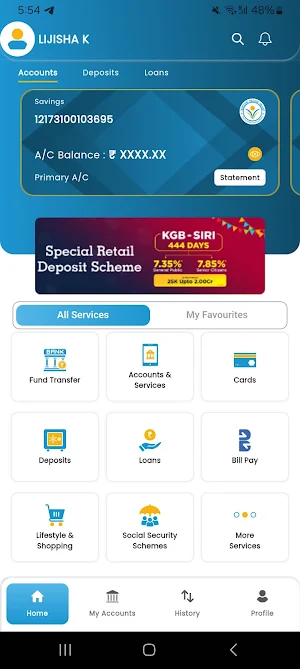
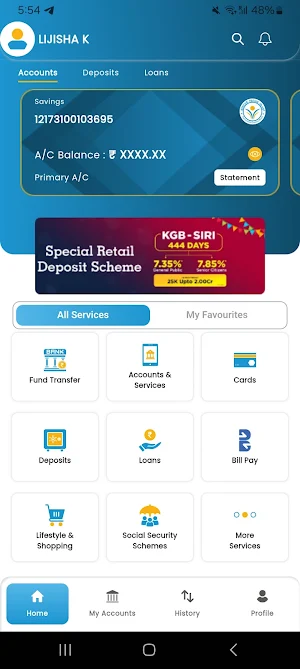
KaGB Connect Features:
1. Fund Transfer to other Bank Customers using NEFT, IMPS (Account+IFSC, Mobile Number+MMID)
2. Fund Transfer to within Bank Accounts of self and other customers.
3. Manage beneficiaries while initiating fund transfer transactions.
4. Manage accounts easily.
5. View account statement, Loan and Term Deposit details.
6. Have a track of all the transactions initiated from your KaGB Connect mobile Banking app using transaction history.
7. Access provided to switch on/off, set debit card limit.
8. Get latest updates on Banking Products inside the app.
For feedback and suggestions, email us at [email protected], https://Karnatakagraminbank.com or call us on 1800 10 25250
Steps to install:
1. Kindly visit Play Store/App Store on your smart phone and search KaGB Connect Mobile Banking application. Click on mobile app icon & click to install.
2. After successful installation open app by clicking new KaGB Connect mobile banking icon.
3. Click on next button to continue after selecting the Registered Mobile Number (RMN)with the Bank. SMS will be initiated by the selected SIM; Ensure balance is available to send the SMS successfully.
4. After successful Mobile Number validation, an OTP will be sent to your RMN.
5. Enter the OTP received and validate the authenticity.
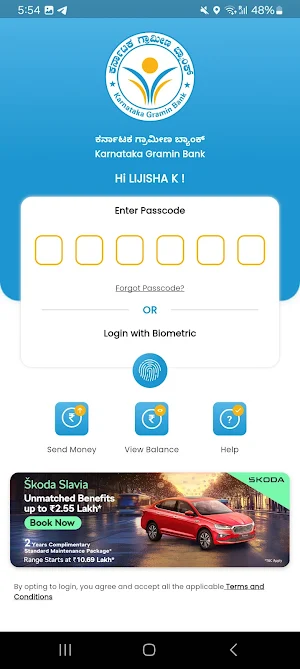
6. You will be redirected to create and confirm your 6 digits numeric LOGIN PIN for login into the application.
7. Accept the Terms & Conditions after successfully creating the LOGIN PIN.
8. Before initiating any mobile Banking transactions, you need to create and confirm new 6 digits numeric MPIN for validating all MB transactions.
10. Activate your Mobile Banking account by entering the active debit card details.
Welcome, you’re all set to explore the KaGB Connect, the new Karnataka Gramin Bank Mobile Banking Application
1. Fund Transfer to other Bank Customers using NEFT, IMPS (Account+IFSC, Mobile Number+MMID)
2. Fund Transfer to within Bank Accounts of self and other customers.
3. Manage beneficiaries while initiating fund transfer transactions.
4. Manage accounts easily.
5. View account statement, Loan and Term Deposit details.
6. Have a track of all the transactions initiated from your KaGB Connect mobile Banking app using transaction history.
7. Access provided to switch on/off, set debit card limit.
8. Get latest updates on Banking Products inside the app.
For feedback and suggestions, email us at [email protected], https://Karnatakagraminbank.com or call us on 1800 10 25250
Steps to install:
1. Kindly visit Play Store/App Store on your smart phone and search KaGB Connect Mobile Banking application. Click on mobile app icon & click to install.
2. After successful installation open app by clicking new KaGB Connect mobile banking icon.
3. Click on next button to continue after selecting the Registered Mobile Number (RMN)with the Bank. SMS will be initiated by the selected SIM; Ensure balance is available to send the SMS successfully.
4. After successful Mobile Number validation, an OTP will be sent to your RMN.
5. Enter the OTP received and validate the authenticity.
6. You will be redirected to create and confirm your 6 digits numeric LOGIN PIN for login into the application.
7. Accept the Terms & Conditions after successfully creating the LOGIN PIN.
8. Before initiating any mobile Banking transactions, you need to create and confirm new 6 digits numeric MPIN for validating all MB transactions.
10. Activate your Mobile Banking account by entering the active debit card details.
Welcome, you’re all set to explore the KaGB Connect, the new Karnataka Gramin Bank Mobile Banking Application
What’s new
Version 1.0.77 · Updated July 31, 2026
We're excited to introduce a new deposit option! KGB NIDHI 555 Days Deposit is now available, giving you another convenient savings option. Update to the latest version and explore the new KGB NIDHI 555 Days Deposit feature.
User reviews

nice work

simply superb...one of the best applications at present market

awesome

Excellent Application

Good one

fully updated with great features.. scanner feature is one much needed one please try to add it..
Alternatives to KaGB Connect
Looking for apps like KaGB Connect? Here are 6 similar Android apps on Google Play. The highest rated is Precise Planning (4.7/5), and all 6 are free to download.
-
Bitcoin Hunt 2 - No Mining!
-
bill :splitter app
-
Газпром Кыргызстан
-
Expense manager
-
Precise Planning 4.7
-
LoanTool - EMI Loan Calculator
| App | Rating | Price | Installs | Last updated | Compare |
|---|---|---|---|---|---|
| KaGB Connect | – | Free | 500,000+ | Jul 31, 2026 | |
| Bitcoin Hunt 2 - No Mining! | – | Free | 1,000+ | May 8, 2025 | Compare |
| bill :splitter app | – | Free | 5,000+ | Mar 19, 2025 | Compare |
| Газпром Кыргызстан | – | Free | 1,000+ | Mar 19, 2025 | Compare |
| Expense manager | – | Free | 10+ | Sep 6, 2024 | Compare |
| Precise Planning | 4.7 / 5 | Free | 10,000+ | Oct 26, 2024 | Compare |
| LoanTool - EMI Loan Calculator | – | Free | 1,000+ | Apr 3, 2025 | Compare |
Compare KaGB Connect with the top alternatives: ratings, updates, ASO score and keyword gaps →
Similar apps on Google Play
- Bitcoin Hunt 2 - No Mining!
- bill :splitter app
- Газпром Кыргызстан
- Expense manager
- Precise Planning
- APGFCU
- LoanTool - EMI Loan Calculator
- Vana - Inscritos en la SBS
- DongHD-VayOnlineFastLoan
- Small Talk
- Abukad Sub
- Т-Инвест: Квиз
- Daghi - Alerta financiera
- Sao Wallet
- Swagbucks-Pro
- CSH DIREK
- Elvenett
- Coosofan
- DYGHTBV
- GCB:Buy Bitcoin&Cryptocurrency
- DataVibe
- LoanCount : EMI Calculator App
- Amar Biniyog
- Bonuscard | Pretorium Trust
- Izwe Float