

StreamFinder: Media/Subs/HLS
Tools Contains ads
Inspect and debug HLS streams, media files, and subtitles directly from website
- Downloads
- 206+
- on Google Play
- Price
- Free
- No in-app purchases
- Updated
- Sep 26
- 2026 · v1.0.1
Screenshots


About StreamFinder: Media/Subs/HLS
StreamFinder: Media/Subs/HLS – Stream Inspection & Debug Tool
StreamFinder is a network inspection tool designed for developers and streaming professionals to analyze how media content is delivered on web pages. Monitor and debug HLS streams, video files, and subtitle resources in real time—all within a simple, focused interface.
Whether you're testing your own platform or analyzing media delivery workflows, StreamFinder helps you gain visibility into media requests and optimize playback performance.
🔍 Key Features :
🔹Real-Time Network Inspection
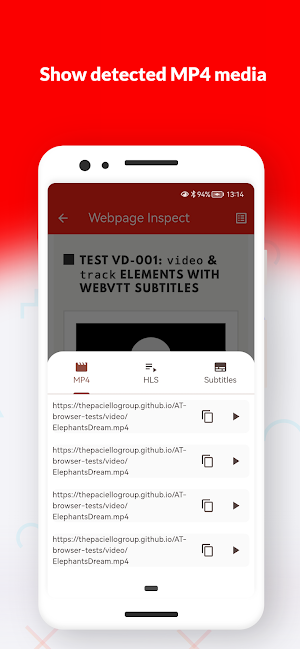
Track media-related requests as they load, including HLS (.m3u8), MP4, and subtitle formats.
🔹Media & Subtitle Detection
Automatically identifies common streaming and subtitle formats:
- HLS playlists (.m3u8)
- Supports different m3u8 formats including mp4, m4s and ts
- Video files (.mp4)
- Subtitles (.srt, .vtt, .ass, .ssa)
🔹Advanced Filtering
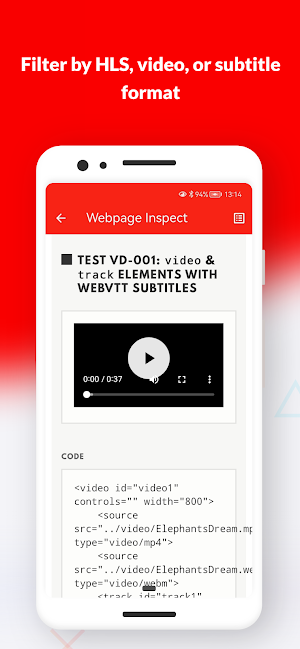
Quickly filter and organize requests to focus only on relevant media resources.
🔹Lightweight & Focused
Built for efficiency with a clean interface tailored for debugging workflows.
🛠 Use Cases :
✅ Debug HLS streaming implementations
✅ Verify subtitle loading and synchronization
✅ Test media delivery on websites you manage
✅ Analyze network behavior during playback
⚠️ Important Notice
StreamFinder is intended for development, testing, and educational purposes only. Users should only inspect content they own or have permission to analyze.
The app does not support downloading, saving, or redistributing media, and does not bypass or interfere with protected or restricted content.
🚀 Why StreamFinder?
Media delivery can be complex. StreamFinder simplifies the process by giving you clear visibility into how streams and subtitles are loaded, helping you diagnose issues faster and build better streaming experiences.
StreamFinder is a network inspection tool designed for developers and streaming professionals to analyze how media content is delivered on web pages. Monitor and debug HLS streams, video files, and subtitle resources in real time—all within a simple, focused interface.
Whether you're testing your own platform or analyzing media delivery workflows, StreamFinder helps you gain visibility into media requests and optimize playback performance.
🔍 Key Features :
🔹Real-Time Network Inspection
Track media-related requests as they load, including HLS (.m3u8), MP4, and subtitle formats.
🔹Media & Subtitle Detection
Automatically identifies common streaming and subtitle formats:
- HLS playlists (.m3u8)
- Supports different m3u8 formats including mp4, m4s and ts
- Video files (.mp4)
- Subtitles (.srt, .vtt, .ass, .ssa)
🔹Advanced Filtering
Quickly filter and organize requests to focus only on relevant media resources.
🔹Lightweight & Focused
Built for efficiency with a clean interface tailored for debugging workflows.
🛠 Use Cases :
✅ Debug HLS streaming implementations
✅ Verify subtitle loading and synchronization
✅ Test media delivery on websites you manage
✅ Analyze network behavior during playback
⚠️ Important Notice
StreamFinder is intended for development, testing, and educational purposes only. Users should only inspect content they own or have permission to analyze.
The app does not support downloading, saving, or redistributing media, and does not bypass or interfere with protected or restricted content.
🚀 Why StreamFinder?
Media delivery can be complex. StreamFinder simplifies the process by giving you clear visibility into how streams and subtitles are loaded, helping you diagnose issues faster and build better streaming experiences.
What’s new
Version 1.0.1 · Updated September 26, 2026
What’s new in 1.0.1: • Improved HLS stream detection, including blob-based playlists. • More reliable HLS previews and playlist handling. • Improved WebView stability during browsing and navigation. • General reliability, performance, and crash-resistance improvements.
Alternatives to StreamFinder: Media/Subs/HLS
Looking for apps like StreamFinder: Media/Subs/HLS? Here are 3 similar Android apps on Google Play. The highest rated is Stone Street Coffee (4.7/5), and all 3 are free to download.



| App | Rating | Price | Installs | Last updated | Compare |
|---|---|---|---|---|---|
| StreamFinder: Media/Subs/HLS | – | Free | 100+ | Sep 26, 2026 | |
| Hamilton Aquatics | – | Free | 10,000+ | Sep 2, 2026 | Compare |
| Stone Street Coffee | 4.7 / 5 | Free | 1,000+ | – | Compare |
| Omstars | 3.8 / 5 | Free | 5,000+ | Jul 1, 2026 | Compare |