
No Crop Resizer
Productivity
Resize photos for Instagram, WhatsApp & more — no crop, no quality loss.
- Downloads
- 939+
- on Google Play
- Price
- Free
- No in-app purchases
- Updated
- Aug 7
- 2026 · v1.0.12
Screenshots
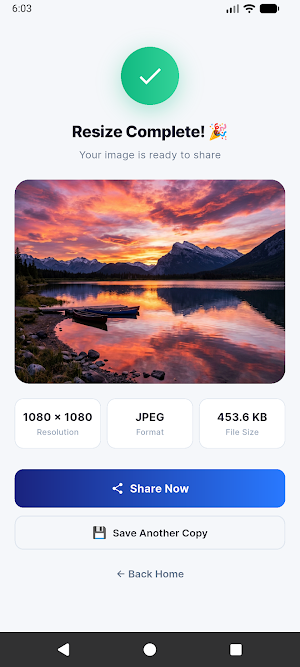


About No Crop Resizer
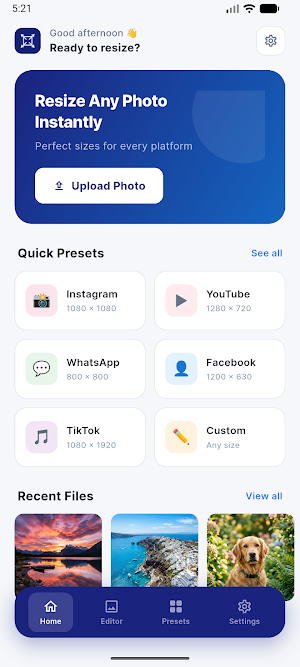
Tired of your photos getting cropped when you upload to social media? No Crop Resizer lets you resize any photo to fit perfectly on Instagram, WhatsApp, Facebook, X (Twitter), YouTube, and more — without cropping or losing quality.
KEY FEATURES:
No-Crop Resize
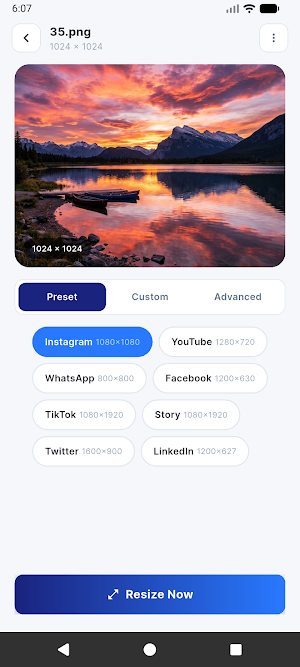
Resize your photos to any social media dimension while keeping the full image intact. Choose your preferred background — blur, color, gradient, or transparent.
Social Media Presets
One-tap presets for all major platforms:
• Instagram Post (1080×1080), Story (1080×1920)
• WhatsApp DP (800×800), Status (1080×1920)
• Facebook Post (1200×630), Story (1080×1920)
• YouTube Thumbnail (1280×720)
• TikTok Video (1080×1920)
• X / Twitter Post (1600×900)
• LinkedIn Post (1200×627)
Custom & Advanced Resize
Enter any custom width and height for complete control. Advanced options include Aspect Ratio Lock, Fit to Canvas, Fill Canvas, and Smart Crop.
Lightning Fast
Optimized image processing engine delivers instant results without compromising quality.
Easy Export & Share
Save resized images directly to your gallery or share them instantly to any app with one tap.
Smart Settings
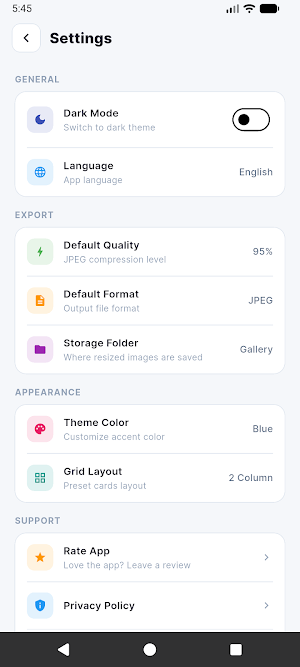
• Default format selection (PNG / JPEG)
• Quality control up to 95%
• Storage folder selection
• Theme color customization
• Dark mode / Light mode toggle
• Grid layout options
Privacy First
All processing happens on your device. No uploads, no servers, no data collection. Your photos stay yours.
100% Free — No Ads, No Watermarks
Enjoy a clean, premium experience with zero interruptions.
Download No Crop Resizer now and make every photo fit perfectly!
What’s new
Version 1.0.12 · Updated August 7, 2026
Huge update! 🚀 • AI Background Removal: Instantly remove backgrounds from your photos with one tap! • Smart Face Cropping: AI automatically detects faces to keep them perfectly centered. • Beautiful New Design: A completely refreshed, modern, and easy-to-use interface. • Recent History: Easily find and re-edit your recently resized photos. • Check for Updates: Added a convenient button in Settings to ensure you're always on the latest version. • Bug fixes and performance improvements.
User reviews

it's the best 👌

This app is very good for cropping images.

Useful app 👍

Nice app for quick resizing and cropping for any social media platform.

very useful app
Very nice app regarding cropping, converting images in different sizes. Very useful app.👍👏
Alternatives to No Crop Resizer
Looking for apps like No Crop Resizer? Here are 6 similar Android apps on Google Play. All of them are free to download.





| App | Rating | Price | Installs | Last updated | Compare |
|---|---|---|---|---|---|
| No Crop Resizer | – | Free | 500+ | Aug 7, 2026 | |
| CryptoVault | – | Free | 100+ | Jul 25, 2026 | Compare |
| Ai Education | – | Free | 50+ | – | Compare |
| Crypto Education | – | Free | 50+ | Jul 11, 2026 | Compare |
| Holy Quran: Prayer & Adhan App | – | Free | 50+ | Jul 6, 2026 | Compare |
| Legal Sections | – | Free | 50+ | Jun 29, 2026 | Compare |
| Zoheb Radio | – | Free | 50+ | Jul 3, 2026 | Compare |
Compare No Crop Resizer with the top alternatives: ratings, updates, ASO score and keyword gaps →