
PDFGen - PDF Converter & Tools
Nishanth Aradhya Productivity Contains ads
Convert images to PDF, scan documents, add signatures, encrypt & protect files
- Downloads
- 53+
- on Google Play
- Price
- Free
- No in-app purchases
- Updated
- Feb 23
- 2026 · v1.1.0
Screenshots
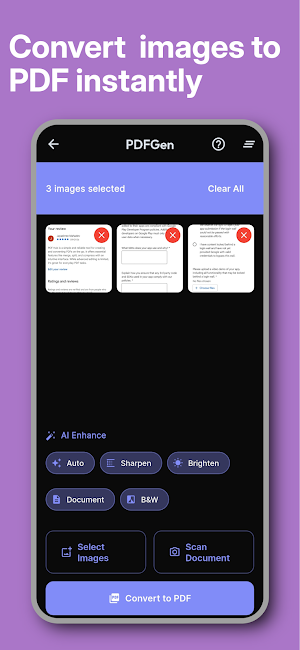


About PDFGen - PDF Converter & Tools
Transform your smartphone into a powerful PDF workstation! PDFGen is the ultimate PDF Converter and Document Scanner app that lets you create, edit, secure, and manage documents effortlessly.
Whether you need to convert JPG to PDF, scan receipts, or create a digital signature, PDFGen handles it all offline for maximum privacy.
✨ KEY FEATURES
📷 IMAGE TO PDF CONVERTER • Convert Images to PDF instantly. • Supports JPG, PNG, JPEG, and other formats. • Perfect for receipts, notes, and certificates. • Reorder pages, crop images, and adjust quality for the smallest file size.
📝 SMART DOCUMENT SCANNER • Turn your camera into a Mobile Scanner. • Auto-edge detection for perfectly cropped scans. • Scan in multiple modes: ID Card, Document, Book, or Passport. • Apply filters to enhance readability and clarity.
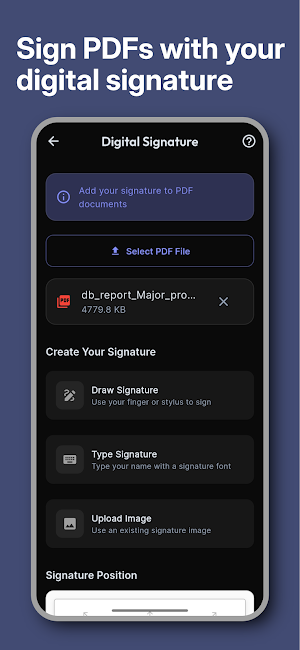
✍️ SIGN & FILL DOCUMENTS • Add Electronic Signatures (E-Sign) to any PDF. • Draw your signature or import one from your gallery. • Fill out forms and sign contracts on the go. • Save multiple signatures for quick use.
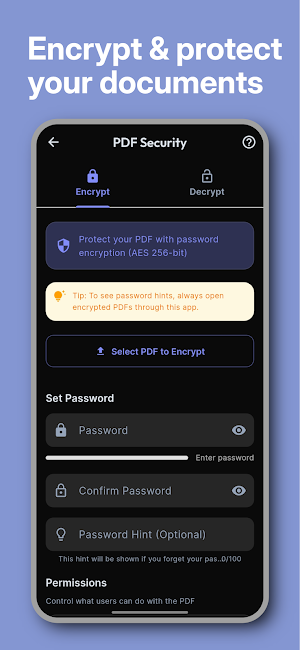
🔒 ADVANCED SECURITY & PRIVACY • Password Protect PDF: Secure confidential files with AES-256 encryption. • Remove passwords from protected files easily. • Set owner permissions to restrict printing or copying.
📑 PDF TOOLS: SPLIT & MERGE • PDF Merger: Combine multiple PDFs into a single file. • PDF Splitter: Separate a large PDF into smaller documents. • Extract specific pages or delete unwanted ones.
🆔 ID PHOTO & CARD MAKER • Passport Size Photo Maker: Create official photos for visas and IDs. • Supports formats for multiple countries with auto-cropping. • Business Card Scanner: Extract contact info via OCR and save to contacts.
💧 WATERMARK & BRANDING • Add custom text watermarks to protect your copyright. • Adjust transparency, position, and font style.
🎯 WHY CHOOSE PDFGEN?
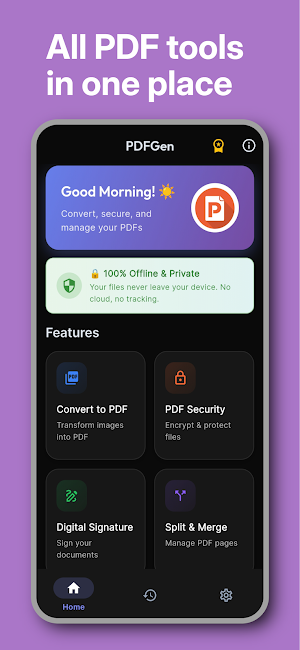
✅ 100% Offline: No internet needed. Your data stays safe on your device. ✅ User-Friendly: Clean, modern, and intuitive interface. ✅ Fast Processing: Convert and compress large files in seconds. ✅ Universal Support: Works with documents, receipts, whiteboards, and ID cards.
📱 PERFECT FOR: • Students: Scan assignments and convert notes to PDF. • Business: Sign contracts, scan business cards, and merge reports. • Travelers: Create passport photos and store travel docs digitally.
⬇️ Download PDFGen: PDF Converter & Tools now to simplify your document work!
Whether you need to convert JPG to PDF, scan receipts, or create a digital signature, PDFGen handles it all offline for maximum privacy.
✨ KEY FEATURES
📷 IMAGE TO PDF CONVERTER • Convert Images to PDF instantly. • Supports JPG, PNG, JPEG, and other formats. • Perfect for receipts, notes, and certificates. • Reorder pages, crop images, and adjust quality for the smallest file size.
📝 SMART DOCUMENT SCANNER • Turn your camera into a Mobile Scanner. • Auto-edge detection for perfectly cropped scans. • Scan in multiple modes: ID Card, Document, Book, or Passport. • Apply filters to enhance readability and clarity.
✍️ SIGN & FILL DOCUMENTS • Add Electronic Signatures (E-Sign) to any PDF. • Draw your signature or import one from your gallery. • Fill out forms and sign contracts on the go. • Save multiple signatures for quick use.
🔒 ADVANCED SECURITY & PRIVACY • Password Protect PDF: Secure confidential files with AES-256 encryption. • Remove passwords from protected files easily. • Set owner permissions to restrict printing or copying.
📑 PDF TOOLS: SPLIT & MERGE • PDF Merger: Combine multiple PDFs into a single file. • PDF Splitter: Separate a large PDF into smaller documents. • Extract specific pages or delete unwanted ones.
🆔 ID PHOTO & CARD MAKER • Passport Size Photo Maker: Create official photos for visas and IDs. • Supports formats for multiple countries with auto-cropping. • Business Card Scanner: Extract contact info via OCR and save to contacts.
💧 WATERMARK & BRANDING • Add custom text watermarks to protect your copyright. • Adjust transparency, position, and font style.
🎯 WHY CHOOSE PDFGEN?
✅ 100% Offline: No internet needed. Your data stays safe on your device. ✅ User-Friendly: Clean, modern, and intuitive interface. ✅ Fast Processing: Convert and compress large files in seconds. ✅ Universal Support: Works with documents, receipts, whiteboards, and ID cards.
📱 PERFECT FOR: • Students: Scan assignments and convert notes to PDF. • Business: Sign contracts, scan business cards, and merge reports. • Travelers: Create passport photos and store travel docs digitally.
⬇️ Download PDFGen: PDF Converter & Tools now to simplify your document work!
What’s new
Version 1.1.0 · Updated February 23, 2026
🚀 Initial Public Release of PDFGen! Features include: - AI-powered document scanning & OCR - Secure PDF encryption & signatures - AI ID photo & background removal - Merge, split, and watermark tools Optimized for stability and performance.
Alternatives to PDFGen - PDF Converter & Tools
Looking for apps like PDFGen - PDF Converter & Tools? Here are 3 similar Android apps on Google Play. All of them are free to download.
| App | Rating | Price | Installs | Last updated | Compare |
|---|---|---|---|---|---|
| PDFGen - PDF Converter & Tools | – | Free | 50+ | Feb 23, 2026 | |
| GeoCam Pro - GPS Map Camera | – | Free | 500+ | Aug 17, 2026 | Compare |
| NearTransfer - Fast File Share | – | Free | 10+ | Feb 12, 2026 | Compare |
| PDF Hub – Editor, OCR & Merge | – | Free | 100+ | Mar 4, 2026 | Compare |