
Collage App
Nipun DIlshan Entertainment
Create stunning photo collages with ease. Export, share & revisit your art.
- Downloads
- 3+
- on Google Play
- Price
- Free
- No in-app purchases
- Updated
- Aug 20
- 2026 · v1.0
Screenshots
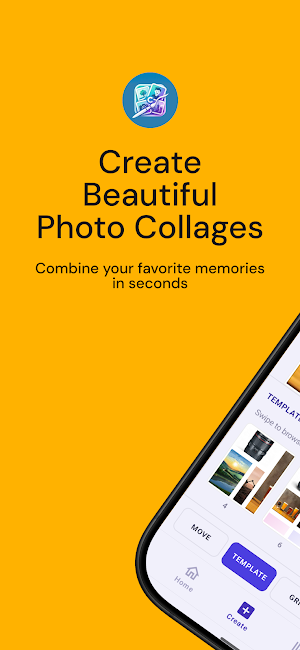
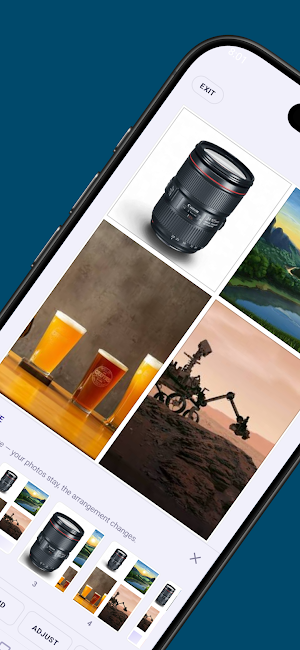
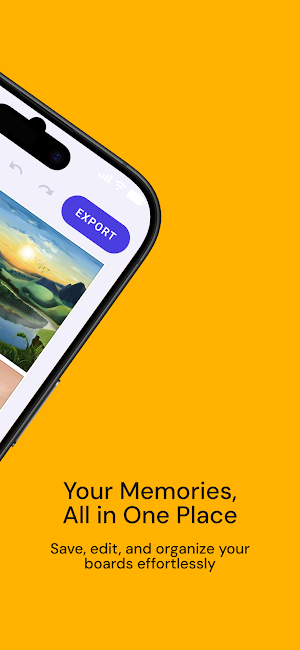


About Collage App
Collage Maker - the clean, powerful photo collage studio built for Android.
Pick a layout, fill it with your photos, and export a high-resolution collage in seconds - no watermarks, no subscriptions.
🖼️ Templates for Every Idea
Browse a library of carefully designed grid templates — from single-photo frames to complex multi-slot layouts. Every template fits neatly into a 4-column × 5-row grid system, so your collages always look balanced and polished.
✏️ A Full-Featured Editor
Once you choose a template, the editor puts everything at your fingertips:
Move — drag photos freely around the canvas
Grid — switch templates mid-edit without losing your photos
Adjust — zoom, pan, flip horizontally or vertically, and rotate each photo independently
Background — choose solid colours, two-tone gradients, blurred photo backgrounds, or go fully transparent
Undo / Redo — experiment freely; every step is reversible
Swap — long-press and drag to instantly swap two photos between slots
Fill from camera roll — tap any empty slot to pull a photo straight from your gallery
📚 Your Photo Library, Always in Sync
The built-in Library screen scans your device gallery, organises photos by album, and lets you tap or long-press to select up to 20 photos at once before sending them to the editor — no fiddling with file managers.
📤 Export the Way You Want
When your collage is ready, choose exactly how to save it:
Format Best for
JPEG High-resolution sharing
PNG Lossless quality, transparent backgrounds
PDF Print-ready documents
Web Optimised file size for online use
Pick your target resolution — 1080p, 2K, or Original (up to 4096 px) on the long edge — then save to your gallery or share directly to WhatsApp, Facebook, or any other app.
Set your preferred format and resolution once in Export Defaults and the editor pre-fills them every time.
🗂️ Recent Boards — Pick Up Where You Left Off
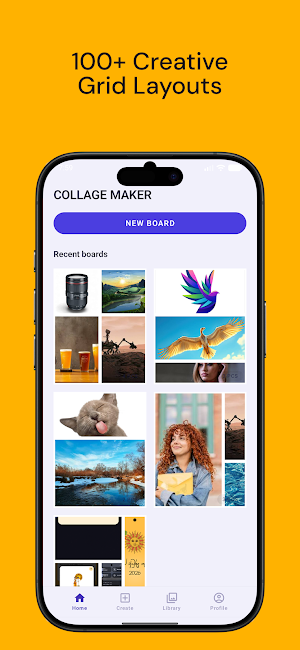
Every board you export is saved automatically. Tap any thumbnail on the Home screen to reopen the full collage — photos, layout, background, spacing, and corner radius all restored exactly as you left them.
✨ Thoughtful Details
Edge-to-edge design — beautifully adapted to modern Android display cutouts
Haptic feedback — satisfying tactile response when swapping or selecting photos
Partial photo access — respects Android 14's granular media permissions; no need to grant access to your entire gallery
Responsive canvas — the editor preview matches the exported bitmap pixel-for-pixel at any resolution
Spacing & corner radius sliders — fine-tune the look of every collage
Aspect ratio picker — portrait, landscape, square, and more
Pick a layout, fill it with your photos, and export a high-resolution collage in seconds - no watermarks, no subscriptions.
🖼️ Templates for Every Idea
Browse a library of carefully designed grid templates — from single-photo frames to complex multi-slot layouts. Every template fits neatly into a 4-column × 5-row grid system, so your collages always look balanced and polished.
✏️ A Full-Featured Editor
Once you choose a template, the editor puts everything at your fingertips:
Move — drag photos freely around the canvas
Grid — switch templates mid-edit without losing your photos
Adjust — zoom, pan, flip horizontally or vertically, and rotate each photo independently
Background — choose solid colours, two-tone gradients, blurred photo backgrounds, or go fully transparent
Undo / Redo — experiment freely; every step is reversible
Swap — long-press and drag to instantly swap two photos between slots
Fill from camera roll — tap any empty slot to pull a photo straight from your gallery
📚 Your Photo Library, Always in Sync
The built-in Library screen scans your device gallery, organises photos by album, and lets you tap or long-press to select up to 20 photos at once before sending them to the editor — no fiddling with file managers.
📤 Export the Way You Want
When your collage is ready, choose exactly how to save it:
Format Best for
JPEG High-resolution sharing
PNG Lossless quality, transparent backgrounds
PDF Print-ready documents
Web Optimised file size for online use
Pick your target resolution — 1080p, 2K, or Original (up to 4096 px) on the long edge — then save to your gallery or share directly to WhatsApp, Facebook, or any other app.
Set your preferred format and resolution once in Export Defaults and the editor pre-fills them every time.
🗂️ Recent Boards — Pick Up Where You Left Off
Every board you export is saved automatically. Tap any thumbnail on the Home screen to reopen the full collage — photos, layout, background, spacing, and corner radius all restored exactly as you left them.
✨ Thoughtful Details
Edge-to-edge design — beautifully adapted to modern Android display cutouts
Haptic feedback — satisfying tactile response when swapping or selecting photos
Partial photo access — respects Android 14's granular media permissions; no need to grant access to your entire gallery
Responsive canvas — the editor preview matches the exported bitmap pixel-for-pixel at any resolution
Spacing & corner radius sliders — fine-tune the look of every collage
Aspect ratio picker — portrait, landscape, square, and more
Alternatives to Collage App
Looking for apps like Collage App? Here are 4 similar Android apps on Google Play. All of them are free to download.



| App | Rating | Price | Installs | Last updated | Compare |
|---|---|---|---|---|---|
| Collage App | – | Free | 1+ | Aug 20, 2026 | |
| Holidays Sri Lanka 2026 | – | Free | 1+ | Sep 14, 2026 | Compare |
| Avurudu Nakath 2026 | – | Free | 1,000+ | Aug 16, 2026 | Compare |
| UOV GPA | – | Free | 100+ | Aug 16, 2026 | Compare |
| MultiBase Calculator | – | Free | 100+ | Aug 27, 2025 | Compare |
Compare Collage App with the top alternatives: ratings, updates, ASO score and keyword gaps →