
Net Tools – Network Toolkit
NikBit Productivity
Ping, scan, and analyze your network — subnet calculators, DNS, WHOIS & more
- Downloads
- 909+
- on Google Play
- Price
- Free
- No in-app purchases
- Updated
- Oct 1
- 2026 · v1.1.2
Screenshots



About Net Tools – Network Toolkit
toolkit for anyone from home users troubleshooting Wi-Fi to IT professionals auditing a network on the go. No root required.
CALCULATORS
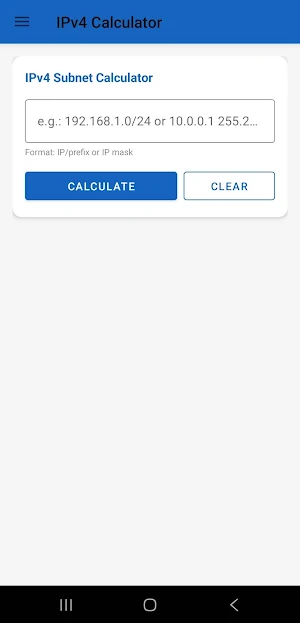
• IPv4 Calculator — mask, broadcast, host range, binary view
• IPv6 Calculator — expanded/compressed form, prefix, address type
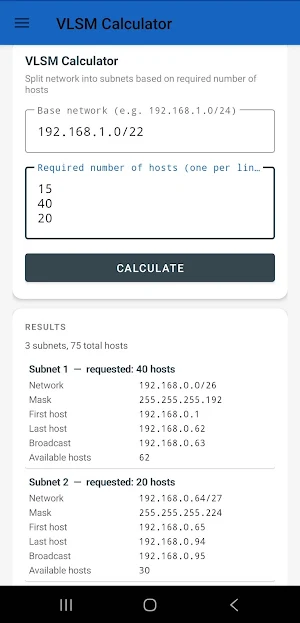
• VLSM Calculator — split a network into custom-sized subnets
• Converter — binary / hex / decimal / IP, live conversion
DIAGNOSTICS
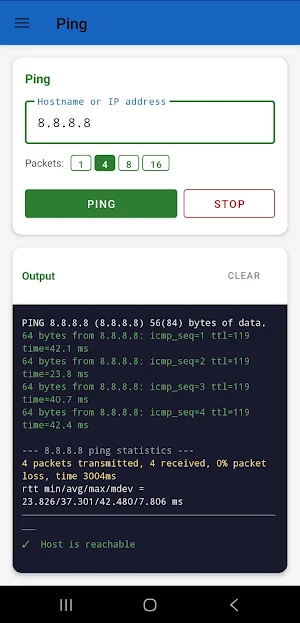
• Ping — classic ICMP reachability check
• Traceroute — real 3-probe-per-hop tracing, see every router your traffic passes through
• Latency Monitor — repeated pings with min/avg/max and packet loss
• Speed Test — download/upload/ping via Cloudflare, with a history graph of past results
SCANNING
• IP Scanner — sweep a subnet for live hosts
• ARP Scanner — find devices on your LAN with MAC address and vendor
• Port Scanner — TCP & UDP, with service-specific probes for accurate detection
• WiFi Scanner — see every network in range: signal, band, channel, security
• mDNS Browser — discover printers, Chromecasts, AirPlay speakers, NAS shares and more
• IP Blacklist Check — check if an address is listed on major spam/abuse blocklists
LOOKUP
• DNS Lookup — query any record type against any DNS server
• WHOIS — full registration data for any domain
• IP Info — geolocation, ISP/ASN and raw WHOIS for any IP or host
• BGP/ASN Lookup — announced prefixes and network ownership
• MAC OUI Lookup — identify a device's manufacturer from its MAC address
• SSL Inspector — view a site's full certificate chain and expiry dates
• HTTP Headers — inspect response headers and redirect chains
• HTTP Request — build and send custom GET/POST requests
TOOLS
• Wake-on-LAN — power on a device remotely
• NTP Test — check your device's clock offset against any time server
Every tool remembers your recent entries and lets you star favorites, and every result can be shared straight from the app to anywhere you like.
Whether you're debugging a flaky Wi-Fi connection, auditing devices on your home network, or doing fieldwork as a network technician, Net Tools puts the whole toolbox in your pocket.
CALCULATORS
• IPv4 Calculator — mask, broadcast, host range, binary view
• IPv6 Calculator — expanded/compressed form, prefix, address type
• VLSM Calculator — split a network into custom-sized subnets
• Converter — binary / hex / decimal / IP, live conversion
DIAGNOSTICS
• Ping — classic ICMP reachability check
• Traceroute — real 3-probe-per-hop tracing, see every router your traffic passes through
• Latency Monitor — repeated pings with min/avg/max and packet loss
• Speed Test — download/upload/ping via Cloudflare, with a history graph of past results
SCANNING
• IP Scanner — sweep a subnet for live hosts
• ARP Scanner — find devices on your LAN with MAC address and vendor
• Port Scanner — TCP & UDP, with service-specific probes for accurate detection
• WiFi Scanner — see every network in range: signal, band, channel, security
• mDNS Browser — discover printers, Chromecasts, AirPlay speakers, NAS shares and more
• IP Blacklist Check — check if an address is listed on major spam/abuse blocklists
LOOKUP
• DNS Lookup — query any record type against any DNS server
• WHOIS — full registration data for any domain
• IP Info — geolocation, ISP/ASN and raw WHOIS for any IP or host
• BGP/ASN Lookup — announced prefixes and network ownership
• MAC OUI Lookup — identify a device's manufacturer from its MAC address
• SSL Inspector — view a site's full certificate chain and expiry dates
• HTTP Headers — inspect response headers and redirect chains
• HTTP Request — build and send custom GET/POST requests
TOOLS
• Wake-on-LAN — power on a device remotely
• NTP Test — check your device's clock offset against any time server
Every tool remembers your recent entries and lets you star favorites, and every result can be shared straight from the app to anywhere you like.
Whether you're debugging a flaky Wi-Fi connection, auditing devices on your home network, or doing fieldwork as a network technician, Net Tools puts the whole toolbox in your pocket.
What’s new
Version 1.1.2 · Updated October 1, 2026
release notes za 1.1.2: "Smaller and faster app. Stability improvements."
Alternatives to Net Tools – Network Toolkit
Looking for apps like Net Tools – Network Toolkit? Here are 5 similar Android apps on Google Play. The highest rated is Coast: Native Work Order CMMS (4.4/5), and all 5 are free to download.
-
Carista OBD2 Car Scanner 3.8
-
Linksys 3.3
-
Coast: Native Work Order CMMS 4.4
-
NETGEAR Orbi – WiFi System App 4.4
-
David Lloyd Clubs 3.8
| App | Rating | Price | Installs | Last updated | Compare |
|---|---|---|---|---|---|
| Net Tools – Network Toolkit | – | Free | 500+ | Oct 1, 2026 | |
| Carista OBD2 Car Scanner | 3.8 / 5 | Free | 1,000,000+ | Oct 23, 2026 | Compare |
| Linksys | 3.3 / 5 | Free | 5,000,000+ | Nov 13, 2025 | Compare |
| Coast: Native Work Order CMMS | 4.4 / 5 | Free | 50,000+ | Oct 26, 2026 | Compare |
| NETGEAR Orbi – WiFi System App | 4.4 / 5 | Free | 1,000,000+ | Oct 9, 2026 | Compare |
| David Lloyd Clubs | 3.8 / 5 | Free | 500,000+ | Oct 13, 2026 | Compare |