

Video Tools: Compress & Trim
American Stoghorn Tools
Free Video compressor & editor offline. Trim, resize, merge, GIF. Reduce size
- Downloads
- 7.7K+
- on Google Play
- Price
- Free
- No in-app purchases
- Updated
- Oct 5
- 2026 · v2.4.0
Screenshots



About Video Tools: Compress & Trim
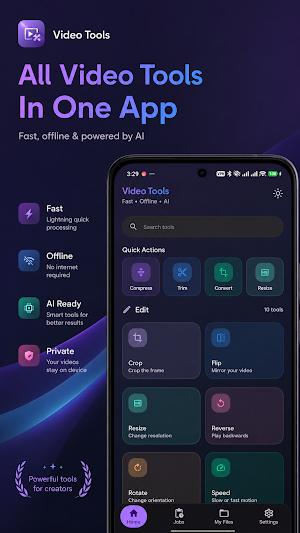
Edit your videos directly on your phone without uploading anything to the cloud. Every edit is processed locally on your device using fast, hardware-accelerated encoding, so your videos stay private and your workflow stays fast.
━━━━━━━━━━━━━━━━━━━━
WHY CHOOSE VIDEO TOOLS?😍
━━━━━━━━━━━━━━━━━━━━
✓ Works completely offline — no internet required
✓ Privacy first — your videos never leave your device
✓ 25+ professional tools in one lightweight app
✓ Batch processing for faster editing
✓ 100% free — no sign-in, no watermark, no limits
✓ Fast hardware-accelerated video processing
✓ Background exports with live progress notifications
✓ Available in multiple languages
━━━━━━━━━━━━━━━━━━━━
✂️ EDIT YOUR VIDEOS
━━━━━━━━━━━━━━━━━━━━
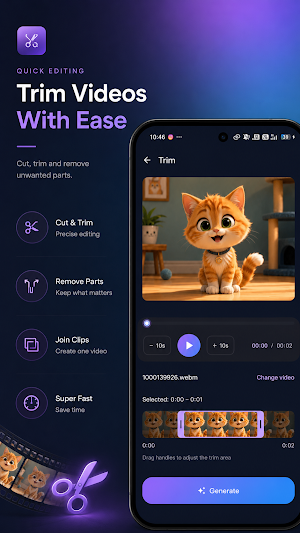
• Trim — cut videos with frame-accurate precision
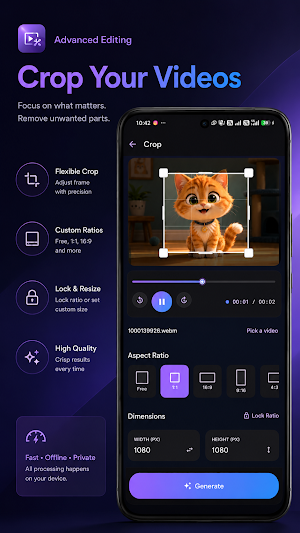
• Crop — free crop or popular aspect ratios like 1:1, 16:9, 9:16, and 4:3
• Flip — mirror videos horizontally or vertically
• Rotate — fix video orientation instantly
• Resize — change video resolution for any platform
• Speed — create slow-motion or fast-motion videos
• Reverse — play videos backwards
• Split — divide videos by duration or file size
• Stickers — overlay images on your videos
• Watermark — add custom text overlays
━━━━━━━━━━━━━━━━━━━━
🔄 COMPRESS & CONVERT
━━━━━━━━━━━━━━━━━━━━
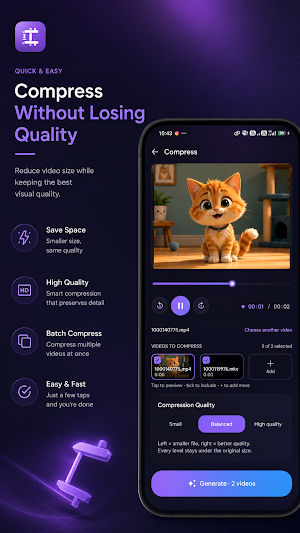
• Compress Video — reduce file size by up to 70% with smart quality presets
• Batch Compress — compress multiple videos at once
• Convert Video — convert formats and codecs, including MP4 and H.265 / HEVC
• GIF Maker — turn any video into an animated GIF
• Extract Frame — capture high-quality images from any video frame
Perfect for sharing on WhatsApp, Instagram, TikTok, YouTube, or simply saving valuable storage space.
━━━━━━━━━━━━━━━━━━━━
🎵 AUDIO TOOLS
━━━━━━━━━━━━━━━━━━━━
• Add Music — mix background music with your videos
• Extract Audio — save audio as M4A or AAC
• Mute Video — remove audio completely
• Replace Audio — swap the original soundtrack with your own
━━━━━━━━━━━━━━━━━━━━
🎬 CREATE & COMBINE
━━━━━━━━━━━━━━━━━━━━
• Merge Videos — combine multiple clips into one seamless video
• Slideshow Maker — create videos from your photos with transitions
• Multi-Edit — apply multiple editing actions in a single workflow
━━━━━━━━━━━━━━━━━━━━
🤖 AI TOOLS (ON-DEVICE)
━━━━━━━━━━━━━━━━━━━━
• Auto Subtitles — generate captions directly on your device
• Smart Trim — automatically detect the best moments
• Video Upscale — improve video quality with on-device AI
• Remove Background — erase backgrounds without uploading your videos
━━━━━━━━━━━━━━━━━━━━
📁 STAY ORGANIZED
━━━━━━━━━━━━━━━━━━━━
• Jobs — monitor every export and share results instantly
• My Files — access all your recent exports in one place
• Background Manager — keep editing while exports continue in the background
━━━━━━━━━━━━━━━━━━━━
🔒 PRIVATE & OFFLINE
━━━━━━━━━━━━━━━━━━━━
Video Tools is built for creators who value speed, simplicity, and privacy. Your videos are never uploaded to any server, and every core editing feature works entirely offline. No account required. No watermark. No ads.
Internet access is only used for anonymous crash reporting to help improve the app.
━━━━━━━━━━━━━━━━━━━━
🌍 LANGUAGES
━━━━━━━━━━━━━━━━━━━━
English · Persian · Arabic · Spanish · German · Russian · French
━━━━━━━━━━━━━━━━━━━━
Download Video Tools today and enjoy a faster, smarter, and completely private way to edit, compress, and convert videos on Android.
What’s new
Version 2.4.0 · Updated October 5, 2026
What's new in 2.4.0 • New result screen after export: preview, one-tap share and quick next steps • Shrink Video Size: fit videos under 10, 16 or 25 MB for WhatsApp and email • Caption editor: split, merge, delete and add lines • Continue your project: Studio now saves your work automatically • Long-press the app icon for shortcuts to Captions and Compress • Optional reminders (off by default) • Fewer needless low-memory warnings and stability fixes
User reviews

just 4MB and still have all features i want tnx
Alternatives to Video Tools: Compress & Trim
Looking for apps like Video Tools: Compress & Trim? Here are 6 similar Android apps on Google Play. The highest rated is Weather Radar & Rain Alerts (4.8/5), and all 6 are free to download.
-
TV Remote Control: Universal
-
QR Code Generator & Analyzer 4.8
-
Weather Radar & Rain Alerts 4.8
-
Gem Fit Lilac Owl
-
Girlfriend Mods Minecraft MCPE 3.8
-
Pocket Leve
| App | Rating | Price | Installs | Last updated | Compare |
|---|---|---|---|---|---|
| Video Tools: Compress & Trim | – | Free | 5,000+ | Oct 5, 2026 | |
| TV Remote Control: Universal | – | Free | 5,000+ | Oct 13, 2026 | Compare |
| QR Code Generator & Analyzer | 4.8 / 5 | Free | 100,000+ | – | Compare |
| Weather Radar & Rain Alerts | 4.8 / 5 | Free | 1,000+ | Oct 13, 2026 | Compare |
| Gem Fit Lilac Owl | – | Free | 10+ | Apr 23, 2026 | Compare |
| Girlfriend Mods Minecraft MCPE | 3.8 / 5 | Free | 100,000+ | May 18, 2026 | Compare |
| Pocket Leve | – | Free | 10+ | – | Compare |
Similar apps on Google Play
- TV Remote Control: Universal
- QR Code Generator & Analyzer
- Weather Radar & Rain Alerts
- Gem Fit Lilac Owl
- Girlfriend Mods Minecraft MCPE
- Pocket Leve
- AI Art Maker: Image Generator
- Mkude App
- KeyInventions: Inventors Hub
- Solar VPN
- Antivirus Defender: Cleaner
- CleanSpark - Phone Cleaner
- Space Cleaner & Home Screen
- 光豆社
- Galaxy Buds 3 App Guide
- Speaker Cleaner AI Water Eject
- Floral Pastel DigitalWatchFace
- Pot・AI Plant Identifier・Garden
- Morse Owl Just Pea
- Find My Phone Launcher
- Vila Tech
- Private Video Downloader
- App Lock - Lock Apps Password
- Mobile Hotspot: WiFi Sharing
- Photo PDF Size Target