

AudioBookMark for Spotify Prem
Stefan Neuber Tools
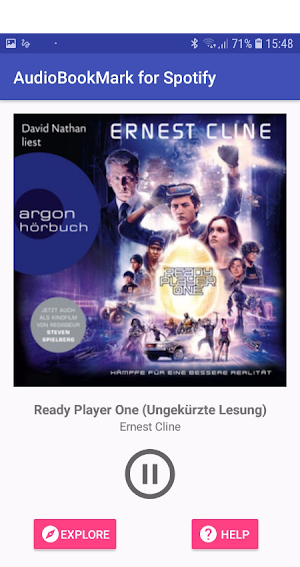
This App is the comfortable way to play all the audiobooks on Spotify Premium.
- Downloads
- 1K+
- on Google Play
- Price
- Free
- No in-app purchases
- Updated
- Jun 26
- 2019 · v2.0
Screenshots
About AudioBookMark for Spotify Prem
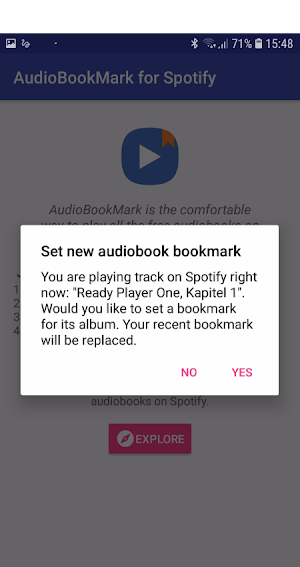
Download AudioBookMark and set a bookmarks for your actual audiobook. The only thing, you have to do is to follow this four steps:
1. Open the Spotify app
2. Play an audiobook
3. Open AudioBookMark again
4. Confirm your selection
After that AudioBookMark saves the progress of your selected audiobook automatically and you are able to play them in the app - and the audiobook starts exactly at the point where you paused it, even if you heard music after that!
1. Open the Spotify app
2. Play an audiobook
3. Open AudioBookMark again
4. Confirm your selection
After that AudioBookMark saves the progress of your selected audiobook automatically and you are able to play them in the app - and the audiobook starts exactly at the point where you paused it, even if you heard music after that!
User reviews

Useful App. Really cool
Alternatives to AudioBookMark for Spotify Prem
Looking for apps like AudioBookMark for Spotify Prem? Here are 5 similar Android apps on Google Play. The highest rated is Spotibooks – Audiobooks Player (2.6/5), and all 5 are free to download.
-
Spotibooks – Audiobooks Player 2.6
-
LehrerX - MatheX for teachers
-
MatheX - Math Training 2.0
-
NFC Assistant - Do it, without
-
AndroidJump
| App | Rating | Price | Installs | Last updated | Compare |
|---|---|---|---|---|---|
| AudioBookMark for Spotify Prem | – | Free | 1,000+ | Jun 26, 2019 | |
| Spotibooks – Audiobooks Player | 2.6 / 5 | Free | 10,000+ | Dec 15, 2022 | Compare |
| LehrerX - MatheX for teachers | – | Free | 50+ | Apr 15, 2021 | Compare |
| MatheX - Math Training 2.0 | – | Free | 1,000+ | May 23, 2024 | Compare |
| NFC Assistant - Do it, without | – | Free | 1,000+ | Oct 9, 2020 | Compare |
| AndroidJump | – | Free | 10+ | Mar 3, 2018 | Compare |