
Neon Glow Icon Pack
Personalization In-app purchases Contains ads
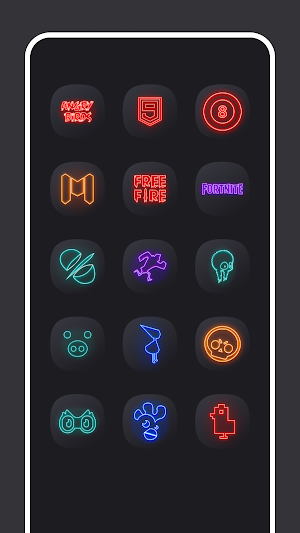
Outline icons with an electrifying neon glow to transform your home screen.
- Rating
- 3.8
- 30 ratings
- Downloads
- 6.8K+
- on Google Play
- Price
- Free
- In-app purchases
- Updated
- Sep 9
- 2026 · v1.7
Screenshots


About Neon Glow Icon Pack
Neon Glow Icon Pack: Bring Your Screen to Life
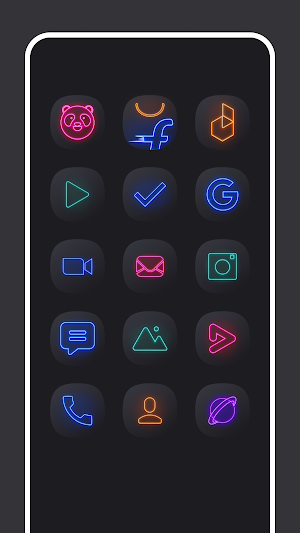
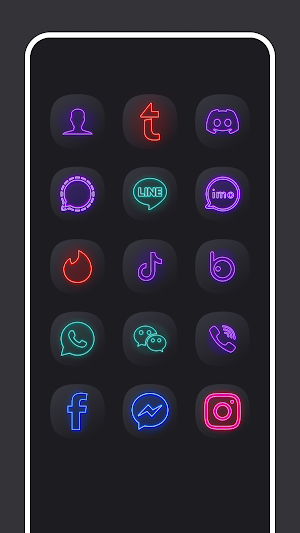
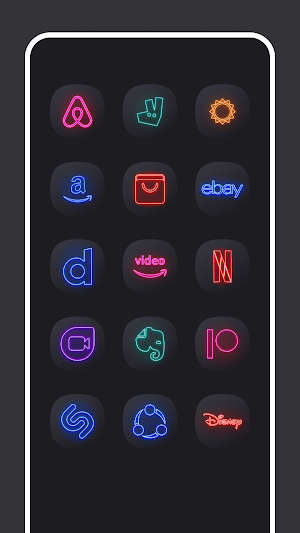
Give your device a complete overhaul with Neon Glow, an icon pack featuring hundreds of outline icons with a distinct, electrifying neon glow. Neon glow icon pack delivers a vibrant, high-contrast look that stands out on any screen.
Enjoy a smooth and stylish interface with high-quality icons, wallpapers, and a refined layout that brings a premium experience to your device. These wallpapers are crafted to complement the icons perfectly, offering a seamless and radiant look for your home screen. These wallpapers are optimized for edge-to-edge displays like Galaxy S25, Galaxy S25 Ultra, Galaxy S24 Ultra, Galaxy S24 & Note20. Neon Glow Theme gives your device a clean and futuristic look.
Key Features:
* Each icon features a thin, clean outline surrounded by a luminous, multi-color glow, creating a striking visual on both dark and light wallpapers.
* High-Definition Clarity: All icons are meticulously designed in a sharp, high resolution (192×192 px) to ensure crisp, clean edges on even the newest, highest-pixel-density screens.
* High-Definition Wallpapers: Enjoy crisp, vibrant wallpapers optimized for various screen sizes, including tall aspect ratio devices. Choose from a wide selection of FHD+ backgrounds, ensuring a visually stunning display.
* Personalized Home & Lock Screens: Set your favorite wallpapers as your home screen or lock screen background.
* Offline Access: Save your favorite HD wallpapers to your device for quick access and offline viewing.
* Effortlessly share your favorite wallpapers and the app with friends.
* Compatible with all mobile devices for a seamless and versatile experience.
Please note: - This icon pack can be applied on selective android launchers which includes: Android 16 Style Launcher, Galaxy S25 Ultra Launcher, Nova launcher, Action launcher, Solo launcher, ADW launcher, N+ Launcher
Applying the Icon Pack is quick and effortless. Simply select your desired launcher from the list, and the icon pack will be automatically applied. For other launchers that support icon packs, you can manually apply the Neon Glow Icon Pack through the launcher's settings menu, typically accessible by long-pressing on the home screen. Use the launcher's theme settings to customize your experience seamlessly.
Download the Neon Glow Icon Pack today and give your phone a fresh makeover!
Give your device a complete overhaul with Neon Glow, an icon pack featuring hundreds of outline icons with a distinct, electrifying neon glow. Neon glow icon pack delivers a vibrant, high-contrast look that stands out on any screen.
Enjoy a smooth and stylish interface with high-quality icons, wallpapers, and a refined layout that brings a premium experience to your device. These wallpapers are crafted to complement the icons perfectly, offering a seamless and radiant look for your home screen. These wallpapers are optimized for edge-to-edge displays like Galaxy S25, Galaxy S25 Ultra, Galaxy S24 Ultra, Galaxy S24 & Note20. Neon Glow Theme gives your device a clean and futuristic look.
Key Features:
* Each icon features a thin, clean outline surrounded by a luminous, multi-color glow, creating a striking visual on both dark and light wallpapers.
* High-Definition Clarity: All icons are meticulously designed in a sharp, high resolution (192×192 px) to ensure crisp, clean edges on even the newest, highest-pixel-density screens.
* High-Definition Wallpapers: Enjoy crisp, vibrant wallpapers optimized for various screen sizes, including tall aspect ratio devices. Choose from a wide selection of FHD+ backgrounds, ensuring a visually stunning display.
* Personalized Home & Lock Screens: Set your favorite wallpapers as your home screen or lock screen background.
* Offline Access: Save your favorite HD wallpapers to your device for quick access and offline viewing.
* Effortlessly share your favorite wallpapers and the app with friends.
* Compatible with all mobile devices for a seamless and versatile experience.
Please note: - This icon pack can be applied on selective android launchers which includes: Android 16 Style Launcher, Galaxy S25 Ultra Launcher, Nova launcher, Action launcher, Solo launcher, ADW launcher, N+ Launcher
Applying the Icon Pack is quick and effortless. Simply select your desired launcher from the list, and the icon pack will be automatically applied. For other launchers that support icon packs, you can manually apply the Neon Glow Icon Pack through the launcher's settings menu, typically accessible by long-pressing on the home screen. Use the launcher's theme settings to customize your experience seamlessly.
Download the Neon Glow Icon Pack today and give your phone a fresh makeover!
What’s new
Version 1.7 · Updated September 9, 2026
— v1.7 • Fixed a crash when opening a wallpaper • Icon requests are now marked as sent only after you confirm — if the email didn't go through, you can request the icon again • Added Go Launcher support • Fixed wallpapers and icons occasionally showing the wrong image • Smaller download and faster startup • Improved translations
Alternatives to Neon Glow Icon Pack
Looking for apps like Neon Glow Icon Pack? Here are 6 similar Android apps on Google Play. The highest rated is Vera Icon Pack: shapeless icon (4.8/5), and 1 of the 6 are free to download.
-
Ares Dark Icon Pack 4.4
-
Vera Icon Pack: shapeless icon 4.8
-
Lena Icon Pack Shapeless Icons 4.7
-
Folder Widget - Large Folders 3.5
-
Pixelful - Icon Pack 4.7
-
Photo Widget Pro 4.1
| App | Rating | Price | Installs | Last updated | Compare |
|---|---|---|---|---|---|
| Neon Glow Icon Pack | 3.8 / 5 | Free | 5,000+ | Sep 9, 2026 | |
| Ares Dark Icon Pack | 4.4 / 5 | 3.49 USD | 5,000+ | Oct 27, 2026 | Compare |
| Vera Icon Pack: shapeless icon | 4.8 / 5 | 3.49 USD | 10,000+ | Oct 22, 2026 | Compare |
| Lena Icon Pack Shapeless Icons | 4.7 / 5 | 3.49 USD | 10,000+ | Oct 6, 2026 | Compare |
| Folder Widget - Large Folders | 3.5 / 5 | Free | 1,000,000+ | – | Compare |
| Pixelful - Icon Pack | 4.7 / 5 | 0.99 USD | 100,000+ | Aug 19, 2026 | Compare |
| Photo Widget Pro | 4.1 / 5 | 0.49 USD | 5,000+ | Sep 15, 2026 | Compare |
Similar apps on Google Play
- Ares Dark Icon Pack
- Vera Icon Pack: shapeless icon
- Lena Icon Pack Shapeless Icons
- Folder Widget - Large Folders
- Pixelful - Icon Pack
- Photo Widget Pro
- PurpleLine Icon Pack : LineX
- Stellio - Music and mp3 Player
- Borealis - Icon Pack
- Walley-Wallpaper, Backgrounds
- Socie
- Focus Launcher
- Dynamic Fitness Texas
- Typewise Offline Keyboard