

SteamDeck: Game Compatibility
Abdelrahman Negm Productivity
Check steam games compatibility level for your Steam Deck
- Rating
- 4.1
- 67 ratings
- Downloads
- 20.5K+
- on Google Play
- Price
- Free
- No in-app purchases
- Updated
- Jul 10
- 2026 · v2.0.0
Screenshots


About SteamDeck: Game Compatibility
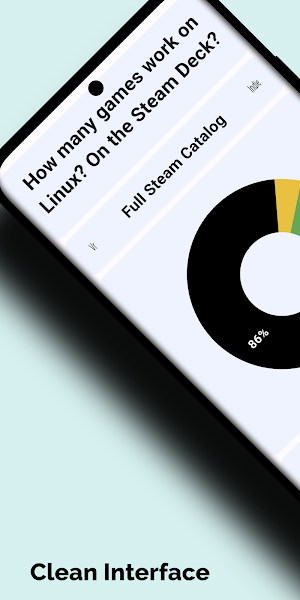
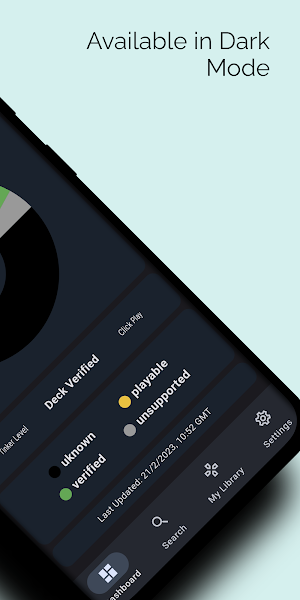
SteamDeck: Game Compatibility is an app for gamers who own a Steam Deck console. With this app, you can browse thousands of Steam games and get compatibility details for most of the steam game catalog . Whether you're looking to find new games to play or want to know if your favorite games will run on your console, this app has got you covered.
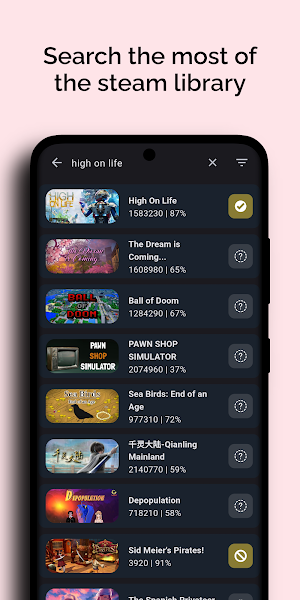
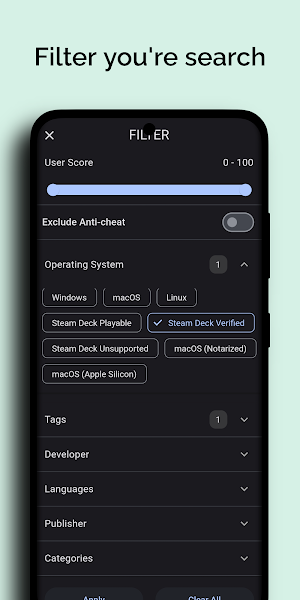
The app uses both Steam's official API and ProtonDB website to provide compatibility information. It's easy to use - just search or filter the game. When you find a game you're interested in, you'll see its compatibility information.
You can also add you're steam id to browse the games and check its compatibility
The app uses both Steam's official API and ProtonDB website to provide compatibility information. It's easy to use - just search or filter the game. When you find a game you're interested in, you'll see its compatibility information.
You can also add you're steam id to browse the games and check its compatibility
What’s new
Version 2.0.0 · Updated July 10, 2026
What’s New * Major UI redesign. * Improved Search, Explore, and Library pages. * Added Steam Sign-In support. * Added ProtonDB Community Reports (Beta). * Bug fixes and performance improvements.
User reviews

Works flawless and without ads, I would even say that is way better than steam official list. Amazing!
Frequently asked questions
What is SteamDeck: Game Compatibility?
SteamDeck: Game Compatibility is an app for gamers who own a Steam Deck console. It allows you to browse thousands of Steam games and provides compatibility details for most of the steam game catalog.
How does SteamDeck: Game Compatibility provide compatibility information?
The app uses both Steam's official API and ProtonDB website to provide compatibility information. It gathers data from these sources to determine if a game is compatible with the Steam Deck console.
How can I use SteamDeck: Game Compatibility to find compatibility information for a game?
You can search or filter games within the app. When you find a game you're interested in, you'll be able to see its compatibility information and determine if it will run on your Steam Deck console.
Can I check the compatibility of my favorite games with SteamDeck: Game Compatibility?
Yes, you can check the compatibility of your favorite games by using SteamDeck: Game Compatibility. Simply search for the game within the app and view its compatibility details.
Can I browse games and check their compatibility using my Steam ID?
Yes, you can add your Steam ID to SteamDeck: Game Compatibility and browse games associated with your account. This allows you to check the compatibility of games directly on your Steam Deck console.
Alternatives to SteamDeck: Game Compatibility
Looking for apps like SteamDeck: Game Compatibility? Here are 6 similar Android apps on Google Play. The highest rated is The Coda Collection (4.4/5), and all 6 are free to download.
-
SteamX - Card Farmer for Steam 4.4
-
GameFly 4.2
-
GeForce NOW Cloud Gaming 3.4
-
The Coda Collection 4.4
-
OSRS Quest Companion 4.3
-
Budget Gamer
| App | Rating | Price | Installs | Last updated | Compare |
|---|---|---|---|---|---|
| SteamDeck: Game Compatibility | 4.1 / 5 | Free | 10,000+ | Jul 10, 2026 | |
| SteamX - Card Farmer for Steam | 4.4 / 5 | Free | 100,000+ | – | Compare |
| GameFly | 4.2 / 5 | Free | 5,000,000+ | Sep 30, 2026 | Compare |
| GeForce NOW Cloud Gaming | 3.4 / 5 | Free | 10,000,000+ | Oct 12, 2026 | Compare |
| The Coda Collection | 4.4 / 5 | Free | 500+ | Nov 22, 2021 | Compare |
| OSRS Quest Companion | 4.3 / 5 | Free | 5,000+ | Dec 14, 2020 | Compare |
| Budget Gamer | – | Free | 100+ | Nov 15, 2022 | Compare |