
Pixel & Page: PDF & Photo Tool
Tools Contains ads
PDF converter, photo editor, background remover & document scanner in one app
- Downloads
- 55+
- on Google Play
- Price
- Free
- No in-app purchases
- Updated
- Feb 21
- 2026 · v1.1.4
Screenshots


About Pixel & Page: PDF & Photo Tool
Pixel & Page: Your Essential All-in-One Digital Toolkit
Tired of switching between five different apps just to edit a photo and manage a document? Meet Pixel & Page, the powerhouse utility app designed to handle all your daily digital tasks instantly and professionally.
Whether you are rushing to meet a deadline or perfecting a photo for social media, Pixel & Page provides professional-grade tools in a single, modern, and easy-to-use interface. It's split into two powerful sections to cover every need:
🎨 PIXEL TOOLS (Professional Image Editing) Instantly fix, adjust, and transform your photos.
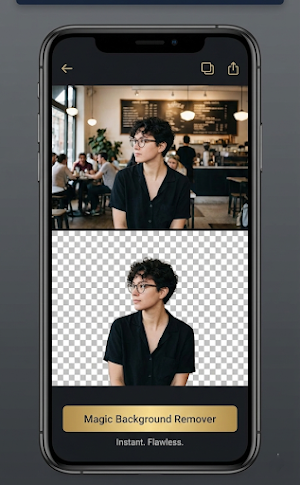
🪄 Magic Background Remover: Isolate subjects instantly. Remove boring or cluttered backgrounds from portraits and product photos with a single tap, creating transparent PNGs in seconds.
✂️ Pro Crop & Resize: Don't just crop randomly. Use precise tools to cut images by exact pixels or choose preset aspect ratios perfect for social media posts, stories, and official passport/ID photo sizes.
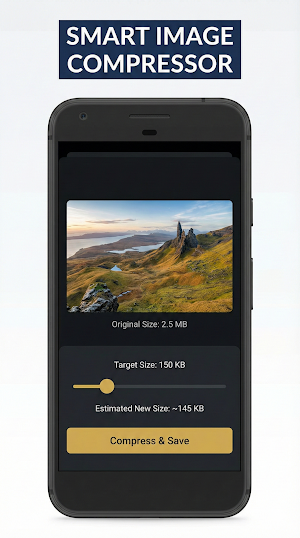
📉 Smart Image Compressor: Reduce image file size (MB to KB) without losing quality. Perfect for uploading photos to job portals or government websites that have strict size limits.
🖼️ Format Converter: Easily switch image formats. Convert modern HEIC photos to standard JPG or PNG for maximum compatibility across all devices.
📄 PAGE TOOLS (Advanced Document Management) Handle PDFs and office files like a pro, right from your phone.
🔄 PDF to Word Converter: The ultimate office lifesaver. Convert uneditable PDF files into fully editable Word (DOCX) documents while preserving the original layout.
📸 Scan to PDF: Turn your camera into a portable scanner. Snap photos of receipts, notes, or contracts and instantly convert them into clean, multi-page PDF documents.
📎 Merge PDFs: Organize your files. Combine multiple separate PDF documents into one single, organized file for easy sharing.
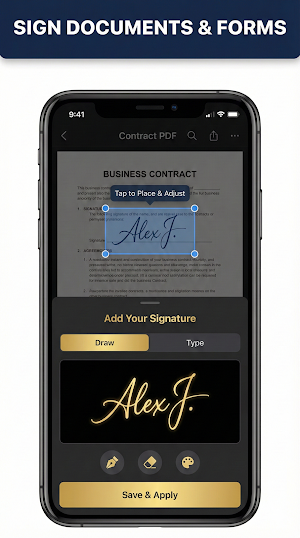
✍️ Sign Documents: Add your signature to contracts or forms digitally without needing a printer.
🌟 Why Choose Pixel & Page?
All-in-One Convenience: Stop cluttering your phone with single-function apps. Get everything done here.
Professional Quality: Tools designed to deliver high-quality results, not just quick fixes.
Privacy Focused: Many operations, like cropping and compressing, happen locally on your device.
Modern Interface: A clean, intuitive dark-mode design that makes complex tasks feel simple.
Download Pixel & Page today and experience the ultimate digital toolkit for your Android device. Get things done, faster.
Whether you need a fast PDF to Word converter, a precise photo cropper, or a reliable image compressor to reduce photo size in KB, Pixel & Page has you covered. Use our smart background remover to edit pictures, scan documents to PDF, merge PDF files, and sign PDF documents digitally. The ultimate HEIC to JPG converter and passport photo maker for your daily office and social media needs.
Tired of switching between five different apps just to edit a photo and manage a document? Meet Pixel & Page, the powerhouse utility app designed to handle all your daily digital tasks instantly and professionally.
Whether you are rushing to meet a deadline or perfecting a photo for social media, Pixel & Page provides professional-grade tools in a single, modern, and easy-to-use interface. It's split into two powerful sections to cover every need:
🎨 PIXEL TOOLS (Professional Image Editing) Instantly fix, adjust, and transform your photos.
🪄 Magic Background Remover: Isolate subjects instantly. Remove boring or cluttered backgrounds from portraits and product photos with a single tap, creating transparent PNGs in seconds.
✂️ Pro Crop & Resize: Don't just crop randomly. Use precise tools to cut images by exact pixels or choose preset aspect ratios perfect for social media posts, stories, and official passport/ID photo sizes.
📉 Smart Image Compressor: Reduce image file size (MB to KB) without losing quality. Perfect for uploading photos to job portals or government websites that have strict size limits.
🖼️ Format Converter: Easily switch image formats. Convert modern HEIC photos to standard JPG or PNG for maximum compatibility across all devices.
📄 PAGE TOOLS (Advanced Document Management) Handle PDFs and office files like a pro, right from your phone.
🔄 PDF to Word Converter: The ultimate office lifesaver. Convert uneditable PDF files into fully editable Word (DOCX) documents while preserving the original layout.
📸 Scan to PDF: Turn your camera into a portable scanner. Snap photos of receipts, notes, or contracts and instantly convert them into clean, multi-page PDF documents.
📎 Merge PDFs: Organize your files. Combine multiple separate PDF documents into one single, organized file for easy sharing.
✍️ Sign Documents: Add your signature to contracts or forms digitally without needing a printer.
🌟 Why Choose Pixel & Page?
All-in-One Convenience: Stop cluttering your phone with single-function apps. Get everything done here.
Professional Quality: Tools designed to deliver high-quality results, not just quick fixes.
Privacy Focused: Many operations, like cropping and compressing, happen locally on your device.
Modern Interface: A clean, intuitive dark-mode design that makes complex tasks feel simple.
Download Pixel & Page today and experience the ultimate digital toolkit for your Android device. Get things done, faster.
Whether you need a fast PDF to Word converter, a precise photo cropper, or a reliable image compressor to reduce photo size in KB, Pixel & Page has you covered. Use our smart background remover to edit pictures, scan documents to PDF, merge PDF files, and sign PDF documents digitally. The ultimate HEIC to JPG converter and passport photo maker for your daily office and social media needs.
What’s new
Version 1.1.4 · Updated February 21, 2026
• Fixed signature resizing: You can now scale and position your signature perfectly on any document. • Enhanced Document Viewer: Improved scrolling and zoom performance for large files. • Fixed image rendering issues for older Android devices. • Stability improvements for PDF merging and file extension conversion. • Optimized for the latest Android 16 features and 16 KB page-size devices.
User reviews

it makes my work easier, and quit simple..
Alternatives to Pixel & Page: PDF & Photo Tool
Looking for apps like Pixel & Page: PDF & Photo Tool? Here are 5 similar Android apps on Google Play. The highest rated is Socie (4.8/5), and 4 of the 5 are free to download.





| App | Rating | Price | Installs | Last updated | Compare |
|---|---|---|---|---|---|
| Pixel & Page: PDF & Photo Tool | – | Free | 50+ | Feb 21, 2026 | |
| Ar Drawing & Sketch App | – | Free | 100,000+ | Aug 25, 2026 | Compare |
| Myrentpad - Vehicle inspection | – | Free | 1,000+ | Jun 23, 2026 | Compare |
| OptoDroid | – | – | 1+ | Aug 31, 2026 | Compare |
| KultureCity | 4.6 / 5 | Free | 10,000+ | Oct 14, 2026 | Compare |
| Socie | 4.8 / 5 | Free | 50,000+ | Oct 5, 2026 | Compare |