
Obscura
TrustedAIApp Tools Contains ads
Private Vault for Markdown notes, PDFs, scans, and secure files
- Downloads
- 365+
- on Google Play
- Price
- Free
- No in-app purchases
- Updated
- May 10
- 2026
Screenshots
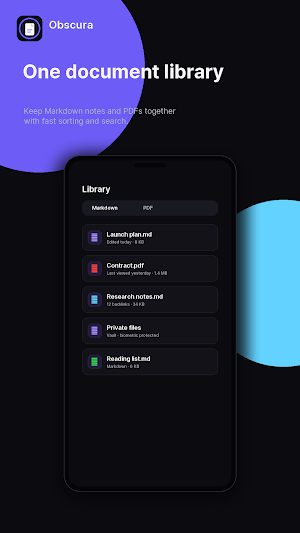


About Obscura
Obscura is a private document workspace built around Secure Vault, Markdown notes, PDFs, scans, and focused reading. It is made for people who want one quiet place to keep important files, write structured notes, and protect sensitive documents without a cluttered workflow.
Secure Vault helps keep personal documents close and protected. Store private PDFs, confidential notes, identity files, contracts, receipts, research, and other sensitive material in a dedicated vault experience designed for privacy-first organization.
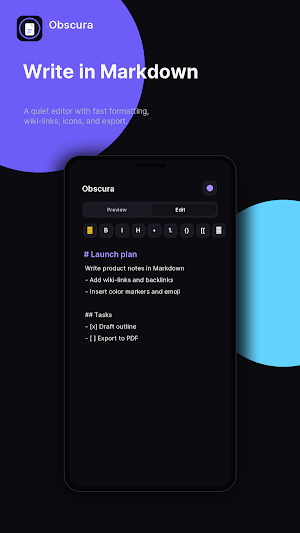
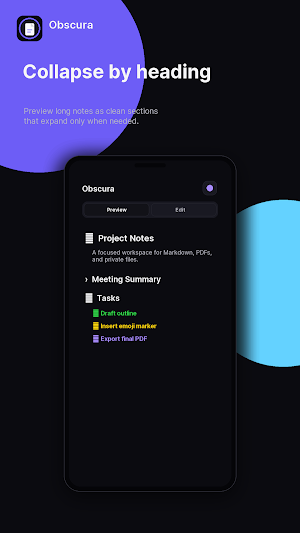
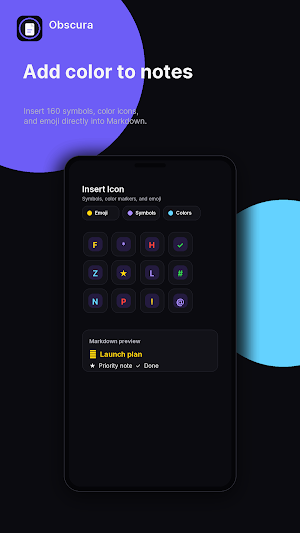
Write in Markdown when you need fast, portable notes. Use headings, tasks, wiki-links, backlinks, symbols, color icons, and emoji to make your notes easier to scan. Long documents stay readable with collapsible preview sections, so big notes can feel lighter and more organized.
Obscura also follows the modern trend of combining notes, documents, and file tools in one workspace. Instead of switching between a note app, a PDF reader, a scanner, and a file vault, you can keep your workflow together: write, read, scan, search, organize, protect, and export from one focused app.
Use Obscura for:
- Secure Vault storage for private documents and notes.
- Markdown writing with edit and preview modes.
- Collapsible sections based on headers.
- PDF reading and document utility tools.
- Scan, merge, export, search, and protect workflows.
- Wiki-links and backlinks for connected notes.
- 160 symbols, color icons, and emoji for expressive Markdown.
- A dark, Apple-inspired interface with Obsidian-style depth.
Obscura is designed for private knowledge, secure files, and modern document organization.
## Feature Highlights
- Secure Vault for sensitive documents, PDFs, and private notes.
- Markdown notes with fast edit and preview modes.
- Collapsible preview sections from headers.
- 160 insertable symbols, color icons, and emoji.
- Wiki-links and backlinks for connected notes.
- PDF reader and utility tools for scan, merge, export, and protect.
- Search, notes, and document assistance in one focused workspace
Secure Vault helps keep personal documents close and protected. Store private PDFs, confidential notes, identity files, contracts, receipts, research, and other sensitive material in a dedicated vault experience designed for privacy-first organization.
Write in Markdown when you need fast, portable notes. Use headings, tasks, wiki-links, backlinks, symbols, color icons, and emoji to make your notes easier to scan. Long documents stay readable with collapsible preview sections, so big notes can feel lighter and more organized.
Obscura also follows the modern trend of combining notes, documents, and file tools in one workspace. Instead of switching between a note app, a PDF reader, a scanner, and a file vault, you can keep your workflow together: write, read, scan, search, organize, protect, and export from one focused app.
Use Obscura for:
- Secure Vault storage for private documents and notes.
- Markdown writing with edit and preview modes.
- Collapsible sections based on headers.
- PDF reading and document utility tools.
- Scan, merge, export, search, and protect workflows.
- Wiki-links and backlinks for connected notes.
- 160 symbols, color icons, and emoji for expressive Markdown.
- A dark, Apple-inspired interface with Obsidian-style depth.
Obscura is designed for private knowledge, secure files, and modern document organization.
## Feature Highlights
- Secure Vault for sensitive documents, PDFs, and private notes.
- Markdown notes with fast edit and preview modes.
- Collapsible preview sections from headers.
- 160 insertable symbols, color icons, and emoji.
- Wiki-links and backlinks for connected notes.
- PDF reader and utility tools for scan, merge, export, and protect.
- Search, notes, and document assistance in one focused workspace
What’s new
Updated May 10, 2026
Enjoy
Alternatives to Obscura
Looking for apps like Obscura? Here are 6 similar Android apps on Google Play. All of them are free to download.


| App | Rating | Price | Installs | Last updated | Compare |
|---|---|---|---|---|---|
| Obscura | – | Free | 100+ | May 10, 2026 | |
| Orbit Pulse | – | Free | 10+ | Apr 22, 2026 | Compare |
| WinMe | – | Free | 10+ | May 1, 2026 | Compare |
| NightFall | – | Free | 5+ | – | Compare |
| Rubik3D | – | Free | 100+ | Mar 12, 2026 | Compare |
| SpatialNote | – | Free | 10+ | – | Compare |
| AI Text Enhance | – | Free | 100+ | Jun 11, 2026 | Compare |
Compare Obscura with the top alternatives: ratings, updates, ASO score and keyword gaps →