
DevDeck - Developer Workspace
Productivity In-app purchases
Finish what you start. Cap your projects, plan your time, ship your versions.
- Downloads
- 3+
- on Google Play
- Price
- Free
- In-app purchases
- Updated
- Sep 14
- 2026 · v1.2.4
Screenshots
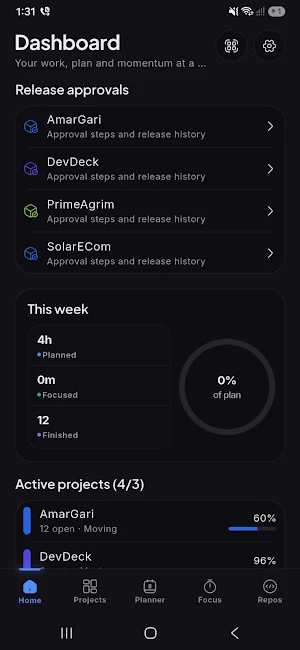
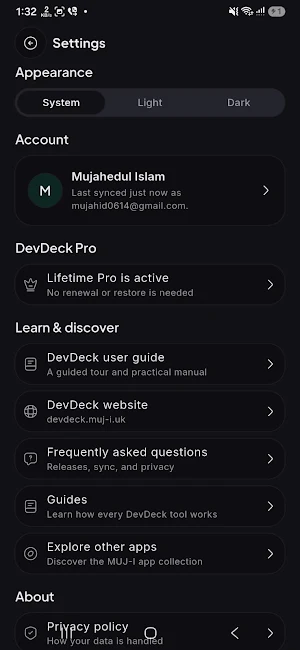
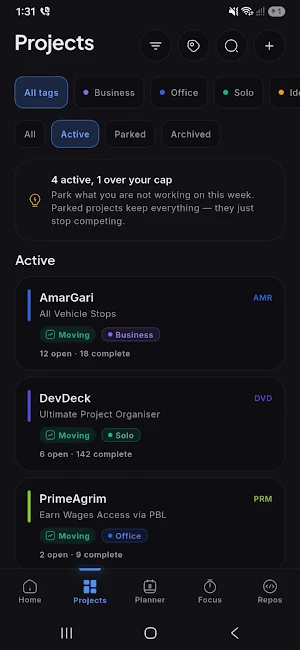
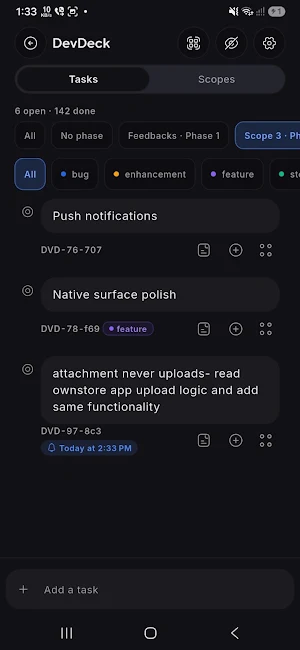


About DevDeck - Developer Workspace
It is built for one developer with nine projects open and nothing shipped. That does not come from a bad todo list. It comes from unbounded work in progress, from planned time nobody ever checks against what actually happened, and from projects with no definition of "shipped" to move toward.
DevDeck holds three opinions, and every feature serves one of them.
WORK IN PROGRESS, CAPPED
Projects past the cap are parked, not quietly neglected. Parking keeps everything — tasks, notes, history — and stops it competing for your attention. Archive what is genuinely finished.
PLANNED TIME, CHECKED AGAINST EVIDENCE
Block out time against a project, then compare it with the work that actually happened. The focus timer is the first evidence. Commits are the strongest. The gap between what you planned and what you did is the most useful screen in the app.
COMMITS CLOSE TASKS
Install the DevDeck GitHub App on the repositories you choose and pick a branch. Name a task in a commit message and DevDeck closes the task that commit finished. No status dragging, no second place to keep the truth.
RELEASES ARE THE DESTINATION
Scopes, phases and versions give tasks somewhere to be pulled to. Release notes are drafted from the commits that closed the work, so shipping is a step in the tool rather than an afterthought in a text file.
EVERYTHING ELSE THAT HAS TO BE GOOD
• Nested subtasks, tags, notes and due dates
• A weekly planner with reminders before a block starts
• A focus timer with session history
• Task exports as plain text, per phase or whole, with the ids to quote in commits
• File attachments kept on your device
• Dark and light, tuned for both
WORKS OFFLINE. AN ACCOUNT IS OPTIONAL.
Everything is stored on your device first and works with no account and no connection. Sign in if you want your work on another device, back after a reinstall, or shared.
CONNECTING A REPOSITORY
You install the DevDeck GitHub App on the repositories you choose, in the browser. No access token is pasted, stored or synced — there is nothing for us to hold. You can revoke it from your GitHub settings at any time, and it covers only the repositories you picked.
DevDeck reads those repositories — their branches and their commits. It never writes to them.
The installation belongs to your GitHub account, so a new phone reconnects on its own.
A SHARED PROJECT SHARES THE PROJECT, NOT YOU
Invite people by email, as a viewer, a contributor or a maintainer. They see the project's tasks, tags, scopes and versions, and what they can change depends on the role you gave them.
Your planned week and your focus sessions stay yours. They are never shared with anyone, on any project.
Before a version ships it can go through approval steps you configure — any two contributors, then a named sign-off, in the order you choose. Everybody sees which step it is on and who it waits for.
NO ADS, EVER
A tool people use to concentrate is the wrong place to sell an impression. There are none, on any plan, and no third-party analytics or tracking in the app.
FREE AND PRO
Free gives you 2 active projects and 1 connected repository — with planning, the focus timer, scopes, versions, release notes and commits-close-tasks all included, and your work synced to your account.
DevDeck Pro adds:
• Unlimited projects
• Unlimited repositories
• Plan versus actual
• Release notes export
• Teams — share a project, with roles
• Release approval — sign-off steps before a version ships
Available monthly, yearly, or as a one-time lifetime purchase.
Calendar sync is planned. It is named on the upgrade screen as coming, never as something you have already bought.
Pro belongs to your DevDeck account, not the device — sign in anywhere and it comes with you. Subscriptions are managed in Google Play.
Questions or requests: [email protected]
What’s new
Version 1.2.4 · Updated September 14, 2026
First release. Cap your work in progress, plan time against projects, and let the commits that finish a task close it. Scopes, phases and versions give the work somewhere to go, with release notes drafted from the commits themselves. Everything works offline with no account. Sign in only if you want your work on more than one device. No ads, no trackers, and your GitHub token never leaves the device.
Alternatives to DevDeck - Developer Workspace
Looking for apps like DevDeck - Developer Workspace? Here are 6 similar Android apps on Google Play. The highest rated is NEC Electrician Exam Test Prep (4.7/5), and all 6 are free to download.
-
Cxxdroid - C/C++ compiler IDE 4.5
-
Code Studio 4.6
-
xTiles: notes, tasks, projects 3.3
-
CodeGym: learn Java 4.6
-
NEC Electrician Exam Test Prep 4.7
-
Learn C++ 4.5
| App | Rating | Price | Installs | Last updated | Compare |
|---|---|---|---|---|---|
| DevDeck - Developer Workspace | – | Free | 1+ | Sep 14, 2026 | |
| Cxxdroid - C/C++ compiler IDE | 4.4 / 5 | Free | 5,000,000+ | Sep 14, 2026 | Compare |
| Code Studio | 4.6 / 5 | Free | 1,000,000+ | Dec 3, 2024 | Compare |
| xTiles: notes, tasks, projects | 3.3 / 5 | Free | 100,000+ | Sep 11, 2026 | Compare |
| CodeGym: learn Java | 4.6 / 5 | Free | 100,000+ | Sep 28, 2026 | Compare |
| NEC Electrician Exam Test Prep | 4.7 / 5 | Free | 10,000+ | Sep 30, 2026 | Compare |
| Learn C++ | 4.5 / 5 | Free | 100,000+ | Aug 27, 2024 | Compare |
Similar apps on Google Play
- Cxxdroid - C/C++ compiler IDE
- Code Studio
- xTiles: notes, tasks, projects
- CodeGym: learn Java
- NEC Electrician Exam Test Prep
- Learn C++
- Memento Database
- Building Tools
- Coding Python
- Learn App Development
- Pocket Prep IT & Cybersecurity
- Coddy: Learn Coding & Python
- Coast: Native Work Order CMMS
- MIT Technology Review
- FastField: Field Service Forms
- CLF-C02 Exam Prep 2026
- Pocket Prep Nursing School
- KultureCity
- SE ATI TEAS & HESI Prep 2025