

ScanSeek AI: Photo Search
MUCO Apps Productivity In-app purchases Contains ads
Search Screenshots, Photos & Documents with AI OCR & Duplicate Cleaner
- Downloads
- 69+
- on Google Play
- Price
- Free
- In-app purchases
- Updated
- Sep 1
- 2026 · v1.1.0
Screenshots


About ScanSeek AI: Photo Search
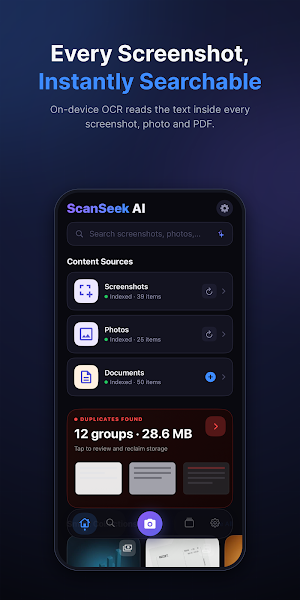
ScanSeek AI helps you search screenshots, photos, and documents instantly using powerful AI and OCR technology. Turn your gallery and files into a smart, searchable knowledge base and find important information in seconds instead of endlessly scrolling.
Whether it’s a receipt, scanned document, handwritten note, code snippet, article, chat message, invoice, or whiteboard photo, ScanSeek AI makes your content searchable, organized, and easy to understand.
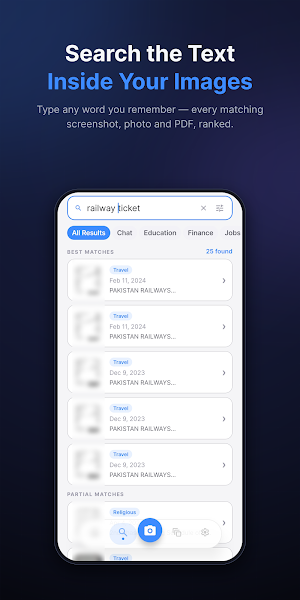
🔍 SEARCH INSIDE SCREENSHOTS, PHOTOS & DOCUMENTS
Find text inside screenshots, images, PDFs, and scanned documents using advanced OCR text recognition. Simply type keywords, phrases, or details to instantly locate what you need.
📄 SCAN DOCUMENTS & PHOTOS
Capture documents directly from your camera or import photos and files. ScanSeek AI extracts text and converts your content into searchable information for quick access anytime.
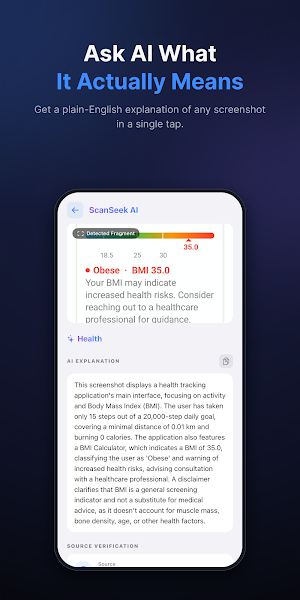
🤖 AI EXPLANATIONS & SUMMARIES
Use AI to explain screenshots, summarize long documents, understand UI screens, analyze notes, or extract important insights from images and files.
🧹 REMOVE DUPLICATES & CLEAN STORAGE
Detect duplicate and visually similar screenshots using smart AI matching. Clean up unnecessary copies and organize your gallery more efficiently.
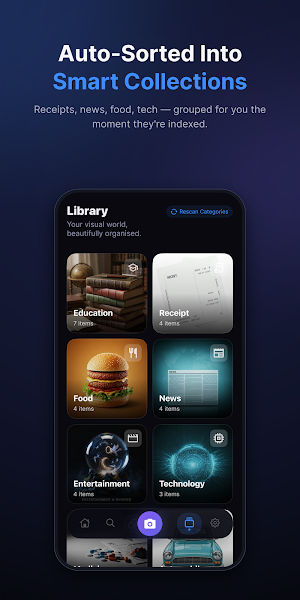
📂 SMART ORGANIZATION
Automatically categorize screenshots, photos, and documents into meaningful groups for faster browsing and better productivity.
🔒 PRIVATE & FAST
* OCR processing happens on-device
* Your photos and documents stay private
* Works offline for search and organization
* No unnecessary cloud storage or tracking
⚡ WHY USE SCANSEEK AI?
* Search text inside screenshots and photos
* OCR scanner for documents and images
* AI-powered summaries and explanations
* Duplicate screenshot cleaner
* Fast screenshot and document search
* Smart organization for productivity
* Clean and easy-to-use interface
PERFECT FOR
* Searching screenshots instantly
* Scanning receipts, notes, contracts, and study material
* Organizing screenshots and documents
* Finding old messages, saved links, and code snippets
* Cleaning duplicate screenshots
* Understanding long content faster with AI
ScanSeek AI is built for students, professionals, researchers, developers, and everyday users who save information daily and want a smarter way to search, scan, organize, and understand screenshots, photos, and documents.
What’s new
Version 1.1.0 · Updated September 1, 2026
Background scanning is here. • Indexing now continues after you leave the app — no more sitting on the scan screen waiting • A progress notification shows how many items are done out of the total • A nightly check picks up new screenshots and photos, so search is ready when you open the app • Prefer it off? Settings › Background Scanning turns it off completely • Smoother, more responsive library while a large scan is running
Alternatives to ScanSeek AI: Photo Search
Looking for apps like ScanSeek AI: Photo Search? Here are 3 similar Android apps on Google Play. All of them are free to download.



| App | Rating | Price | Installs | Last updated | Compare |
|---|---|---|---|---|---|
| ScanSeek AI: Photo Search | – | Free | 50+ | Sep 1, 2026 | |
| SleepTonic: Binaural Beats | – | Free | 50+ | Sep 24, 2026 | Compare |
| Stepora: Step Counter | – | Free | 100+ | – | Compare |
| Takhmeena: Income Tax & Solar | – | Free | 100+ | – | Compare |