
Canvex Display™: Second Screen
Productivity In-app purchases
Turn your Android tablet into a low-latency second screen for Windows.
- Downloads
- 2.1K+
- on Google Play
- Price
- Free
- In-app purchases
- Updated
- Jul 27
- 2026 · v1.1.1
Screenshots

About Canvex Display™: Second Screen
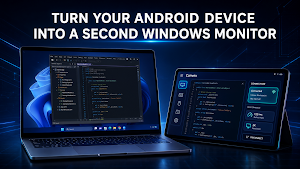
Canvex Display™ turns your Android phone or tablet into a low-latency second screen for your Windows PC.
Stream your Windows desktop to your Android device, expand your workspace, and stay productive with a portable second-screen setup designed for work, travel, and everyday use.
Features:
• Low-latency second screen experience for Windows
• Stream your PC display to an Android phone or tablet
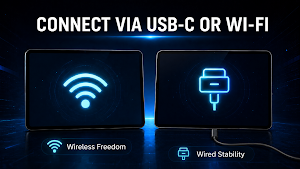
• Wi-Fi connection with supported USB routing options
• Automatic host discovery and manual IP connection
• Secure pairing and trusted device flow
• Fullscreen session mode
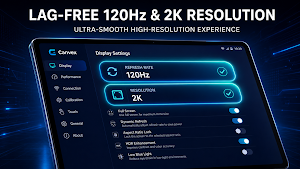
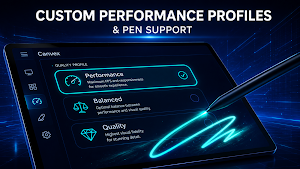
• Adjustable quality, FPS, and connection preferences
• Diagnostics screen with runtime and network metrics
• Tablet-friendly modern interface
• Multi-language support
How it works:
① Install Canvex Display Host on your Windows 10/11 PC.
Download: canvexdisplay.mtgsoftworks.com
② Connect your Android device and PC to the same network, or use a supported USB method.
③Open the app and find your host automatically, or connect manually with an IP address. (Complete pairing if required)
Start your session and use your Android device as a second screen.
Important:
• A Windows host application is required for core functionality.
• Performance depends on network quality, device hardware, resolution, and selected quality settings.
• Best results are achieved on a strong local network or supported wired connection.
• Some features may vary by device, Android version, and host configuration.
Stream your Windows desktop to your Android device, expand your workspace, and stay productive with a portable second-screen setup designed for work, travel, and everyday use.
Features:
• Low-latency second screen experience for Windows
• Stream your PC display to an Android phone or tablet
• Wi-Fi connection with supported USB routing options
• Automatic host discovery and manual IP connection
• Secure pairing and trusted device flow
• Fullscreen session mode
• Adjustable quality, FPS, and connection preferences
• Diagnostics screen with runtime and network metrics
• Tablet-friendly modern interface
• Multi-language support
How it works:
① Install Canvex Display Host on your Windows 10/11 PC.
Download: canvexdisplay.mtgsoftworks.com
② Connect your Android device and PC to the same network, or use a supported USB method.
③Open the app and find your host automatically, or connect manually with an IP address. (Complete pairing if required)
Start your session and use your Android device as a second screen.
Important:
• A Windows host application is required for core functionality.
• Performance depends on network quality, device hardware, resolution, and selected quality settings.
• Best results are achieved on a strong local network or supported wired connection.
• Some features may vary by device, Android version, and host configuration.
What’s new
Version 1.1.1 · Updated July 27, 2026
- Fixed a black-screen issue caused by media encryption key synchronization. - Added automatic H.264 software encoding fallback when hardware encoding is unavailable. - Pairing codes are now also shown in the Windows host console. - Improved connection startup and first-frame reliability.
Alternatives to Canvex Display™: Second Screen
Looking for apps like Canvex Display™: Second Screen? Here are 4 similar Android apps on Google Play. The highest rated is 1st Phorm: Fitness & Nutrition (4.8/5), and all 4 are free to download.



| App | Rating | Price | Installs | Last updated | Compare |
|---|---|---|---|---|---|
| Canvex Display™: Second Screen | – | Free | 1,000+ | Jul 27, 2026 | |
| 1st Phorm: Fitness & Nutrition | 4.8 / 5 | Free | 100,000+ | Sep 29, 2026 | Compare |
| Tixoo - Long division | 4.7 / 5 | Free | 100,000+ | Aug 21, 2026 | Compare |
| Sensi | 4.4 / 5 | Free | 1,000,000+ | Sep 14, 2026 | Compare |
| Big City Volleyball | 4.6 / 5 | Free | 1,000+ | May 26, 2026 | Compare |