

Acoustix: Studio Calculator
MS MOBILES Productivity
Optimize your studio with room mode, RT60, and speaker placement tools.
- Downloads
- 1+
- on Google Play
- Price
- Free
- No in-app purchases
- Updated
- Jun 1
- 2026 · v1.0
Screenshots


About Acoustix: Studio Calculator
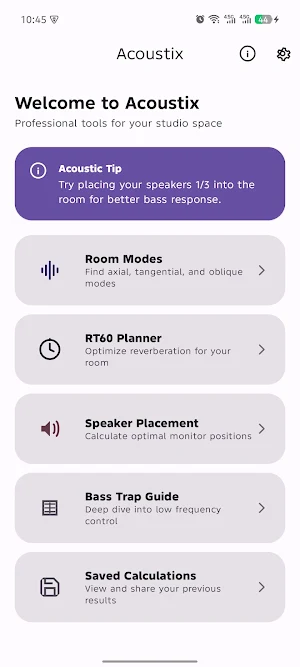
Elevate your audio production and listening experience with Acoustix, the comprehensive acoustic toolkit designed for music producers, sound engineers, and home studio enthusiasts. Whether you are building a new studio or fine-tuning an existing space, Acoustix provides the essential calculations needed to achieve professional sound quality.
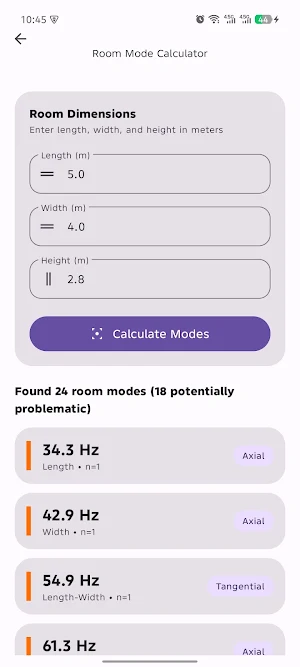
Room Mode Calculator Identify standing waves that color your sound. By entering your room dimensions, you can quickly find axial, tangential, and oblique modes. Understanding these frequencies helps you identify where bass buildup or phase cancellation might occur, allowing you to treat your room with precision.
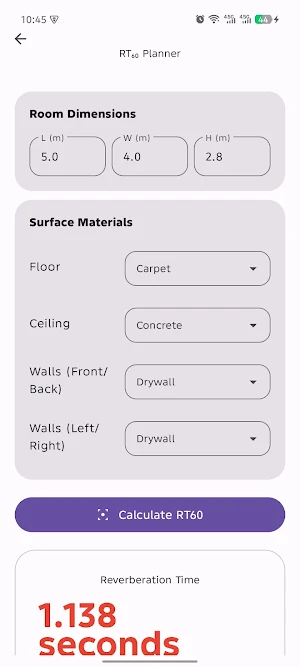
RT60 Planner Control your room’s reverberation. Select different surface materials—such as wood, carpet, concrete, or acoustic foam—to estimate the RT60 (reverberation time). This tool helps you balance absorption and reflection to create a space that is neither too "dead" nor too "live" for mixing and recording.
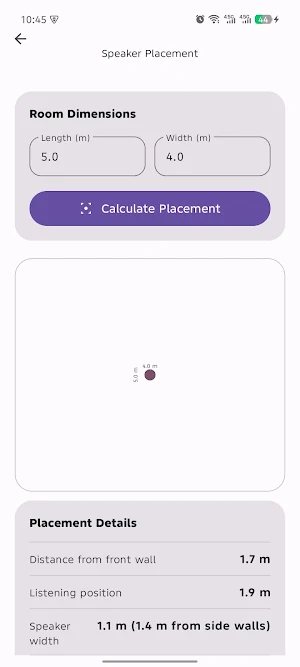
Speaker Placement Guide Achieve the perfect stereo image. Using acoustic principles like the Rule of Thirds and the Equilateral Triangle, Acoustix calculates the optimal position for your monitors and your listening seat. Minimize early reflections and improve the accuracy of your low-end response.
Bass Trap Recommendations Target specific low-frequency issues. Enter a problematic frequency and receive recommendations for absorber thickness and types. Manage corner energy and improve the clarity of your sub-bass with data-driven depth guides.
Key Features:
• Visual Analysis: See your room layout and listening triangle with a dedicated visualization widget.
• Material Library: Choose from a variety of architectural materials to see how they impact your room's decay time.
• Save & Compare: Store your calculations to compare different room setups or track your progress as you add acoustic treatment.
• Share Results: Export your analysis to share with equipment consultants or studio builders.
Take the guesswork out of studio setup. Download Acoustix and start building a better sounding space today.
Room Mode Calculator Identify standing waves that color your sound. By entering your room dimensions, you can quickly find axial, tangential, and oblique modes. Understanding these frequencies helps you identify where bass buildup or phase cancellation might occur, allowing you to treat your room with precision.
RT60 Planner Control your room’s reverberation. Select different surface materials—such as wood, carpet, concrete, or acoustic foam—to estimate the RT60 (reverberation time). This tool helps you balance absorption and reflection to create a space that is neither too "dead" nor too "live" for mixing and recording.
Speaker Placement Guide Achieve the perfect stereo image. Using acoustic principles like the Rule of Thirds and the Equilateral Triangle, Acoustix calculates the optimal position for your monitors and your listening seat. Minimize early reflections and improve the accuracy of your low-end response.
Bass Trap Recommendations Target specific low-frequency issues. Enter a problematic frequency and receive recommendations for absorber thickness and types. Manage corner energy and improve the clarity of your sub-bass with data-driven depth guides.
Key Features:
• Visual Analysis: See your room layout and listening triangle with a dedicated visualization widget.
• Material Library: Choose from a variety of architectural materials to see how they impact your room's decay time.
• Save & Compare: Store your calculations to compare different room setups or track your progress as you add acoustic treatment.
• Share Results: Export your analysis to share with equipment consultants or studio builders.
Take the guesswork out of studio setup. Download Acoustix and start building a better sounding space today.
Alternatives to Acoustix: Studio Calculator
Looking for apps like Acoustix: Studio Calculator? Here are 6 similar Android apps on Google Play. The highest rated is Zona: AI Song Maker & Creator (4.5/5), and 4 of the 6 are free to download.
-
Storyboard GO
-
Typr — Voice to PDF
-
StoryJourney
-
DesignEvo - Logo Maker 3.0
-
AI Attractiveness Test-Facewow 4.0
-
Zona: AI Song Maker & Creator 4.5
| App | Rating | Price | Installs | Last updated | Compare |
|---|---|---|---|---|---|
| Acoustix: Studio Calculator | – | Free | 1+ | Jun 1, 2026 | |
| Storyboard GO | – | – | 5,000+ | Sep 4, 2026 | Compare |
| Typr — Voice to PDF | – | – | – | Apr 12, 2026 | Compare |
| StoryJourney | – | Free | 1,000+ | Sep 27, 2024 | Compare |
| DesignEvo - Logo Maker | 3.0 / 5 | Free | 1,000,000+ | Apr 19, 2018 | Compare |
| AI Attractiveness Test-Facewow | 4.0 / 5 | Free | 100,000+ | Sep 22, 2026 | Compare |
| Zona: AI Song Maker & Creator | 4.5 / 5 | Free | 1,000,000+ | Aug 28, 2026 | Compare |