

MPlayer - Video, Music & Clips
mksmohan Video Players & Editors Contains ads
Play HD videos & music, record screen, create clips. Your all-in-one media app.
- Downloads
- 11.6K+
- on Google Play
- Price
- Free
- No in-app purchases
- Updated
- Aug 22
- 2026 · v2.1.0
Screenshots


About MPlayer - Video, Music & Clips
🎬 MPlayer – The Ultimate All-in-One Media Solution for Android 🎵
Transform your Android device into a complete multimedia powerhouse! MPlayer combines a professional-grade video player, premium music player, HD screen recorder, file manager, and video editor into one powerful application. Experience seamless playback of all media formats with intuitive controls and lightning-fast performance.
🌟 Why MPlayer Stands Out:
Watch movies in stunning 8K quality, listen to crystal-clear music, record your screen in Full HD, edit videos with precision tools, and organize your entire media library effortlessly. Whether streaming from remote servers, playing offline content, or creating clips for social media, MPlayer handles it all flawlessly.
🎥 PROFESSIONAL VIDEO PLAYER
Experience cinema-quality playback with our advanced video engine:
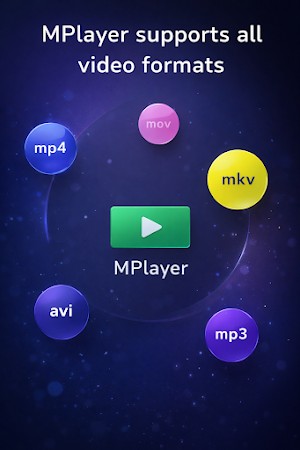
- Support for ALL formats: MKV, MP4, AVI, MOV, 3GP, TS, FLV, WMV, WEBM, M4V
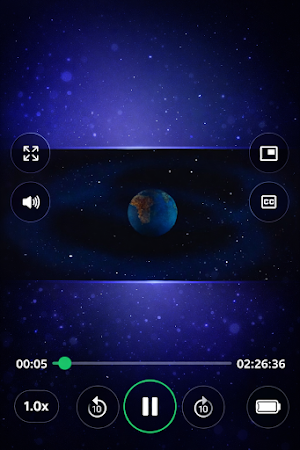
- Ultra HD playback: 720p, 1080p, 2K, 4K, and 8K resolution support
- Picture-in-Picture (PIP) mode for multitasking
- Perfect for movies, TV shows, reels, and WhatsApp status videos
🎵 PREMIUM MUSIC PLAYER
Enjoy studio-quality sound:
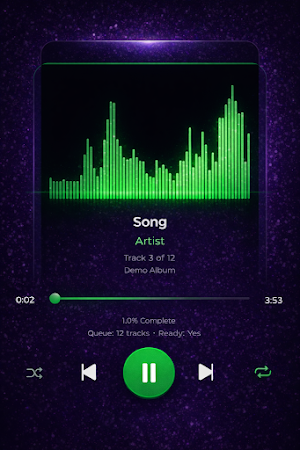
- Universal format support: MP3, AAC, WAV, FLAC, OGG, M4A, ALAC, WMA
- Custom playlist creation
- Background playback while using other apps
🎙️ HD SCREEN RECORDER
Capture everything with professional quality:
- Record in 1080p Full HD at 60FPS
- Internal audio and microphone recording
- Facecam overlay for reaction videos
- Drawing tools and annotations
- Perfect for gaming, tutorials, video calls, and educational content
✂️ VIDEO EDITOR & AUDIO TOOLS
Create and customize your media:
- Precise video trimmer and cutter
- Audio extractor: Convert MP4 to MP3 instantly
- Merge multiple clips
- Share directly to social media
📁 SMART FILE MANAGER
Take control of your media library:
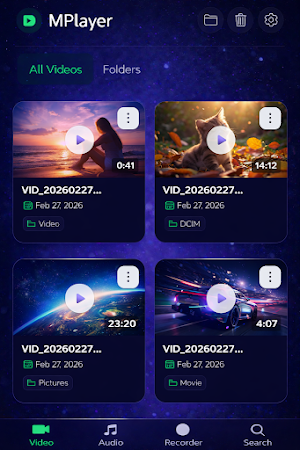
- Automatic video and audio detection
- Advanced search by name, size, date, or duration
- Folder management: create, rename, move, delete
- Duplicate file finder and storage analyzer
- Thumbnail preview for quick identification
🚀 File Transfer
- Fast & Secure file transfer of any type with high speed and end-to-end reliability.
- Send anything, Anytime over WIFI or mobile network in just a few taps
- Private & Hassle-Free sharing No cables, no limits—just simple, secure file sharing between devices.
⬇️ VIDEO DOWNLOADER
Download videos effortlessly:
- Direct URL-based downloading
- Fast speeds with resume capability
- Download queue management
🌐 NETWORK STREAMING
Access media from anywhere:
- Wi-Fi network streaming (SMB, FTP, NAS)
- Supports HTTPS/HTTP, RTMP, RTSP and DASH URL remote play
- Cloud storage integration
- DLNA/UPnP server support
- Remote file access without downloading
⚡ ADDITIONAL FEATURES
- Chromecast support for big-screen viewing
- Private folder with password protection
- Small app size with powerful functionality
- Multi-language support
- No internet required for offline playback
📌 PERFECT FOR:
✔ Movie enthusiasts and binge-watchers
✔ Music lovers and audiophiles
✔ Content creators and YouTubers
✔ Mobile gamers recording gameplay
✔ Students creating tutorials
✔ Social media content creators
✔ Anyone seeking an all-in-one media solution
🏆 MPlayer = Complete Media Freedom
Stop juggling multiple apps! MPlayer replaces 5+ applications with one powerful solution. Enjoy unlimited media playback, professional screen recording capabilities, private file transfer, creative editing tools, and intelligent file management—all optimized for Android with a beautiful, intuitive interface.
Download MPlayer today and experience the future of mobile media!
📩 Support & Feedback:
We love hearing from our users! Contact us anytime for assistance or feature requests. Your satisfaction is our priority.
Transform your Android device into a complete multimedia powerhouse! MPlayer combines a professional-grade video player, premium music player, HD screen recorder, file manager, and video editor into one powerful application. Experience seamless playback of all media formats with intuitive controls and lightning-fast performance.
🌟 Why MPlayer Stands Out:
Watch movies in stunning 8K quality, listen to crystal-clear music, record your screen in Full HD, edit videos with precision tools, and organize your entire media library effortlessly. Whether streaming from remote servers, playing offline content, or creating clips for social media, MPlayer handles it all flawlessly.
🎥 PROFESSIONAL VIDEO PLAYER
Experience cinema-quality playback with our advanced video engine:
- Support for ALL formats: MKV, MP4, AVI, MOV, 3GP, TS, FLV, WMV, WEBM, M4V
- Ultra HD playback: 720p, 1080p, 2K, 4K, and 8K resolution support
- Picture-in-Picture (PIP) mode for multitasking
- Perfect for movies, TV shows, reels, and WhatsApp status videos
🎵 PREMIUM MUSIC PLAYER
Enjoy studio-quality sound:
- Universal format support: MP3, AAC, WAV, FLAC, OGG, M4A, ALAC, WMA
- Custom playlist creation
- Background playback while using other apps
🎙️ HD SCREEN RECORDER
Capture everything with professional quality:
- Record in 1080p Full HD at 60FPS
- Internal audio and microphone recording
- Facecam overlay for reaction videos
- Drawing tools and annotations
- Perfect for gaming, tutorials, video calls, and educational content
✂️ VIDEO EDITOR & AUDIO TOOLS
Create and customize your media:
- Precise video trimmer and cutter
- Audio extractor: Convert MP4 to MP3 instantly
- Merge multiple clips
- Share directly to social media
📁 SMART FILE MANAGER
Take control of your media library:
- Automatic video and audio detection
- Advanced search by name, size, date, or duration
- Folder management: create, rename, move, delete
- Duplicate file finder and storage analyzer
- Thumbnail preview for quick identification
🚀 File Transfer
- Fast & Secure file transfer of any type with high speed and end-to-end reliability.
- Send anything, Anytime over WIFI or mobile network in just a few taps
- Private & Hassle-Free sharing No cables, no limits—just simple, secure file sharing between devices.
⬇️ VIDEO DOWNLOADER
Download videos effortlessly:
- Direct URL-based downloading
- Fast speeds with resume capability
- Download queue management
🌐 NETWORK STREAMING
Access media from anywhere:
- Wi-Fi network streaming (SMB, FTP, NAS)
- Supports HTTPS/HTTP, RTMP, RTSP and DASH URL remote play
- Cloud storage integration
- DLNA/UPnP server support
- Remote file access without downloading
⚡ ADDITIONAL FEATURES
- Chromecast support for big-screen viewing
- Private folder with password protection
- Small app size with powerful functionality
- Multi-language support
- No internet required for offline playback
📌 PERFECT FOR:
✔ Movie enthusiasts and binge-watchers
✔ Music lovers and audiophiles
✔ Content creators and YouTubers
✔ Mobile gamers recording gameplay
✔ Students creating tutorials
✔ Social media content creators
✔ Anyone seeking an all-in-one media solution
🏆 MPlayer = Complete Media Freedom
Stop juggling multiple apps! MPlayer replaces 5+ applications with one powerful solution. Enjoy unlimited media playback, professional screen recording capabilities, private file transfer, creative editing tools, and intelligent file management—all optimized for Android with a beautiful, intuitive interface.
Download MPlayer today and experience the future of mobile media!
📩 Support & Feedback:
We love hearing from our users! Contact us anytime for assistance or feature requests. Your satisfaction is our priority.
What’s new
Version 2.1.0 · Updated August 22, 2026
1. Added a sleep timer to auto-pause music and video after a set time. 2. Refreshed the app icon, color theme, and splash screen. 3. Fixed a crash when starting screen recording.
User reviews

great app for playing video and file transfer

very good app for file transfer. It has very clean UI and is user friendly flow
great appnfor file transfer and clean ui

very good app for playing videos and audio and file transfer

very good app with clear and clean UI

very good app for all media
Alternatives to MPlayer - Video, Music & Clips
Looking for apps like MPlayer - Video, Music & Clips? Here are 4 similar Android apps on Google Play. The highest rated is Vision AI – Photos, Scan & OCR (4.8/5), and all 4 are free to download.
-
SplashAI - Photo & Art Editor
-
FaceScan – AI Face Analyzer
-
Vision AI – Photos, Scan & OCR 4.8
-
Easy QR & Barcode Scanner
| App | Rating | Price | Installs | Last updated | Compare |
|---|---|---|---|---|---|
| MPlayer - Video, Music & Clips | – | Free | 10,000+ | Aug 22, 2026 | |
| SplashAI - Photo & Art Editor | – | Free | 1,000+ | Aug 1, 2026 | Compare |
| FaceScan – AI Face Analyzer | – | Free | 10,000+ | Oct 14, 2026 | Compare |
| Vision AI – Photos, Scan & OCR | 4.8 / 5 | Free | 10,000+ | Aug 2, 2026 | Compare |
| Easy QR & Barcode Scanner | – | Free | 5,000+ | – | Compare |