

My m-link® MPEON Dash Cam
MPEON Co., Ltd. Tools
Perfect Device Control and Real Time Live Monitoring
- Downloads
- 1K+
- on Google Play
- Price
- Free
- No in-app purchases
- Updated
- Sep 9
- 2026 · v1.2.0
Screenshots



About My m-link® MPEON Dash Cam
MPEON Dash Cam, My m-link®
m-link® provides remote control and convenience functions for MPEON dash-cam devices.
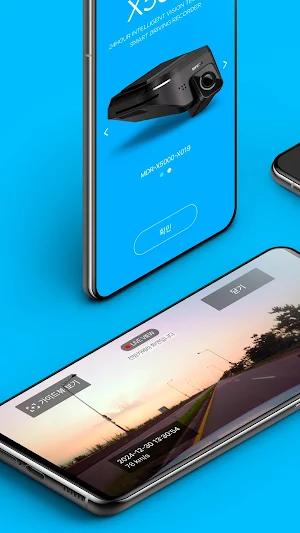
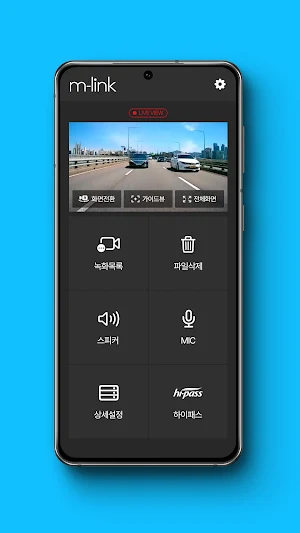
You can check the live feed video in real time on your smartphone and also save it.
m-link® solves the inconvenient and complicated app connection process, so it connects automatically after the first initial connection, making it very easy to use the app without any hassle.
Additionally, it uses 5.4Ghz WiFi to provide fast and smooth streaming and downloads of video footage.
The application control is perfect, so there is no inconvenience at all even if the dash-cam does not have an LCD display.
m-link® provides the following convenient functions in the your car by linking with the dash-cam.
Key Features
Automatic connection
Automatic pairing with the black box when the user gets into the car
Auto-update (OTA)
Your device's firmware automatically updates to the latest version
Massaging Parking Location Photo
Automatically send photos of your parked location to your smartphone
Service with Location tracking function
Vehicle driving speed, tracking driving route, ADAS and traffic camera information
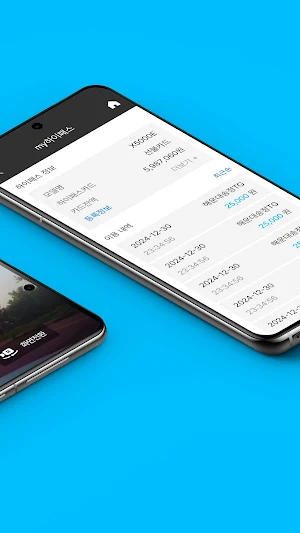
Hi-pass(ETC : Electronic Toll Collection OBU) usage information
Providing registration information and transaction history
*Only available in Hi-pass integrated option
Watch and Manage dash-cam video
- Real-time live view streaming
- Play and download video files
- Footage with driving route map
- Easy Footage management delete by time zone
- Memory card format management
Device control with App
Operation settings
- Timelapse recording
- Memory storage capacity and resolution management
- Incident detection sensitivity settings
- Security LED operation settings
Parking recording settings
- Select parking recording mode or OFF
- Automatic shutdown voltage limits setting
- Set maximum recording time
ADAS settings
- Lane departure notification
- Forward vehicle start Alert
- High speed warning and Traffic Cam Alert
System
- Check device setting environment details
- Check firmware version information
#mymlink #mym-link #mym.link #mlink3.0 my mlink #mlink #m.link #m-link #MPEON mlink
m-link® provides remote control and convenience functions for MPEON dash-cam devices.
You can check the live feed video in real time on your smartphone and also save it.
m-link® solves the inconvenient and complicated app connection process, so it connects automatically after the first initial connection, making it very easy to use the app without any hassle.
Additionally, it uses 5.4Ghz WiFi to provide fast and smooth streaming and downloads of video footage.
The application control is perfect, so there is no inconvenience at all even if the dash-cam does not have an LCD display.
m-link® provides the following convenient functions in the your car by linking with the dash-cam.
Key Features
Automatic connection
Automatic pairing with the black box when the user gets into the car
Auto-update (OTA)
Your device's firmware automatically updates to the latest version
Massaging Parking Location Photo
Automatically send photos of your parked location to your smartphone
Service with Location tracking function
Vehicle driving speed, tracking driving route, ADAS and traffic camera information
Hi-pass(ETC : Electronic Toll Collection OBU) usage information
Providing registration information and transaction history
*Only available in Hi-pass integrated option
Watch and Manage dash-cam video
- Real-time live view streaming
- Play and download video files
- Footage with driving route map
- Easy Footage management delete by time zone
- Memory card format management
Device control with App
Operation settings
- Timelapse recording
- Memory storage capacity and resolution management
- Incident detection sensitivity settings
- Security LED operation settings
Parking recording settings
- Select parking recording mode or OFF
- Automatic shutdown voltage limits setting
- Set maximum recording time
ADAS settings
- Lane departure notification
- Forward vehicle start Alert
- High speed warning and Traffic Cam Alert
System
- Check device setting environment details
- Check firmware version information
#mymlink #mym-link #mym.link #mlink3.0 my mlink #mlink #m.link #m-link #MPEON mlink
What’s new
Version 1.2.0 · Updated September 9, 2026
Fix issues
Alternatives to My m-link® MPEON Dash Cam
Looking for apps like My m-link® MPEON Dash Cam? Here are 3 similar Android apps on Google Play. All of them are free to download.



| App | Rating | Price | Installs | Last updated | Compare |
|---|---|---|---|---|---|
| My m-link® MPEON Dash Cam | – | Free | 1,000+ | Sep 9, 2026 | |
| 엠링크Go - 엠피온 블랙박스 m-link Go! | – | Free | 100+ | May 7, 2025 | Compare |
| MPEON | – | Free | 1,000+ | Jul 19, 2026 | Compare |
| m-link 엠피온(주) | – | Free | 10,000+ | Mar 25, 2026 | Compare |