
FileHub: Viewer & Converter
MokaIO Productivity In-app purchases
Open, preview, edit, convert, extract, and manage many file types in one app.
- Downloads
- 120+
- on Google Play
- Price
- Free
- In-app purchases
- Updated
- Oct 12
- 2026 · v5.6.5
Screenshots


About FileHub: Viewer & Converter
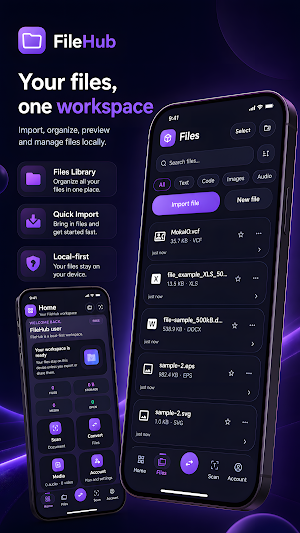
FileHub is a local-first file utility app that helps you open, preview, edit, convert, extract, and manage many common file types from one clean workspace.
Instead of switching between many separate apps, FileHub gives you one place to work with documents, spreadsheets, archives, images, code files, contacts, audio, and video files.
Key features:
Open and preview many file types
View common document, image, archive, audio, video, contact, vector, and code formats directly inside the app.
Edit supported local files
Edit text, code, CSV, spreadsheet-style files, DOC/DOCX editable content where supported, VCF contacts, Solidity files, and other editable formats.
Convert files locally where supported
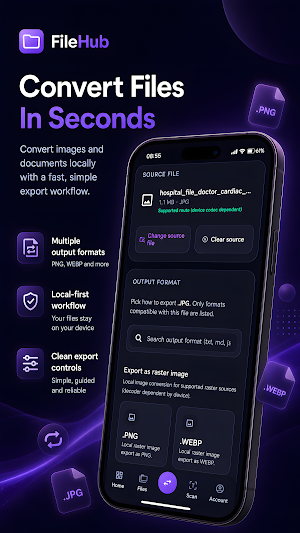
Convert between supported text, code, document, spreadsheet, image, and archive formats. Converted files are added back into your FileHub library automatically.
Archive support
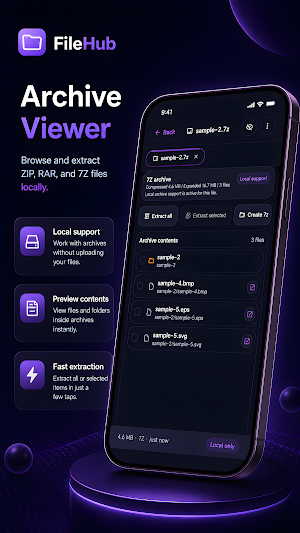
Open, inspect, and extract supported archive files such as ZIP, TAR, RAR, and 7Z. Extract archives into organized folders and manage extracted files from inside the app.
Image and vector preview
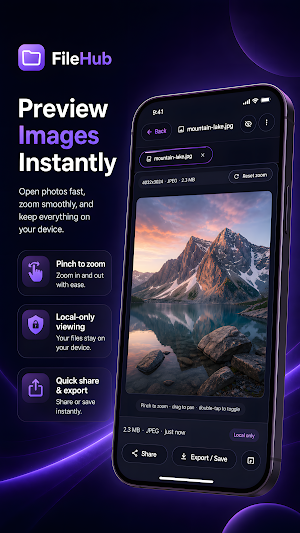
Preview common image and design formats including JPG, JPEG, PNG, WEBP, GIF, BMP, SVG, EPS, and AI where local rendering is supported. Some complex EPS or AI files may require another app if they use features that cannot be rendered locally on-device.
Media playback
Play supported audio and video files, including MP3, MP4, and WEBM, with useful playback controls.
Code and text workflow
Open and edit common code and text formats such as TXT, MD, JSON, XML, YAML, HTML, CSS, JS, TS, PY, SQL, SOL, and more.
Local-first design
FileHub is designed around local file handling. Your imported files stay on your device unless you choose to share, export, or open them with another app.
Organized file management
Import files, create folders, rename, duplicate, delete, select multiple files, create archives, and keep your workspace clean.
Free and paid plans
Use FileHub with free local limits, or upgrade for higher usage limits and expanded productivity features.
Important notes:
FileHub does not replace specialized professional tools for every format. Some complex formats may be preview-only, partially supported, or require opening with another app depending on the file structure and device support. FileHub aims to provide a practical all-in-one local file workspace for everyday file handling.
Instead of switching between many separate apps, FileHub gives you one place to work with documents, spreadsheets, archives, images, code files, contacts, audio, and video files.
Key features:
Open and preview many file types
View common document, image, archive, audio, video, contact, vector, and code formats directly inside the app.
Edit supported local files
Edit text, code, CSV, spreadsheet-style files, DOC/DOCX editable content where supported, VCF contacts, Solidity files, and other editable formats.
Convert files locally where supported
Convert between supported text, code, document, spreadsheet, image, and archive formats. Converted files are added back into your FileHub library automatically.
Archive support
Open, inspect, and extract supported archive files such as ZIP, TAR, RAR, and 7Z. Extract archives into organized folders and manage extracted files from inside the app.
Image and vector preview
Preview common image and design formats including JPG, JPEG, PNG, WEBP, GIF, BMP, SVG, EPS, and AI where local rendering is supported. Some complex EPS or AI files may require another app if they use features that cannot be rendered locally on-device.
Media playback
Play supported audio and video files, including MP3, MP4, and WEBM, with useful playback controls.
Code and text workflow
Open and edit common code and text formats such as TXT, MD, JSON, XML, YAML, HTML, CSS, JS, TS, PY, SQL, SOL, and more.
Local-first design
FileHub is designed around local file handling. Your imported files stay on your device unless you choose to share, export, or open them with another app.
Organized file management
Import files, create folders, rename, duplicate, delete, select multiple files, create archives, and keep your workspace clean.
Free and paid plans
Use FileHub with free local limits, or upgrade for higher usage limits and expanded productivity features.
Important notes:
FileHub does not replace specialized professional tools for every format. Some complex formats may be preview-only, partially supported, or require opening with another app depending on the file structure and device support. FileHub aims to provide a practical all-in-one local file workspace for everyday file handling.
What’s new
Version 5.6.5 · Updated October 12, 2026
Fix Obfuscation Issue
Alternatives to FileHub: Viewer & Converter
Looking for apps like FileHub: Viewer & Converter? Here are 5 similar Android apps on Google Play. All of them are free to download.
-
CodeTutorAI: Learn How To Code
-
SwiftTrim: Video Compressor
-
StockFlow: Inventory & POS
-
NeonMind: Neural Loops
-
ShieldScan: Crypto RiskScanner
| App | Rating | Price | Installs | Last updated | Compare |
|---|---|---|---|---|---|
| FileHub: Viewer & Converter | – | Free | 100+ | Oct 12, 2026 | |
| CodeTutorAI: Learn How To Code | – | Free | 50+ | Oct 12, 2026 | Compare |
| SwiftTrim: Video Compressor | – | Free | 50+ | – | Compare |
| StockFlow: Inventory & POS | – | Free | 50+ | Oct 11, 2026 | Compare |
| NeonMind: Neural Loops | – | Free | 10+ | – | Compare |
| ShieldScan: Crypto RiskScanner | – | Free | 10+ | Oct 12, 2026 | Compare |