
Lock Screen Protect & Optimise
Mobile apps LTD Personalization Contains ads
Secure your device with style and optimise your lock screen
- Rating
- 4.3
- 17 ratings
- Downloads
- 1K+
- on Google Play
- Price
- Free
- No in-app purchases
- Updated
- Apr 18
- 2024 · v1.0
Screenshots
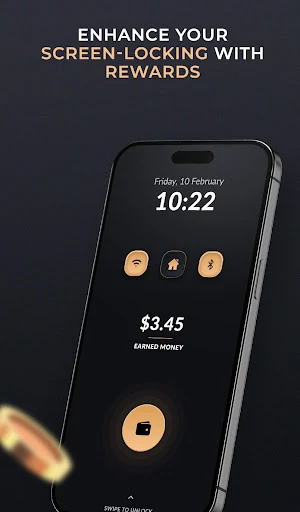
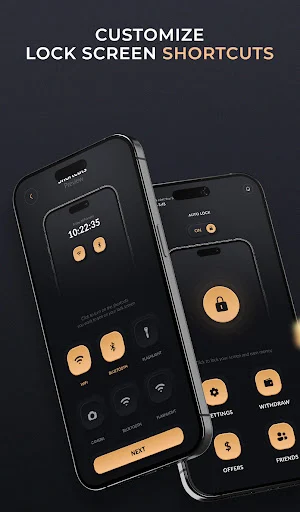


About Lock Screen Protect & Optimise
Lock Screen stands as a pinnacle of security and personalization for Android devices, offering a comprehensive suite of features to ensure your device remains secure while reflecting your unique style preferences. With the ever-increasing need for data protection and privacy, LockScreen steps in as a reliable guardian, providing robust security measures without compromising on user experience.
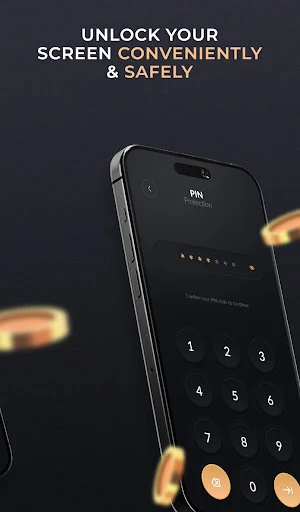
At its core, LockScreen is designed to fortify your device against unauthorized access. Users can choose from a variety of authentication methods, including the classic PIN, intricate pattern locks, or the cutting-edge fingerprint recognition technology. This flexibility allows you to tailor your security settings to match your preferences and lifestyle, ensuring a seamless and intuitive unlocking experience.
Beyond its security features, LockScreen doubles as a platform for personal expression. With a diverse array of themes, wallpapers, and customization options, users can transform their lock screens into personalized digital canvases that reflect their personality and tastes. Whether you prefer minimalist designs, vibrant colors, or elegant patterns, LockScreen offers a myriad of options to suit every aesthetic inclination.
In addition to its aesthetic appeal, LockScreen also prioritizes functionality and convenience. Quick access to essential features such as camera, flashlight, and notifications ensures that users can efficiently navigate their devices without compromising security. Furthermore, intuitive gesture controls and customizable shortcuts empower users to streamline their digital interactions, enhancing overall productivity and user satisfaction.
One of LockScreen's standout features is its adaptive intelligence, which continuously learns and adapts to user behavior to provide a more personalized experience. By analyzing usage patterns and user preferences, LockScreen intelligently adjusts settings and suggests relevant themes and features, further enhancing user engagement and satisfaction.
Moreover, LockScreen is committed to staying ahead of emerging security threats through regular updates and enhancements. With ongoing improvements and security patches, users can rest assured that their devices are fortified against the latest vulnerabilities and risks, providing peace of mind in an increasingly interconnected world.
Overall, LockScreen redefines the concept of device security, seamlessly integrating advanced security features with personalized customization options to deliver a holistic and immersive user experience. Whether you're safeguarding sensitive data or expressing your individuality through creative customization, LockScreen stands as your trusted companion, empowering you to unlock the full potential of your Android device with confidence and style.
At its core, LockScreen is designed to fortify your device against unauthorized access. Users can choose from a variety of authentication methods, including the classic PIN, intricate pattern locks, or the cutting-edge fingerprint recognition technology. This flexibility allows you to tailor your security settings to match your preferences and lifestyle, ensuring a seamless and intuitive unlocking experience.
Beyond its security features, LockScreen doubles as a platform for personal expression. With a diverse array of themes, wallpapers, and customization options, users can transform their lock screens into personalized digital canvases that reflect their personality and tastes. Whether you prefer minimalist designs, vibrant colors, or elegant patterns, LockScreen offers a myriad of options to suit every aesthetic inclination.
In addition to its aesthetic appeal, LockScreen also prioritizes functionality and convenience. Quick access to essential features such as camera, flashlight, and notifications ensures that users can efficiently navigate their devices without compromising security. Furthermore, intuitive gesture controls and customizable shortcuts empower users to streamline their digital interactions, enhancing overall productivity and user satisfaction.
One of LockScreen's standout features is its adaptive intelligence, which continuously learns and adapts to user behavior to provide a more personalized experience. By analyzing usage patterns and user preferences, LockScreen intelligently adjusts settings and suggests relevant themes and features, further enhancing user engagement and satisfaction.
Moreover, LockScreen is committed to staying ahead of emerging security threats through regular updates and enhancements. With ongoing improvements and security patches, users can rest assured that their devices are fortified against the latest vulnerabilities and risks, providing peace of mind in an increasingly interconnected world.
Overall, LockScreen redefines the concept of device security, seamlessly integrating advanced security features with personalized customization options to deliver a holistic and immersive user experience. Whether you're safeguarding sensitive data or expressing your individuality through creative customization, LockScreen stands as your trusted companion, empowering you to unlock the full potential of your Android device with confidence and style.
What’s new
Version 1.0 · Updated April 18, 2024
Introducing Lock Screen! Enhance your device's security and style with our latest update. Enjoy new themes, improved performance, and enhanced customization options. Update now for the ultimate lock screen experience!
User reviews

Good lock

Good luck
I like it 😁
Alternatives to Lock Screen Protect & Optimise
Looking for apps like Lock Screen Protect & Optimise? Here are 6 similar Android apps on Google Play. The highest rated is Rohit Sharma Wallpapers (4.6/5), and 5 of the 6 are free to download.
-
Rohit Sharma Wallpapers 4.6
-
MECHANIC Animated Watchface
-
Neon Photo Keyboard LED Theme
-
Inter Miami Wallpapers 2023 4K
-
Ringtones for note 10 plus
-
Battery Charging Animation
| App | Rating | Price | Installs | Last updated | Compare |
|---|---|---|---|---|---|
| Lock Screen Protect & Optimise | 4.3 / 5 | Free | 1,000+ | Apr 18, 2024 | |
| Rohit Sharma Wallpapers | 4.6 / 5 | Free | 1,000+ | Feb 5, 2024 | Compare |
| MECHANIC Animated Watchface | – | 0.99 USD | 10+ | Mar 3, 2024 | Compare |
| Neon Photo Keyboard LED Theme | – | Free | 100+ | – | Compare |
| Inter Miami Wallpapers 2023 4K | – | Free | 500+ | Aug 16, 2023 | Compare |
| Ringtones for note 10 plus | – | Free | 1,000+ | Oct 23, 2023 | Compare |
| Battery Charging Animation | – | Free | 500+ | Apr 10, 2024 | Compare |
Similar apps on Google Play
- Rohit Sharma Wallpapers
- MECHANIC Animated Watchface
- Neon Photo Keyboard LED Theme
- Inter Miami Wallpapers 2023 4K
- Ringtones for note 10 plus
- Battery Charging Animation
- Chicago Bears Wallpapers 2023
- iPhone 16 Launcher
- Expert Connect
- Gallery pro - Photo gallery
- Glitter Wallpapers
- All in one Shortcut Maker
- son heung min wallpaper 4k
- Green Bay Packers Wallpapers
- HIXIE GAS 01 Sport Watchface
- FLW117 Spring Flowers Drawing
- U-Sport臺北樂運動 業者版
- Masjid HD Wallpaper
- Frost Diamond Skins
- 4K & HD Black Cool Wallpaper
- Real Madrid Wallpapers 2024 4K
- Teddy bears stickers
- King Kong Wallpapers
- Galatasaray Wallpapers
- Raycon Everyday Earbuds guide