
Mockup Creator Screenshot mock
Mobile App Xperts Tools Contains ads
Mockup Generator App- Mockitup : Mockup Studio Your Screenshot Maker Generator!
- Downloads
- 100+
- on Google Play
- Price
- Free
- No in-app purchases
- Updated
- Sep 30
- 2023 · v1.0.2
Screenshots
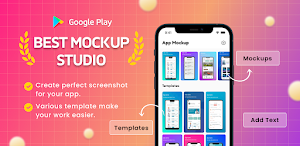
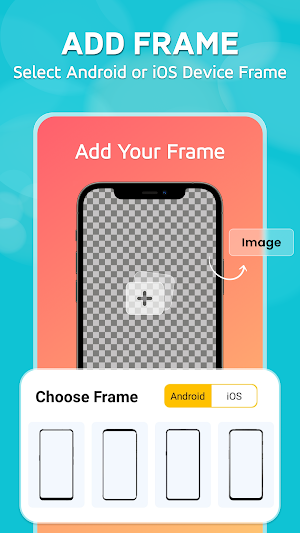
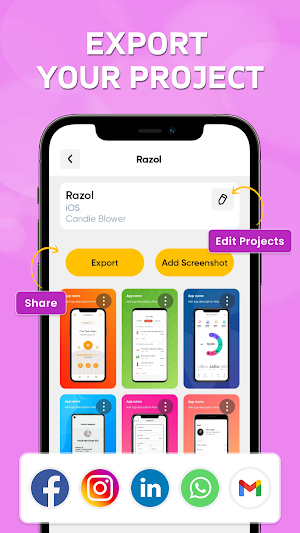


About Mockup Creator Screenshot mock
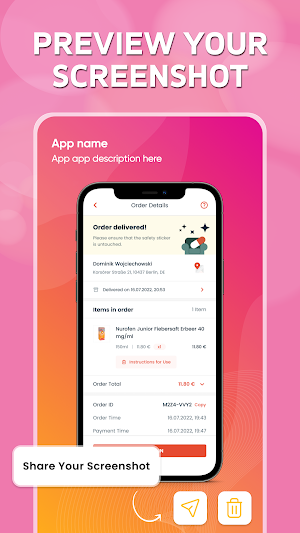
Elevate your digital presentation game or app with Mockup Studio, the ultimate Screenshot Maker for Android and iOS devices. Unleash your creativity and craft stunning, professional-grade mockup images for your websites, apps, games, presentations, and marketing materials with ease.
📸 Create Striking Mockups:
Make your digital content pop with captivating mockups that resonate with your audience. Mockup Studio offers an extensive library of mockup templates for various devices, screens, and products, enabling you to showcase your work in a visually appealing and realistic manner.
💼 Perfect for Professionals:
Whether you're a web designer, app developer, marketer, or content creator, Mockup Studio is your indispensable tool for creating polished and eye-catching visuals. Impress clients, colleagues, and customers with top-tier mockup presentations.
✨ User-Friendly Design:
Crafting mockups has never been this user-friendly. Mockup Studio boasts an intuitive and easy-to-navigate interface, ensuring that both novices and seasoned designers can swiftly create stunning visuals without a steep learning curve.
🖌️ Customize with Ease:
Tailor your mockups to perfection. Mockup Studio empowers you with an array of customization options, letting you tweak details, add branding, and adjust colors effortlessly. Your mockups, your way.
📷 Realistic Results:
Achieve realism that captivates. Mockup Studio's advanced rendering technology ensures that your mockups look convincingly lifelike, making your digital projects truly shine.
📤 Share with Confidence:
Once your masterpiece is complete, share it with confidence. Mockup Studio allows you to export and share your mockups in various formats, ensuring compatibility with your chosen platform or presentation.
🚀 Boost Your Creative Arsenal:
Stay ahead of the curve with regular updates and new mockup templates. Mockup Studio keeps your creative arsenal fresh and ready for any project that comes your way.
The following devices and wireframe are supported.
Apple iPhone Series:
iPhone 13 Pro Max: 1284 x 2778 pixels (Super Retina XDR)
iPhone 13 Pro: 1284 x 2778 pixels (Super Retina XDR)
iPhone 13: 1170 x 2532 pixels (Super Retina XDR)
iPhone 13 mini: 1080 x 2340 pixels (Super Retina XDR)
iPhone 12 Series: 1170 x 2532 pixels (Super Retina XDR)
iPhone SE (2nd Gen): 750 x 1334 pixels (Retina HD)
Samsung Galaxy Series:
Samsung Galaxy S21 Ultra: 1440 x 3200 pixels (Dynamic AMOLED 2X)
Samsung Galaxy S21/S21+: 1080 x 2400 pixels (Dynamic AMOLED 2X)
Samsung Galaxy S20 Series: 1440 x 3200 pixels (Dynamic AMOLED 2X)
Samsung Galaxy Note 20 Ultra: 1440 x 3088 pixels (Dynamic AMOLED 2X)
Samsung Galaxy A Series: Various resolutions depending on the model
Google Pixel Series:
Google Pixel 5: 1080 x 2340 pixels (OLED)
Google Pixel 4a: 1080 x 2340 pixels (OLED)
OnePlus Series:
OnePlus 9 Pro: 1440 x 3216 pixels (Fluid AMOLED)
OnePlus 9: 1080 x 2400 pixels (Fluid AMOLED)
Xiaomi/Redmi Series:
Xiaomi Mi 11: 1440 x 3200 pixels (AMOLED)
Redmi Note Series: Various resolutions depending on the model
Sony Xperia Series:
Sony Xperia 1 III: 1644 x 3840 pixels (4K OLED)
Sony Xperia 5 III: 1080 x 2520 pixels (OLED)
LG V Series:
LG V60 ThinQ: 1080 x 2460 pixels (P-OLED)
Motorola Moto Series:
Motorola Moto G Power: 720 x 1600 pixels (IPS LCD)
Nokia Series:
Nokia 8.3 5G: 1080 x 2400 pixels (IPS LCD)
Various resolutions for different Nokia models
Asus ROG Phone Series:
Asus ROG Phone 5: 1080 x 2448 pixels (AMOLED)
Please keep in mind that these are typical resolutions for the mentioned models, but there may be variations within the same series or line of devices.
Upgrade your presentation game and turn your ideas into stunning visual reality with Mockup Studio. Download the app now and start crafting mockups that leave a lasting impression!
📸 Create Striking Mockups:
Make your digital content pop with captivating mockups that resonate with your audience. Mockup Studio offers an extensive library of mockup templates for various devices, screens, and products, enabling you to showcase your work in a visually appealing and realistic manner.
💼 Perfect for Professionals:
Whether you're a web designer, app developer, marketer, or content creator, Mockup Studio is your indispensable tool for creating polished and eye-catching visuals. Impress clients, colleagues, and customers with top-tier mockup presentations.
✨ User-Friendly Design:
Crafting mockups has never been this user-friendly. Mockup Studio boasts an intuitive and easy-to-navigate interface, ensuring that both novices and seasoned designers can swiftly create stunning visuals without a steep learning curve.
🖌️ Customize with Ease:
Tailor your mockups to perfection. Mockup Studio empowers you with an array of customization options, letting you tweak details, add branding, and adjust colors effortlessly. Your mockups, your way.
📷 Realistic Results:
Achieve realism that captivates. Mockup Studio's advanced rendering technology ensures that your mockups look convincingly lifelike, making your digital projects truly shine.
📤 Share with Confidence:
Once your masterpiece is complete, share it with confidence. Mockup Studio allows you to export and share your mockups in various formats, ensuring compatibility with your chosen platform or presentation.
🚀 Boost Your Creative Arsenal:
Stay ahead of the curve with regular updates and new mockup templates. Mockup Studio keeps your creative arsenal fresh and ready for any project that comes your way.
The following devices and wireframe are supported.
Apple iPhone Series:
iPhone 13 Pro Max: 1284 x 2778 pixels (Super Retina XDR)
iPhone 13 Pro: 1284 x 2778 pixels (Super Retina XDR)
iPhone 13: 1170 x 2532 pixels (Super Retina XDR)
iPhone 13 mini: 1080 x 2340 pixels (Super Retina XDR)
iPhone 12 Series: 1170 x 2532 pixels (Super Retina XDR)
iPhone SE (2nd Gen): 750 x 1334 pixels (Retina HD)
Samsung Galaxy Series:
Samsung Galaxy S21 Ultra: 1440 x 3200 pixels (Dynamic AMOLED 2X)
Samsung Galaxy S21/S21+: 1080 x 2400 pixels (Dynamic AMOLED 2X)
Samsung Galaxy S20 Series: 1440 x 3200 pixels (Dynamic AMOLED 2X)
Samsung Galaxy Note 20 Ultra: 1440 x 3088 pixels (Dynamic AMOLED 2X)
Samsung Galaxy A Series: Various resolutions depending on the model
Google Pixel Series:
Google Pixel 5: 1080 x 2340 pixels (OLED)
Google Pixel 4a: 1080 x 2340 pixels (OLED)
OnePlus Series:
OnePlus 9 Pro: 1440 x 3216 pixels (Fluid AMOLED)
OnePlus 9: 1080 x 2400 pixels (Fluid AMOLED)
Xiaomi/Redmi Series:
Xiaomi Mi 11: 1440 x 3200 pixels (AMOLED)
Redmi Note Series: Various resolutions depending on the model
Sony Xperia Series:
Sony Xperia 1 III: 1644 x 3840 pixels (4K OLED)
Sony Xperia 5 III: 1080 x 2520 pixels (OLED)
LG V Series:
LG V60 ThinQ: 1080 x 2460 pixels (P-OLED)
Motorola Moto Series:
Motorola Moto G Power: 720 x 1600 pixels (IPS LCD)
Nokia Series:
Nokia 8.3 5G: 1080 x 2400 pixels (IPS LCD)
Various resolutions for different Nokia models
Asus ROG Phone Series:
Asus ROG Phone 5: 1080 x 2448 pixels (AMOLED)
Please keep in mind that these are typical resolutions for the mentioned models, but there may be variations within the same series or line of devices.
Upgrade your presentation game and turn your ideas into stunning visual reality with Mockup Studio. Download the app now and start crafting mockups that leave a lasting impression!
User reviews

Great 👍
Alternatives to Mockup Creator Screenshot mock
Looking for apps like Mockup Creator Screenshot mock? Here are 6 similar Android apps on Google Play. All of them are free to download.
-
Eating ASMR
-
Blower Candle - Blower Lite
-
Bamboo Shots Videos
-
Astro Talk Videos Reels
-
Click to Chat
-
GPS Map Camera
| App | Rating | Price | Installs | Last updated | Compare |
|---|---|---|---|---|---|
| Mockup Creator Screenshot mock | – | Free | 100+ | Sep 30, 2023 | |
| Eating ASMR | – | Free | 50+ | Dec 19, 2023 | Compare |
| Blower Candle - Blower Lite | – | Free | 10,000+ | Jul 20, 2023 | Compare |
| Bamboo Shots Videos | – | Free | 0+ | Dec 26, 2023 | Compare |
| Astro Talk Videos Reels | – | Free | 1+ | Dec 26, 2023 | Compare |
| Click to Chat | – | Free | 10+ | Dec 16, 2023 | Compare |
| GPS Map Camera | – | Free | 500+ | Dec 19, 2023 | Compare |
Similar apps on Google Play
- Eating ASMR
- Blower Candle - Blower Lite
- Bamboo Shots Videos
- Astro Talk Videos Reels
- Click to Chat
- GPS Map Camera
- Travel Planner Guide
- Foodiee videos
- Food ASMR
- Cricket Tips Videos
- 1 Min Recipe - QuickBite Chef
- NotiSave
- Life Hacks Tricks & Tips Reels
- Quizland - Quiz and Trivia App
- Rangoli Designs - Indian Art
- Ramayan Video and All Episodes
- Clap to Find Phone with Flash
- Navratri short video and reels
- Money Tracker - Income Expense
- Mahabharat Quiz Master Quest
- Mahabharat Videos & Moments
- Mytho Reels - Short Videos
- Meditation Music - Yoga Relax
- Christmas Daily Video Status
- Jain Daily Video Status Stavan
- PDF Creator Pro
- Happy New Year Video Status
- Jesus Daily Video Status
- Diwali Daily Video Status
- Navratri Daily Video Status
- Ram Video Status Ayodhya
- Janmashtami Daily Video Status
- CallShield - Spam Call Blocker
- Krishna Daily Video Status
- Ganpati Daily Video Status
- Photo Motion Video Editor
- Hanuman Daily Video Status
- Mahadev Daily Video Status
- Water Reminder - Remind Drink
- Swaminarayan Daily Status
- Buddha Quotes & Thoughts
- All Bank Balance Check Enquiry
- Toon Photo : AI Image Editor
- Warranty Service Manager Track