
GPS Map Camera Timestamp Photo
mobifyappstudio Photography In-app purchases Contains ads
GPS map camera with location, address, date & time photo stamps. GPS PDF reports
- Downloads
- 58.9K+
- on Google Play
- Price
- Free
- In-app purchases
- Updated
- Oct 6
- 2026 · v2.5.0
Screenshots


About GPS Map Camera Timestamp Photo
GPS Map Camera with Timestamp & Location Stamps
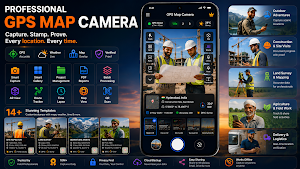
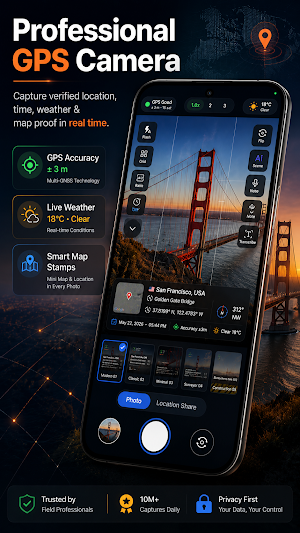
Capture photos with GPS location, map, address, date, time and coordinates in one tap. GPS Map Camera Timestamp helps you create accurate geotagged photos for work, travel and daily use.
Perfect for field engineers, construction teams, delivery drivers, surveyors, auditors, inspectors, real estate agents and travelers who need reliable location-stamped photos.
✨ Why choose this GPS camera
✔ Fast GPS lock with accurate latitude and longitude
✔ Clean camera interface built for quick capture
✔ Reliable stamped photo saving directly to gallery
✔ GPS photo stamps with map, address, date and time
✔ Offline support using last known GPS data
✔ No ads blocking the shutter area
✔ Privacy-focused location stamping
📌 Add detailed GPS stamps to photos
• GPS coordinates in Decimal or DMS format
• Street address and Plus Code
• City, state and country
• Date and time stamps
• UTC, GMT and local time formats
• Live map preview on photos
• Satellite, Terrain, Hybrid and Normal maps
• Compass direction and altitude
• Weather and temperature details
• Custom notes and signature lines
• Company logo or watermark
• Project and site details
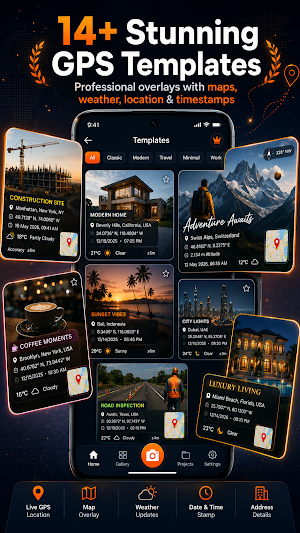
🎨 14+ GPS stamp templates
Choose from templates designed for:
• Construction site reports
• Real estate documentation
• Survey and engineering work
• Delivery proof photos
• Inspection and audit reports
• Travel memories and road trips
• Professional field work
Customize:
• Stamp position
• Font size and color
• Background opacity
• GPS coordinate format
• Map style
• Individual fields ON/OFF
Save your favorite template for one-tap capture.
📷 Camera & gallery tools
• Front and rear camera support
• Flash, focus and pinch zoom
• 1:1, 4:3, 16:9 and full frame ratios
• Self timer for hands-free capture
• GPS accuracy indicator
• Manual location override
• Fast camera launch
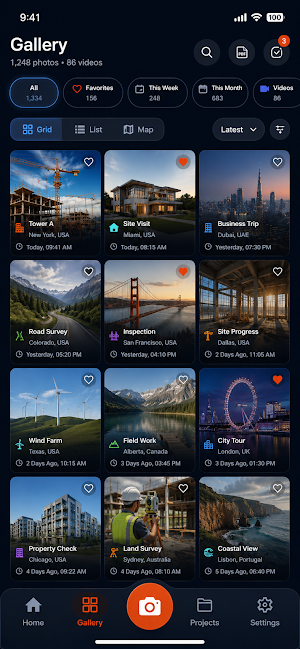
• Smooth gallery browsing
• Edit and restamp older photos
• Batch processing support
• Project folders for organization
Use this app to geotag photos automatically with accurate GPS location data and timestamp overlays.
👷 Built for real work
→ Field engineers capturing site visits and progress reports
→ Construction teams documenting work updates
→ Real estate agents photographing properties with location proof
→ Delivery drivers recording proof of drop-off
→ Surveyors and auditors keeping geo-tagged records
→ Insurance photographers needing visual proof with GPS data
→ Travelers recording exact locations and memories
📄 Create PDF photo reports
Generate shareable PDF reports using GPS-stamped photos for inspections, construction updates, engineering reports, audits and field documentation.
• Select multiple photos
• Organize reports by project or location
• Export PDF photo reports instantly
• Share reports with clients and teams
🗂 Smart gallery & organization
• Grid, list and map gallery views
• Search photos by location or date
• Filter by projects and folders
• Favorite important captures
• View geotagged photos on the map
🚀 How to use
1. Open the app and allow permissions
2. Pick a GPS stamp template
3. Capture your GPS photo
4. Save or share instantly
5. Export reports anytime
🔐 Privacy
Location permission is used only for GPS photo stamps. Your data is never sold or shared without your action.
Permissions used:
• Camera — capture photos
• Location — GPS coordinates and address
• Storage / Media — save stamped photos
GPS accuracy depends on device hardware, network conditions and indoor/outdoor signal quality.
Download GPS Map Camera Timestamp today and capture photos with GPS location, map, address, coordinates, date and time in one tap.
What’s new
Version 2.5.0 · Updated October 6, 2026
• Faster, more reliable purchases — Premium activates instantly and restores correctly after reinstalling • New: remove the watermark and ads for good right from the share screen • Smoother, more stable ads with fewer interruptions • Safer backups — exports are now consistent, and restore protects your latest projects if anything goes wrong • Photo saving is more reliable on all devices • Bug fixes and performance improvements
User reviews

Nice GPS Map Camera very good and providing real location i like this app

excillent camera

i have used this app and it is quite good app.you can easy to use for map location. gps work accurate so you can capture picture with map location and it contains many other useful features you can try .

very useful app for secure travel and all so nice, i hesrtly thanks to make this app

nice app it helps me a lot

good app it's working and veri nice
Alternatives to GPS Map Camera Timestamp Photo
Looking for apps like GPS Map Camera Timestamp Photo? Here are 6 similar Android apps on Google Play. The highest rated is GPS Map Camera (4.5/5), and 4 of the 6 are free to download.
-
Socifind - Family Safety 3.7
-
Timestamp Camera Pro 4.4
-
Seestar 4.1
-
NoteCam Lite - GPS memo camera 4.4
-
Solocator - GPS Field Camera 3.6
-
GPS Map Camera 4.5
| App | Rating | Price | Installs | Last updated | Compare |
|---|---|---|---|---|---|
| GPS Map Camera Timestamp Photo | – | Free | 50,000+ | Oct 6, 2026 | |
| Socifind - Family Safety | 3.7 / 5 | Free | 1,000,000+ | Oct 15, 2026 | Compare |
| Timestamp Camera Pro | 4.4 / 5 | 4.99 USD | 100,000+ | Dec 15, 2025 | Compare |
| Seestar | 4.1 / 5 | Free | 100,000+ | Oct 17, 2026 | Compare |
| NoteCam Lite - GPS memo camera | 4.4 / 5 | Free | 10,000,000+ | Sep 8, 2026 | Compare |
| Solocator - GPS Field Camera | 3.7 / 5 | 0.99 USD | 100,000+ | Jun 22, 2026 | Compare |
| GPS Map Camera | 4.5 / 5 | Free | 10,000,000+ | May 23, 2020 | Compare |