
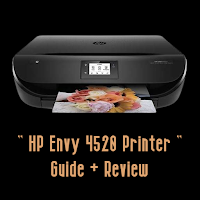
Hp Envy 4520 Printer Guide
TheHomeOfApps Books & Reference Contains ads
An app that guides for the Hp Envy 4520 Printer
- Downloads
- 50+
- on Google Play
- Price
- Free
- No in-app purchases
- Updated
- Aug 18
- 2023 · v1
Screenshots
Save to Pinterest

About Hp Envy 4520 Printer Guide
*HP Envy 4520 Printer Guide & Manual: Your Ultimate Resource*
Welcome to the comprehensive HP Envy 4520 Printer Guide and Manual app - your essential companion for unlocking the full potential of the HP Envy 4520 printer.
🖨️ *Explore the HP Envy 4520:*
Delve into an insightful exploration of the HP Envy 4520 printer. Uncover its features, functions, and capabilities, enhancing your understanding of this remarkable device.
📱 *Seamless Connectivity and Setup:*
Discover how to connect, pair, and unpair your HP Envy 4520. This tutorial provides step-by-step guidance, ensuring a hassle-free setup experience.
🔍 *A Brief Product Review:*
Get an overview of the HP Envy 4520, including its exceptional features and advantages, helping you make informed decisions.
🔧 *Master Your Printer:*
Acquaint yourself with the HP Envy 4520 driver, an essential component for optimizing your printing experience.
🏠 *Versatile Printer for All Settings:*
The HP Envy 4520 serves as a wireless printer, scanner, and copier suitable for home, office, and dorm use.
📚 *Rich Information at Your Fingertips:*
Explore the following aspects within the app:
1. Specifications of the HP Envy 4520
2. In-Depth Printer Review
3. Comprehensive User Guide
4. Highlighted Features
5. Detailed Manual
6. HP Envy 4520 Driver Insights
7. Effective Setup Guidelines
8. Wireless Setup Instructions
9. Windows 7 and Windows 10 Drivers
10. Ink Cartridge Information
🤔 *Answers to Your Questions:*
Find solutions to common inquiries:
a. Setting up the HP Envy 4520
b. Identifying the HP Envy 4520 model
c. Connecting the HP Envy 4520 to WiFi
d. Charging the HP Envy 4520
e. Resetting the HP Envy 4520
f. Pairing the HP Envy 4520
g. Finding your HP password
h. Windows Driver Downloads for HP Envy 4520
i. Refilling Ink Cartridges
j. Scanning Documents with the HP Envy 4520
📜 *A Comprehensive Printer Experience:*
The HP Envy 4520 offers exceptional wireless printing convenience. Its user-friendly features enable seamless printing from smartphones and tablets.
🔍 *Explore Further:*
Satisfy your curiosity by learning more about:
i. Is HP Envy a laser printer?
ii. The accuracy of the HP 4520
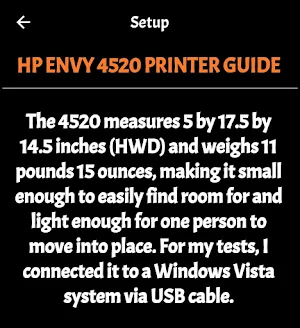
iii. Dimensions of the HP 4520
iv. Essential apps for the HP Envy 4520
v. Understanding the HP Envy 4520
vi. Scanning capabilities of the HP Envy 4520
vii. Connecting the HP Envy 4520 to your computer
viii. Connecting the HP Envy 4520 to your phone
ix. Refilling ink cartridges for the HP Envy 4520
📰 *Comprehensive Insights:*
This guide app covers reviews, pricing, manuals, user handbooks, and more.
📥 *Download Now:*
Curious about the pros and cons of the HP Envy 4520? Download the guide app into the HP Envy 4520 printer.
📝 *Disclaimer:*
- This unofficial app is designed to enhance user understanding of the product.
- It is not affiliated, sponsored, or approved by any organization.
- The app uses free material from various sources, with proper credit given.
- If you spot copyright infringement, please notify us for prompt action.
What’s new
Version 1 · Updated August 18, 2023
HP Envy 4520 Printer Guide Application
Alternatives to Hp Envy 4520 Printer Guide
Looking for apps like Hp Envy 4520 Printer Guide? Here are 6 similar Android apps on Google Play. All of them are free to download.
-
Canon Pixma ts3522 Manual
-
Glowforge Aura Laser Guide
-
Spade and co Smartwatch3 Guide
-
FILIEKEU Smart Watch guide
-
Boltune Wireless Earbuds Guide
-
Eversecu Security Camera Guide
| App | Rating | Price | Installs | Last updated | Compare |
|---|---|---|---|---|---|
| Hp Envy 4520 Printer Guide | – | Free | 50+ | Aug 18, 2023 | |
| Canon Pixma ts3522 Manual | – | Free | 500+ | Jun 27, 2023 | Compare |
| Glowforge Aura Laser Guide | – | Free | 500+ | Aug 31, 2023 | Compare |
| Spade and co Smartwatch3 Guide | – | Free | 100+ | Jul 14, 2023 | Compare |
| FILIEKEU Smart Watch guide | – | Free | 500+ | Aug 25, 2023 | Compare |
| Boltune Wireless Earbuds Guide | – | Free | 100+ | Sep 2, 2023 | Compare |
| Eversecu Security Camera Guide | – | Free | 100+ | Sep 14, 2023 | Compare |
Similar apps on Google Play
- Canon Pixma ts3522 Manual
- Glowforge Aura Laser Guide
- Spade and co Smartwatch3 Guide
- FILIEKEU Smart Watch guide
- Boltune Wireless Earbuds Guide
- Eversecu Security Camera Guide
- Spypoint Trail Camera Guide
- Plantronics Voyager 5200 Guide
- Tmezon Security Camera Guide
- Suga Pro Smart Watch Guide
- HP Officejet Pro 8025e Guide
- Itech Fusion 2 Watch Guide
- Hp Envy Photo 7800 Guide
- Mi Body Scale 2 Guide
- Blue Yeti Microphone Guide
- Canon Pixma Ts6350 Guide
- v720 Mini Camera Guide
- BOIFUN Camera Guide
- Drone E88 Pro 4K Guide
- Sq11 Mini dv Camera Guide
- Willful Smartwatch Guide
- HP Officejet 3830 Guide
- GT3 Max Smartwatch Guide
- Sekonda Smart Watch Guide
- HK9 Pro Smart Watch Guide
- Apai Genie Guide
- Popglory Smartwatch p66 Guide
- Mi Selfie Stick Tripod Guide
- HP DeskJet 3755 Printer Guide
- Sawgrass SG1000 Printer Guide
- Creality Ender 3 Pro Guide
- Bouncie GPS Tracker Guide
- Tinwoo Smart Watch Guide
- Gizmo Smartwatch Guide
- Enacfire E60 Earbuds Guide
- Sony Wf C500 Guide
- Earfun Air Pro 2 Guide
- Bowflex Velocore Guide
- Trailblazer Pro Watch Guide
- CrossWord : Word Connect Game
- Geekran Smart Watch Guide
- Fitpolo Smartwatch Guide
- Agptek Smartwatch LW11 Guide
- Umidigi Smartwatch Guide
- Hp envy 6455e Guide
- HP Envy 6020e Guide
- Hp Envy 4500 Printer Guide
- Canon Pixma Tr8520 Guide
- Canon Pixma Pro 100 Guide
- Canon Pixma Ts3450 Guide
- Canon Pixma iP8720 Guide
- Canon Pixma G3270 Guide
- Hp Envy Photo 6200 Guide
- Canon Pixma Ts3420 Guide
- Popglory Smartwatch p22 Guide
- Fitbit Inspire 2 Watch - Guide
- OnePlus Buds Pro 2 Guide
- Fitpro m5 Smart Watch Guide
- Smt 4 Smart Watch Guide