
Golf2ndPlan Mini
Golf 2nd Plan Sports
Golf score card with error management system. 9-hole version. Target around 50.
- Downloads
- 10+
- on Google Play
- Price
- Free
- No in-app purchases
- Updated
- Oct 14
- 2025 · v1.5
Screenshots
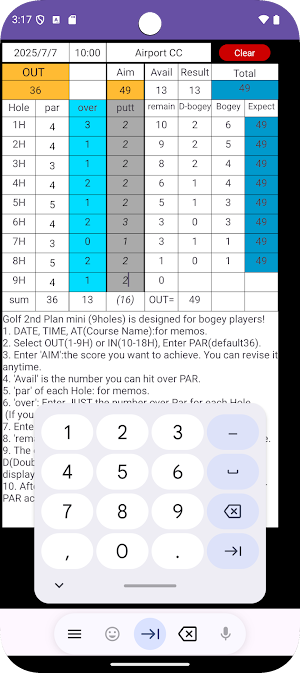
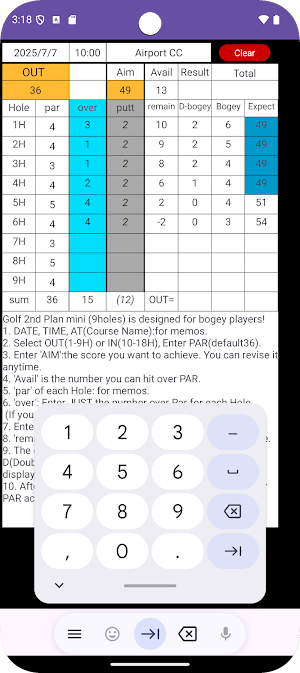
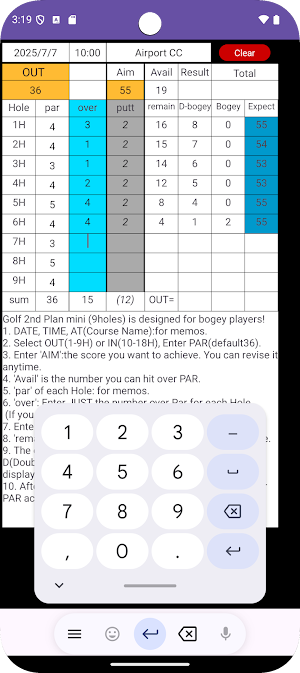


About Golf2ndPlan Mini
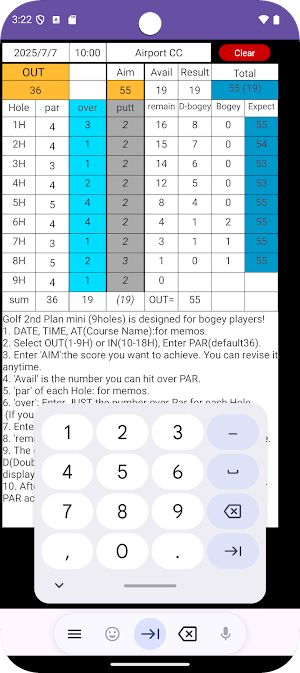
*When you play golf aiming for a target score, you may make a big error and your motivation may drop down. In such a case, the error management system will guide you to the maximum possible double bogey and bogey combination for the remaining holes to achieve your target score. If it is difficult to achieve, you can reset the target score at any time to maintain and recover your motivation.
*This is a half-round type for free trial.
*For bogey players.
*The target score is about 50 for the half.
*If you like it, please purchase the one-round type (paid).
*We are also planning to release a sister product, Golf 2nd Plan T.B. mini (the combination of triple bogey and double bogey), with the target score of about 60 for the half.
*Patented
*How to use
1. You can enter the date, time, and location (optional).
2. Press the [OUT] or [IN] button to select the pattern.
3. Enter the par for the OUT or IN course (default value 36).
4. Enter the target score in [AIM]. You can change it at any time during play.
5. In [Avail], the difference between [AIM] and [PAR], that is, the number of strokes you can go over the target, is displayed.
6. You can enter the number of pars for each hole in [Par] (optional).
7. Enter the number of strokes over each hole in [over] (e.g., 1 for bogey, 2 for double bogey, 0 for par, -1 for birdie).
8. You can enter the number of strokes putt in [putt] (optional).
9. [Rem] shows the number of strokes over remaining at the end of each hole to achieve your goal. (When all strokes are used up, it becomes zero and then negative.)
10. [DBg] shows the maximum number of double bogeys possible at the end of each hole to achieve your goal.
11. [Bog] shows the corresponding number of bogeys.
12. [Exp] shows the expected final score based on the above combinations. If it is within the target score range, the background will be displayed in blue.
13. When you enter the number of strokes over each hole, the total of the actual number of strokes over will be displayed in [Result].
14. The actual total score will be displayed in [Total].
15. If your target score [AIM] and expected score [Exp] deviate significantly during play, you can reset [AIM] to maintain and recover your motivation.
16. Save the results as a screenshot.
17. You can erase the data with the [CLR] button.
*This is a half-round type for free trial.
*For bogey players.
*The target score is about 50 for the half.
*If you like it, please purchase the one-round type (paid).
*We are also planning to release a sister product, Golf 2nd Plan T.B. mini (the combination of triple bogey and double bogey), with the target score of about 60 for the half.
*Patented
*How to use
1. You can enter the date, time, and location (optional).
2. Press the [OUT] or [IN] button to select the pattern.
3. Enter the par for the OUT or IN course (default value 36).
4. Enter the target score in [AIM]. You can change it at any time during play.
5. In [Avail], the difference between [AIM] and [PAR], that is, the number of strokes you can go over the target, is displayed.
6. You can enter the number of pars for each hole in [Par] (optional).
7. Enter the number of strokes over each hole in [over] (e.g., 1 for bogey, 2 for double bogey, 0 for par, -1 for birdie).
8. You can enter the number of strokes putt in [putt] (optional).
9. [Rem] shows the number of strokes over remaining at the end of each hole to achieve your goal. (When all strokes are used up, it becomes zero and then negative.)
10. [DBg] shows the maximum number of double bogeys possible at the end of each hole to achieve your goal.
11. [Bog] shows the corresponding number of bogeys.
12. [Exp] shows the expected final score based on the above combinations. If it is within the target score range, the background will be displayed in blue.
13. When you enter the number of strokes over each hole, the total of the actual number of strokes over will be displayed in [Result].
14. The actual total score will be displayed in [Total].
15. If your target score [AIM] and expected score [Exp] deviate significantly during play, you can reset [AIM] to maintain and recover your motivation.
16. Save the results as a screenshot.
17. You can erase the data with the [CLR] button.
What’s new
Version 1.5 · Updated October 14, 2025
New! Golf score card with error management system, target score around 50 for 9 holes.
Alternatives to Golf2ndPlan Mini
Looking for apps like Golf2ndPlan Mini? Here are 4 similar Android apps on Google Play. The highest rated is Toptracer Range (4.8/5), and all 4 are free to download.




| App | Rating | Price | Installs | Last updated | Compare |
|---|---|---|---|---|---|
| Golf2ndPlan Mini | – | Free | 10+ | Oct 14, 2025 | |
| Omstars | 3.8 / 5 | Free | 5,000+ | Jul 1, 2026 | Compare |
| Calfinity: AI Calorie Tracker | – | Free | 1,000+ | Jul 29, 2026 | Compare |
| Toptracer Range | 4.8 / 5 | Free | 1,000,000+ | Oct 19, 2026 | Compare |
| DigiBudget: Expense Tracker | – | Free | 5,000+ | Aug 31, 2023 | Compare |
Compare Golf2ndPlan Mini with the top alternatives: ratings, updates, ASO score and keyword gaps →