
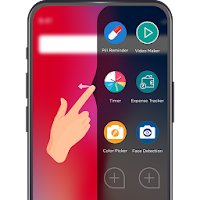
Edge Screen - Sidebar & Swipe Navigation Gesture
Background Changer, Eraser & Booth Photo Editor Personalization In-app purchases Contains ads
Easily access your favorite application, contact, music, etc. from the sidebar.
- Rating
- 3.0
- 199 ratings
- Downloads
- 10K+
- on Google Play
- Price
- Free
- In-app purchases
- Updated
- Jul 10
- 2020 · v1.3
Screenshots


About Edge Screen - Sidebar & Swipe Navigation Gesture
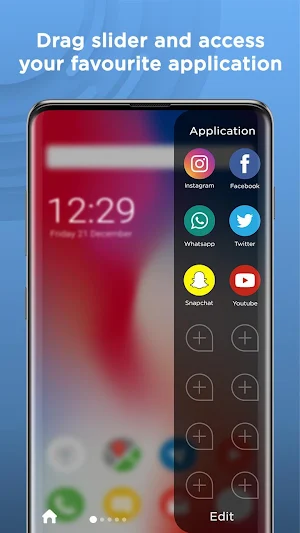
Do you like easily accessible shortcuts? If your answer is yes, then Edge Screen - Sidebar & Swipe Navigation Gesture app will help you. This app allows you to set the shortcuts for any app, contact, calendar, music player & calculator. The main feature of this app is, you will find all the shortcuts in one sidebar panel. You will access the sidebar by simply swiping on the screen. You can also change their position, style, color, symbol, etc. You can change the design of the toolbar, too. The shortcuts are customizable in one or two columns. The application is suitable for any android device. It is absolutely free and user-friendly. With this app, you can launch your favorite apps faster, call favorite contacts, play favorite music & more. Install this amazing application and save time.
Features of Edge Screen - Sidebar & Swipe Navigation Gesture:
# Shortcut for applications and contacts in the sidebar.
# Set sidebar position either right or left side.
# Change Edge handle’s transparency, position, height, width, and color.
# Choose any colors to change the style of a sidebar theme.
# Change sidebar layout transparency, edge width, and blurriness.
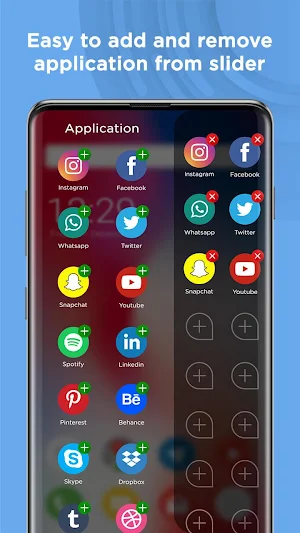
# In the sidebar, simply add apps & contacts by a single tap.
# To remove the app from shortcut, Press & hold on icon for a while.
# This app can easily redirect you on calendars, music, and calculators.
# Full-screen mode is also available.
# Choose a shape for the icon.
# Select one-column or two-column style for a sidebar.
# Multi-language supported.
How to use “Edge Screen - Sidebar & Swipe Navigation Gesture” app:
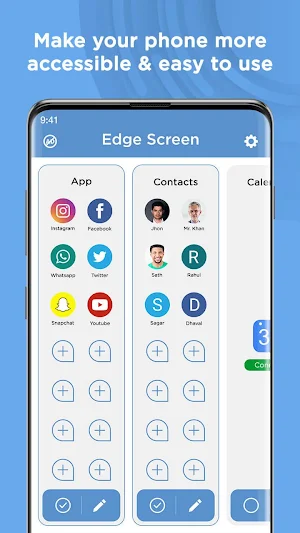
First of all, download this amazing application from the play store. After installing, it will f ask for permission to access the contact, approve it. Now You will be led to the main screen, there you can see the main categories. There are many categories available such as Applications, Contacts, Calendar, Music, and Calculator.
You have to allow its accessibility. To do so, click on the "Enable Service" option. So, you'll lead to settings for Accessibility tools, find and allow an Edge Screen option. Then go back to the App. You can see there is a sidebar on the right side. Tap on the Apps button. All of the apps installed on your device are visible there. Tap on the app icon which you want to add to your list. The applications included are shown at the right-side panel. To remove the app from the shortcut, press & hold onto the app icon. Additionally, you can add your favorite contacts from the second category "Contact" to this sidebar edge. You can see events directly from the third category "Calendar." While you can see the music player in that section from the fourth category "Music." If you want a quick calculation then you can also find the fifth column "Calculator" here.
There is a setting tab in “Edge Screen - Sidebar & Swipe Navigation Gesture”. From the Setting tab, you can configure the screen of the app, the handle of the side panel, the shape of icons & much more. The General section provides the necessary settings for full-screen mode access, enable/disable vibration, and change the language of the application. You may change its appearance, too. The appearance segment contains settings for edge panel, the background of the panel, and theme. You can change the position of the handle, its opacity, color, and size. You can sort shortcuts according to your preference. Also, you can adjust the background of the panel with clarity and round corner choices. The "Theme" choice includes a setting to alter the side panel theme, that provides options for the transparency, blur & edge width. You can also set your custom picture as a background.
To use phone more effectively, download this incredible Edge Screen - Sidebar & Swipe Navigation Gesture app. And also give us ratings. If you found any errors then give us reviews so that we can improve our work. Do not forget to share this with your friends and family, too.
Features of Edge Screen - Sidebar & Swipe Navigation Gesture:
# Shortcut for applications and contacts in the sidebar.
# Set sidebar position either right or left side.
# Change Edge handle’s transparency, position, height, width, and color.
# Choose any colors to change the style of a sidebar theme.
# Change sidebar layout transparency, edge width, and blurriness.
# In the sidebar, simply add apps & contacts by a single tap.
# To remove the app from shortcut, Press & hold on icon for a while.
# This app can easily redirect you on calendars, music, and calculators.
# Full-screen mode is also available.
# Choose a shape for the icon.
# Select one-column or two-column style for a sidebar.
# Multi-language supported.
How to use “Edge Screen - Sidebar & Swipe Navigation Gesture” app:
First of all, download this amazing application from the play store. After installing, it will f ask for permission to access the contact, approve it. Now You will be led to the main screen, there you can see the main categories. There are many categories available such as Applications, Contacts, Calendar, Music, and Calculator.
You have to allow its accessibility. To do so, click on the "Enable Service" option. So, you'll lead to settings for Accessibility tools, find and allow an Edge Screen option. Then go back to the App. You can see there is a sidebar on the right side. Tap on the Apps button. All of the apps installed on your device are visible there. Tap on the app icon which you want to add to your list. The applications included are shown at the right-side panel. To remove the app from the shortcut, press & hold onto the app icon. Additionally, you can add your favorite contacts from the second category "Contact" to this sidebar edge. You can see events directly from the third category "Calendar." While you can see the music player in that section from the fourth category "Music." If you want a quick calculation then you can also find the fifth column "Calculator" here.
There is a setting tab in “Edge Screen - Sidebar & Swipe Navigation Gesture”. From the Setting tab, you can configure the screen of the app, the handle of the side panel, the shape of icons & much more. The General section provides the necessary settings for full-screen mode access, enable/disable vibration, and change the language of the application. You may change its appearance, too. The appearance segment contains settings for edge panel, the background of the panel, and theme. You can change the position of the handle, its opacity, color, and size. You can sort shortcuts according to your preference. Also, you can adjust the background of the panel with clarity and round corner choices. The "Theme" choice includes a setting to alter the side panel theme, that provides options for the transparency, blur & edge width. You can also set your custom picture as a background.
To use phone more effectively, download this incredible Edge Screen - Sidebar & Swipe Navigation Gesture app. And also give us ratings. If you found any errors then give us reviews so that we can improve our work. Do not forget to share this with your friends and family, too.
User reviews

delete app very nice app

👍👍👍👍👌👌👌👌

Great!.

Very good

Good ho

s. B S. B
Alternatives to Edge Screen - Sidebar & Swipe Navigation Gesture
Looking for apps like Edge Screen - Sidebar & Swipe Navigation Gesture? Here are 6 similar Android apps on Google Play. The highest rated is Toki Toki Video Player (4.6/5), and all 6 are free to download.
-
Remote Control for All TV 3.6
-
Clap To Find My Phone 4.5
-
Recover Deleted All Photos 3.9
-
Photo Caller Screen Dialer 4.0
-
Voice Changer Male to Female 3.3
-
Toki Toki Video Player 4.6
| App | Rating | Price | Installs | Last updated | Compare |
|---|---|---|---|---|---|
| Edge Screen - Sidebar & Swipe Navigation Gesture | 3.0 / 5 | Free | 10,000+ | Jul 10, 2020 | |
| Remote Control for All TV | 3.6 / 5 | Free | 50,000,000+ | Jul 2, 2026 | Compare |
| Clap To Find My Phone | 4.5 / 5 | Free | 5,000,000+ | Nov 22, 2019 | Compare |
| Recover Deleted All Photos | 3.9 / 5 | Free | 10,000,000+ | Sep 29, 2026 | Compare |
| Photo Caller Screen Dialer | 4.0 / 5 | Free | 10,000,000+ | Aug 19, 2026 | Compare |
| Voice Changer Male to Female | 3.3 / 5 | Free | 100,000+ | Nov 18, 2019 | Compare |
| Toki Toki Video Player | 4.6 / 5 | Free | 500+ | May 5, 2022 | Compare |
Similar apps on Google Play
- Remote Control for All TV
- Clap To Find My Phone
- Recover Deleted All Photos
- Photo Caller Screen Dialer
- Voice Changer Male to Female
- Toki Toki Video Player
- Body Shape Editor For Women
- Voice Calculator
- Smoke Effect Photo Editor
- Duplicate File Remover
- Moving Picture - Photo Motion
- Custom Navigation Bar
- AC Remote Control
- Calculator Vault - Hide Photos
- My Photo Phone Dialer
- Birthday Song With Name
- Pencil Sketch Photo Editor
- Photo Video Maker With Music
- Contact Backup And Restore