

AC Auto Clicker - Auto Tap
mingzhu58 Productivity In-app purchases Contains ads
A stable and fast auto clicker, suitable for work tasks and all types of games.
- Rating
- 4.4
- 70 ratings
- Downloads
- 5K+
- on Google Play
- Price
- Free
- In-app purchases
- Updated
- Jul 27
- 2026 · v1.1.0
Screenshots
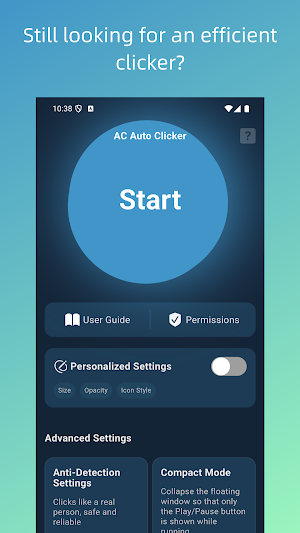
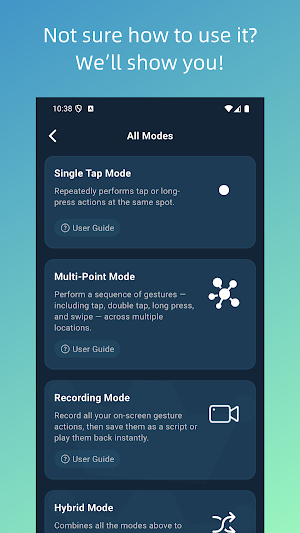
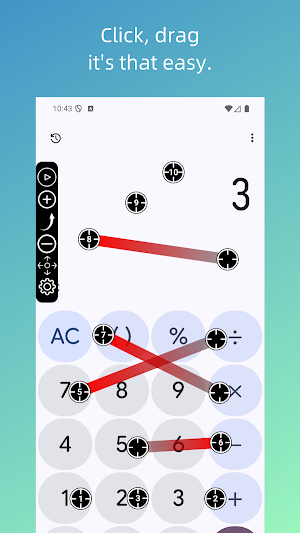
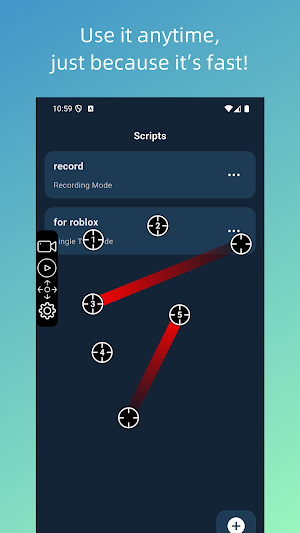
About AC Auto Clicker - Auto Tap
AC Auto Clicker — A professional auto-clicking tool that works without Root.
AC Auto Clicker is a powerful auto-click and automation tool. With its in-app visual editor and floating control panel, you can freely set tap positions, execution order, click frequency, and even record swipe gestures anywhere on the screen.
Whether it's repetitive tasks or high-frequency operations, AC Auto Clicker helps you handle them effortlessly—truly freeing your hands.
Perfect for Many Use Cases
●Gaming assistance: Ideal for games like Roblox that require constant tapping
●Workflow automation: Repetitive form submissions, page actions, etc.
●Ticket/Sale grabbing: Faster, more precise high-frequency tapping
●Smart home control: Automate routine steps with ease
AC Auto Clicker can simulate taps, touches, swipes, long presses, and more. It can also automatically repeat tasks such as tapping buttons or links.
Why Choose AC Auto Clicker?
🟢 Easy to Use
●User-friendly interface with zero learning curve
●Complete usage tutorials included
●One-tap activation
●No root permission required
🟣 Powerful Features
●Multiple auto-click modes
●Supports auto-tapping and swipe gestures
●Customizable intervals and click counts
●Create complex action sequences
🔵 Save Your Configurations
●Save your custom setups anytime
●Reload them instantly for future use and higher efficiency
If you’re still looking for Auto Click, Auto Clicker, Click Assistant, OP Auto Clicker, GC Auto Clicker, Auto Clicker apps for games, or Auto Clicker for Roblox, then AC Auto Clicker is definitely a choice you won’t be disappointed with.
Important Notice
AC Auto Clicker uses the AccessibilityService API to enable its core features.
Q: Why does it require AccessibilityService?
A: Features like auto-tap, multi-touch simulation, swipe, and long-press actions can only be achieved through AccessibilityService.
Q: Does the app collect personal data?
A: No. AC Auto Clicker does not collect any personal information through AccessibilityService. All actions are used solely to provide automation capabilities.
Download AC Auto Clicker now and experience a truly effortless, time-saving auto-click solution!
AC Auto Clicker is a powerful auto-click and automation tool. With its in-app visual editor and floating control panel, you can freely set tap positions, execution order, click frequency, and even record swipe gestures anywhere on the screen.
Whether it's repetitive tasks or high-frequency operations, AC Auto Clicker helps you handle them effortlessly—truly freeing your hands.
Perfect for Many Use Cases
●Gaming assistance: Ideal for games like Roblox that require constant tapping
●Workflow automation: Repetitive form submissions, page actions, etc.
●Ticket/Sale grabbing: Faster, more precise high-frequency tapping
●Smart home control: Automate routine steps with ease
AC Auto Clicker can simulate taps, touches, swipes, long presses, and more. It can also automatically repeat tasks such as tapping buttons or links.
Why Choose AC Auto Clicker?
🟢 Easy to Use
●User-friendly interface with zero learning curve
●Complete usage tutorials included
●One-tap activation
●No root permission required
🟣 Powerful Features
●Multiple auto-click modes
●Supports auto-tapping and swipe gestures
●Customizable intervals and click counts
●Create complex action sequences
🔵 Save Your Configurations
●Save your custom setups anytime
●Reload them instantly for future use and higher efficiency
If you’re still looking for Auto Click, Auto Clicker, Click Assistant, OP Auto Clicker, GC Auto Clicker, Auto Clicker apps for games, or Auto Clicker for Roblox, then AC Auto Clicker is definitely a choice you won’t be disappointed with.
Important Notice
AC Auto Clicker uses the AccessibilityService API to enable its core features.
Q: Why does it require AccessibilityService?
A: Features like auto-tap, multi-touch simulation, swipe, and long-press actions can only be achieved through AccessibilityService.
Q: Does the app collect personal data?
A: No. AC Auto Clicker does not collect any personal information through AccessibilityService. All actions are used solely to provide automation capabilities.
Download AC Auto Clicker now and experience a truly effortless, time-saving auto-click solution!
What’s new
Version 1.1.0 · Updated July 27, 2026
Fixed crashes and improved performance.
User reviews

best one
Alternatives to AC Auto Clicker - Auto Tap
Looking for apps like AC Auto Clicker - Auto Tap? Here are 5 similar Android apps on Google Play. The highest rated is Square Team (4.6/5), and all 5 are free to download.
-
Square Team 4.6
-
Macrorify - Image Auto Clicker 4.4
-
Touch Screen Test 4.5
-
Spoked: AI Cycling Coach 3.4
-
Auto Clicker-Auto Tap & Swipe 4.1
| App | Rating | Price | Installs | Last updated | Compare |
|---|---|---|---|---|---|
| AC Auto Clicker - Auto Tap | 4.4 / 5 | Free | 5,000+ | Jul 27, 2026 | |
| Square Team | 4.6 / 5 | Free | 1,000,000+ | Oct 26, 2026 | Compare |
| Macrorify - Image Auto Clicker | 4.4 / 5 | Free | 1,000,000+ | – | Compare |
| Touch Screen Test | 4.5 / 5 | Free | 1,000,000+ | Jun 26, 2026 | Compare |
| Spoked: AI Cycling Coach | 3.4 / 5 | Free | 5,000+ | Jun 5, 2026 | Compare |
| Auto Clicker-Auto Tap & Swipe | 4.1 / 5 | Free | 10,000,000+ | Oct 19, 2026 | Compare |