About Cuadrante pro GC
📅 GC Schedule App
GC Schedule is an app designed to easily and efficiently manage monthly services using a flexible and comprehensive calendar. It is specifically designed for organizing shifts, tracking hours worked, and monitoring vacations and breaks.
________________________________________
🗓️ Monthly Calendar by Weeks
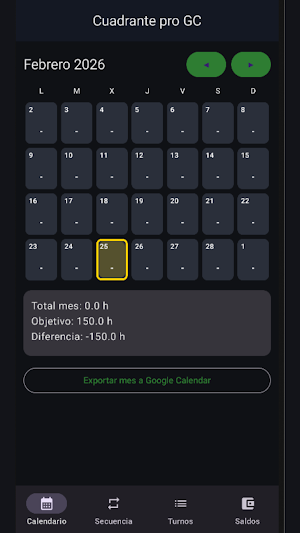
The calendar is organized by full weeks, so each month can contain 4 or 5 weeks, as appropriate.
On the calendar's main screen, you can:
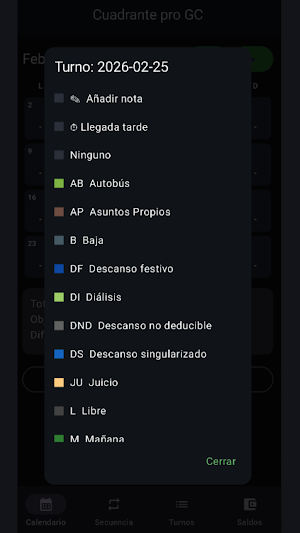
• ✅ Add the daily shift.
• ⏱️ View the total number of hours worked, with an alert if the established hours are exceeded.
• 📝 Add notes on any day (a pencil icon will appear when a note exists).
• ⏳ Record lateness, which will be indicated by a stopwatch symbol.
• 📤 Export the month to other calendars installed on the device.
________________________________________
Service Rules and Hour Calculation
🚨 Urgent Leave (UL)
• Abbreviation: UL
• Counts 7.5 hours.
• 🔹 If it falls on a Saturday, Sunday, or public holiday, it does not count any hours (0h).
________________________________________
🩺 Sick Leave (S)
• If a full week (7 days) is marked as Sick Leave:
Saturday and Sunday do not count any hours (0h).
• If there are 5 days of Sick Leave and 2 days off in the same week:
All 5 days of Sick Leave do count hours, regardless of the specific days.
________________________________________
🎉 Holiday Rest (H)
• If there is a public holiday in the month, but on that day you are on:
Sick Leave (S)
Vacation (V)
Personal Leave (PF)
Urgent Leave
👉 Holiday Rest is not generated for that day.
________________________________________
🌙 Night before Outgoing + Outgoing
• The Outgoing (S) shift is counted as 6 hours.
• If there is a Night (N) immediately before an Outgoing (S) shift (N → S):
The Night shift counts as 2 hours.
The Outgoing shift counts as 6 hours.
________________________________________
🔁 Sequence Management
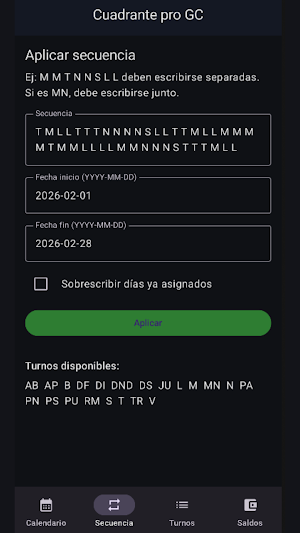
In the Sequences section you can:
• Create a shift combination.
• Apply this sequence for the desired time period.
This function facilitates planning when work patterns are repeated.
________________________________________
🕒 Shift Management
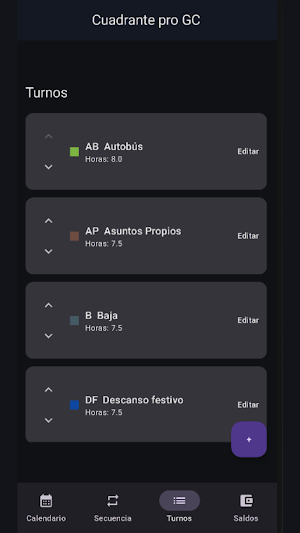
From the Shifts screen you can:
• Create new shifts (morning, afternoon, night, etc.).
• Modify existing shifts.
• Customize schedules according to the user's needs.
________________________________________
🏖️ Balance Screen
In the Balance section, you'll find detailed control of:
🌴 Vacation and Personal Days
• Enter the total number of days available for the year.
• The calendar will automatically deduct them when used.
• Vacation days will not be deducted if they coincide with weekends or public holidays.
________________________________________
🎉 Public Holidays and Special Holidays
• These will be automatically generated based on the months worked.
• They can also be added manually if they already existed before you started using the application.
• For accurate calculation, you must manually enter the national, regional, and local holidays for your destination.
________________________________________
💾 Backups and Exports
The application includes:
• 🔄 Backup system, with the option to export and import data.
• 📅 Generate .ICS files to export events to other calendars, selecting a custom date range.
________________________________________
🔒 Privacy
Cuadrante by GC does not collect or store your personal data.
All information entered is saved exclusively on the user's device.
The application does not belong to or represent any official organization.
It may display ads managed by third-party providers such as Google AdMob.
Similar Apps
AEO
Audit websites and app listings for SEO, AEO, GEO, LLMO, and ASO in one app
Stream Tap
Control OBS Studio: scenes, keyboard shortcuts, and more from your phone.
Scanify – Smart PDF Scanner
Scan documents to PDF, edit, Filter & share with smart scanner

Gallas Group
Human Resource Management in a single platform

Blueprint for Creators
Blueprint helps creators find ideas, write content, and record videos.

Interfy Mobile
Execute workflows, sign documents, and manage content on the go.
