

PhotoPurge: Photo Cleaner
MichP Tools In-app purchases Contains ads
Swipe to clean your gallery. BIN safety, duplicates & folders. Try Pro.
- Downloads
- 18+
- on Google Play
- Price
- Free
- In-app purchases
- Updated
- Aug 8
- 2026 · v1.1.6
Screenshots


About PhotoPurge: Photo Cleaner
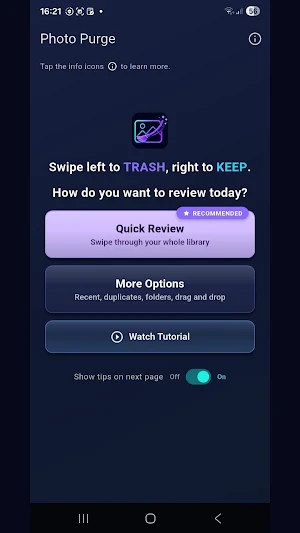
Photo Purge is the fastest way to tidy your camera roll — one swipe at a time.
Screenshots, blurry shots, duplicate selfies, and forgotten videos pile up fast. PhotoPurge turns cleanup into a quick, focused ritual: see one photo or video, decide, swipe, move on. Clear months of clutter in a single sit-down.
Quick Review: https://heylonstudio.com/photopurge-quick-review.html
Tutorial: https://heylonstudio.com/photopurge-tutorial.html
HOW IT WORKS
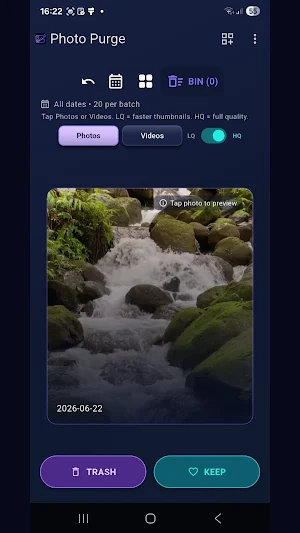
• Swipe left to TRASH — sends the item to your BIN (queue)
• Swipe right to KEEP it
• Tap any item for a full-screen preview — pinch to zoom on photos, playback controls on videos
• Switch between LQ (faster) and HQ (higher quality) in the swipe view
• When your BIN fills up (up to 50 items) or whenever you’re ready, open it, review, and tap Delete
• Nothing is deleted until you confirm — restore queued items or undo your last swipe anytime
• Final deletes are removed from your device gallery according to your Android / Photos trash settings (recoverable where your device or Photos app provides a trash / Recently deleted period)
CHOOSE YOUR MODE
• Quick Review — swipe through your entire library, with an optional date range on large libraries
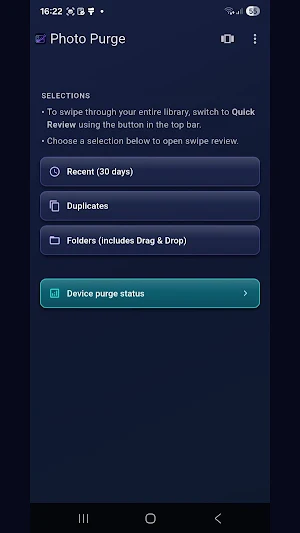
• More Options — targeted cleanup:
– Recent — photos and videos from the last 30 days
– Duplicates — find and review similar photos (photos only; optional month range)
– Folders — review one album at a time, with date filtering and drag-and-drop sorting
• Switch between Photos and Videos anytime
REVIEW BATCH
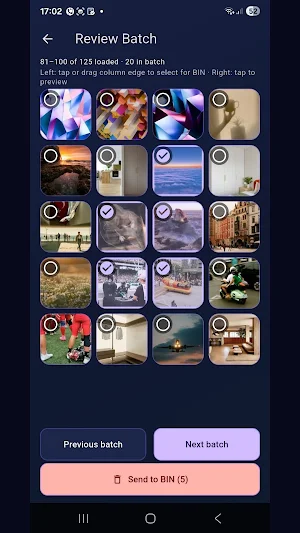
• Tap the grid icon to see thumbnails of the current batch of up to 20 items at once
• Tap any thumbnail for a full-screen preview, or jump ahead or back through your library
• Select several at once — tap, or drag your finger down the left edge of the thumbnails — then send them all to the BIN in one tap
KEEP TRACK
• Device purge status — live stats for Reviewed, Kept, Trashed, storage freed, and more
• A live counter for items in your BIN
• Device totals for photos and videos still on your phone
• Optional storage calculation for file sizes
BUILT-IN SAFETY
• TRASH sends items to the BIN first — not straight to permanent deletion
• Review your BIN before anything is deleted for good
• Undo your last KEEP or TRASH decision from the toolbar
• Cleanup runs entirely on your device — your photos and videos are never uploaded or shared
FREE TO USE
• 150 swipe actions included — Quick Review and More Options share one lifetime total
• After that, each day you get 25 free swipes, plus one optional short video for +25 more (50 max/day; resets at midnight)
• Once today’s free swipes and video are used, upgrade to Pro for unlimited cleanup — or come back tomorrow
• No ads when you open the app — only that optional video after your daily free swipes
UPGRADE TO PRO
• Unlimited swipes and no ads, ever
• Choose Monthly, Yearly (best value), or a one-time Lifetime purchase
Subscription details:
• PhotoPurge Pro Monthly — auto-renewable subscription, billed monthly
• PhotoPurge Pro Yearly — auto-renewable subscription, billed yearly
• PhotoPurge Pro Lifetime — a single one-time payment (not a subscription)
• Prices are shown in the app and may vary by region
Payment is charged to your Google Play account at purchase. Subscriptions auto-renew unless auto-renew is turned off at least 24 hours before the period ends. Manage or cancel anytime in Google Play → Payments & subscriptions.
Privacy Policy: https://heylonstudio.com/legal/privacy.html
PERMISSIONS
Photo Purge needs access to your photos and videos so you can review and delete them. Nothing is uploaded, no account required, and your media never leaves your device.
Ready to take back your storage and enjoy your camera roll again? Download Photo Purge and start swiping.
Screenshots, blurry shots, duplicate selfies, and forgotten videos pile up fast. PhotoPurge turns cleanup into a quick, focused ritual: see one photo or video, decide, swipe, move on. Clear months of clutter in a single sit-down.
Quick Review: https://heylonstudio.com/photopurge-quick-review.html
Tutorial: https://heylonstudio.com/photopurge-tutorial.html
HOW IT WORKS
• Swipe left to TRASH — sends the item to your BIN (queue)
• Swipe right to KEEP it
• Tap any item for a full-screen preview — pinch to zoom on photos, playback controls on videos
• Switch between LQ (faster) and HQ (higher quality) in the swipe view
• When your BIN fills up (up to 50 items) or whenever you’re ready, open it, review, and tap Delete
• Nothing is deleted until you confirm — restore queued items or undo your last swipe anytime
• Final deletes are removed from your device gallery according to your Android / Photos trash settings (recoverable where your device or Photos app provides a trash / Recently deleted period)
CHOOSE YOUR MODE
• Quick Review — swipe through your entire library, with an optional date range on large libraries
• More Options — targeted cleanup:
– Recent — photos and videos from the last 30 days
– Duplicates — find and review similar photos (photos only; optional month range)
– Folders — review one album at a time, with date filtering and drag-and-drop sorting
• Switch between Photos and Videos anytime
REVIEW BATCH
• Tap the grid icon to see thumbnails of the current batch of up to 20 items at once
• Tap any thumbnail for a full-screen preview, or jump ahead or back through your library
• Select several at once — tap, or drag your finger down the left edge of the thumbnails — then send them all to the BIN in one tap
KEEP TRACK
• Device purge status — live stats for Reviewed, Kept, Trashed, storage freed, and more
• A live counter for items in your BIN
• Device totals for photos and videos still on your phone
• Optional storage calculation for file sizes
BUILT-IN SAFETY
• TRASH sends items to the BIN first — not straight to permanent deletion
• Review your BIN before anything is deleted for good
• Undo your last KEEP or TRASH decision from the toolbar
• Cleanup runs entirely on your device — your photos and videos are never uploaded or shared
FREE TO USE
• 150 swipe actions included — Quick Review and More Options share one lifetime total
• After that, each day you get 25 free swipes, plus one optional short video for +25 more (50 max/day; resets at midnight)
• Once today’s free swipes and video are used, upgrade to Pro for unlimited cleanup — or come back tomorrow
• No ads when you open the app — only that optional video after your daily free swipes
UPGRADE TO PRO
• Unlimited swipes and no ads, ever
• Choose Monthly, Yearly (best value), or a one-time Lifetime purchase
Subscription details:
• PhotoPurge Pro Monthly — auto-renewable subscription, billed monthly
• PhotoPurge Pro Yearly — auto-renewable subscription, billed yearly
• PhotoPurge Pro Lifetime — a single one-time payment (not a subscription)
• Prices are shown in the app and may vary by region
Payment is charged to your Google Play account at purchase. Subscriptions auto-renew unless auto-renew is turned off at least 24 hours before the period ends. Manage or cancel anytime in Google Play → Payments & subscriptions.
Privacy Policy: https://heylonstudio.com/legal/privacy.html
PERMISSIONS
Photo Purge needs access to your photos and videos so you can review and delete them. Nothing is uploaded, no account required, and your media never leaves your device.
Ready to take back your storage and enjoy your camera roll again? Download Photo Purge and start swiping.
What’s new
Version 1.1.6 · Updated August 8, 2026
Implement playstore recommendations
Alternatives to PhotoPurge: Photo Cleaner
Looking for apps like PhotoPurge: Photo Cleaner? Here are 6 similar Android apps on Google Play. The highest rated is Kittysplit: Bills & cost split (4.9/5), and all 6 are free to download.
-
Workable 3.7
-
Kittysplit: Bills & cost split 4.9
-
HapiBrain
-
TAP Kiln Control Mobile 4.1
-
Blue Sky Vitamin 4.8
-
Autio - Travel Companion 3.2
| App | Rating | Price | Installs | Last updated | Compare |
|---|---|---|---|---|---|
| PhotoPurge: Photo Cleaner | – | Free | 10+ | Aug 8, 2026 | |
| Workable | 3.7 / 5 | Free | 50,000+ | Oct 8, 2026 | Compare |
| Kittysplit: Bills & cost split | 4.9 / 5 | Free | 10,000+ | Oct 13, 2026 | Compare |
| HapiBrain | – | Free | 1,000+ | Apr 12, 2023 | Compare |
| TAP Kiln Control Mobile | 4.1 / 5 | Free | 5,000+ | Oct 22, 2026 | Compare |
| Blue Sky Vitamin | 4.8 / 5 | Free | 1,000+ | Oct 8, 2026 | Compare |
| Autio - Travel Companion | 3.2 / 5 | Free | 10,000+ | Nov 7, 2024 | Compare |