

Photo Compressor: MB to KB
Merah Putih Corp Photography
Compress photos from MB to KB, resize, crop, and prepare social media images.
- Downloads
- 10+
- on Google Play
- Price
- Free
- No in-app purchases
- Updated
- Aug 11
- 2026 · v1.0.1
Screenshots


About Photo Compressor: MB to KB
📸 PHOTO COMPRESSOR: MB TO KB
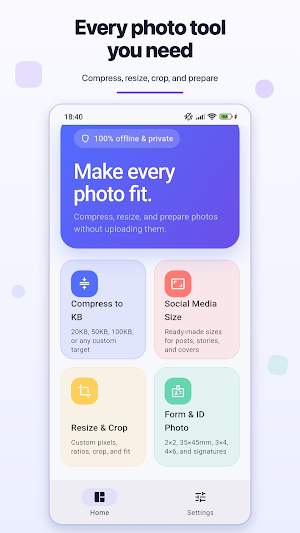
Reduce photo size without complicated settings or cloud uploads. Photo Compressor helps you compress photos from MB to KB, resize images, crop pictures, convert formats, and prepare photos for social media, online forms, and ID documents.
🎯 COMPRESS PHOTOS TO AN EXACT SIZE
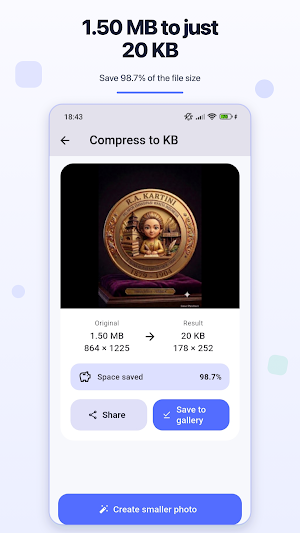
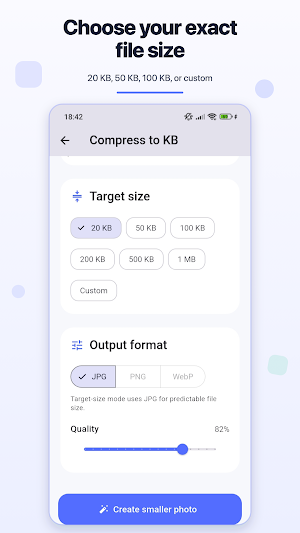
Need a 20 KB photo, 50 KB image, 100 KB upload, or a custom file size? Select a target and Photo Compressor adjusts the image to create a smaller file. View the original and compressed sizes, final dimensions, and percentage of space saved.
✂️ RESIZE AND CROP IMAGES
• Set a custom width and height in pixels
• Choose 1:1, 3:4, 16:9, or 9:16 aspect ratios
• Crop photos or fit them to a new canvas
• Add a blurred background when fitting an image
• Adjust image quality before processing
📱 SOCIAL MEDIA IMAGE SIZES
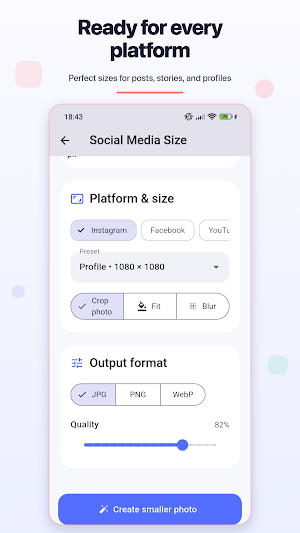
Prepare images using ready-made size presets for:
• Instagram profiles, posts, stories, Reels, and covers
• Facebook profiles, posts, stories, groups, and events
• YouTube profiles, thumbnails, and channel banners
• TikTok profiles, videos, and covers
🪪 FORM AND ID PHOTO PRESETS
Quickly prepare photos and signatures for forms and documents. Available presets include 2 × 2 inch, 35 × 45 mm, 2 × 3 cm, 3 × 4 cm, 4 × 6 cm, and signature size.
🖼️ CHOOSE YOUR OUTPUT FORMAT
Save processed images as JPG, PNG, or WebP. Control the output quality and choose whether photo metadata should be removed.
🔒 PRIVATE AND OFFLINE
Your selected photos are processed locally on your device. No account, sign-in, or cloud upload is required. Your images are not sent to a developer-operated server.
🎨 SIMPLE AND PERSONAL
• Light, dark, or device theme
• English, Indonesian, and Malay languages
• Clear before-and-after size information
• Save results to your gallery
• Share compressed photos with other apps
✅ USE PHOTO COMPRESSOR FOR
• Reducing image size for email and messaging
• Meeting upload limits for websites and online forms
• Preparing social media posts and profile pictures
• Preparing ID and document photos with common dimensions
• Saving device storage with smaller image files
Compress photos, resize images, and prepare the exact dimensions you need with Photo Compressor.
Reduce photo size without complicated settings or cloud uploads. Photo Compressor helps you compress photos from MB to KB, resize images, crop pictures, convert formats, and prepare photos for social media, online forms, and ID documents.
🎯 COMPRESS PHOTOS TO AN EXACT SIZE
Need a 20 KB photo, 50 KB image, 100 KB upload, or a custom file size? Select a target and Photo Compressor adjusts the image to create a smaller file. View the original and compressed sizes, final dimensions, and percentage of space saved.
✂️ RESIZE AND CROP IMAGES
• Set a custom width and height in pixels
• Choose 1:1, 3:4, 16:9, or 9:16 aspect ratios
• Crop photos or fit them to a new canvas
• Add a blurred background when fitting an image
• Adjust image quality before processing
📱 SOCIAL MEDIA IMAGE SIZES
Prepare images using ready-made size presets for:
• Instagram profiles, posts, stories, Reels, and covers
• Facebook profiles, posts, stories, groups, and events
• YouTube profiles, thumbnails, and channel banners
• TikTok profiles, videos, and covers
🪪 FORM AND ID PHOTO PRESETS
Quickly prepare photos and signatures for forms and documents. Available presets include 2 × 2 inch, 35 × 45 mm, 2 × 3 cm, 3 × 4 cm, 4 × 6 cm, and signature size.
🖼️ CHOOSE YOUR OUTPUT FORMAT
Save processed images as JPG, PNG, or WebP. Control the output quality and choose whether photo metadata should be removed.
🔒 PRIVATE AND OFFLINE
Your selected photos are processed locally on your device. No account, sign-in, or cloud upload is required. Your images are not sent to a developer-operated server.
🎨 SIMPLE AND PERSONAL
• Light, dark, or device theme
• English, Indonesian, and Malay languages
• Clear before-and-after size information
• Save results to your gallery
• Share compressed photos with other apps
✅ USE PHOTO COMPRESSOR FOR
• Reducing image size for email and messaging
• Meeting upload limits for websites and online forms
• Preparing social media posts and profile pictures
• Preparing ID and document photos with common dimensions
• Saving device storage with smaller image files
Compress photos, resize images, and prepare the exact dimensions you need with Photo Compressor.
Alternatives to Photo Compressor: MB to KB
Looking for apps like Photo Compressor: MB to KB? Here are 3 similar Android apps on Google Play. All of them are free to download.



| App | Rating | Price | Installs | Last updated | Compare |
|---|---|---|---|---|---|
| Photo Compressor: MB to KB | – | Free | 10+ | Aug 11, 2026 | |
| Pinny Notes: To-Do List | – | Free | 10+ | Aug 11, 2026 | Compare |
| Nourish: Cycle & Craving Log | – | Free | 5+ | Aug 8, 2026 | Compare |
| GPS Tester: Mock Location Tool | – | Free | 10+ | – | Compare |