

Buildworks-Manage Construction
Medinin Labs Productivity
Efficiently manage your projects, staff, materials, and updates in one app.
- Downloads
- 60+
- on Google Play
- Price
- Free
- No in-app purchases
- Updated
- Nov 25
- 2023 · v1.0.0
Screenshots



About Buildworks-Manage Construction
- Introduction:
• Buildworks revolutionizes construction project management by blending traditional methods with cutting-edge technology, ensuring efficiency and flexibility.
- Key Features:
• Comprehensive Project Management: Track and manage every aspect of your construction projects with ease.
• Staff Management: Efficiently organize staff schedules, payroll, and performance, all within the app.
• Material Tracking: Keep an eye on inventory, deliveries, and usage with real-time updates.
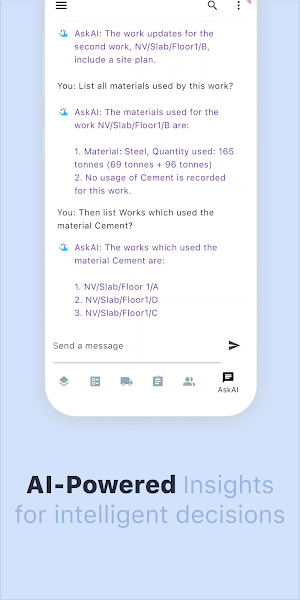
• AI-Powered Assistance: ChatGPT integration offers smart querying and decision support, enhancing your management capabilities.
• Collaborative Workspaces: Share updates, progress, and documents seamlessly within your team.
• Customizable Reporting: Generate and share detailed reports tailored to your project needs.
• Serverless Architecture & Syncing: Enjoy the added flexibility of working offline with local data storage and the option to sync online for backup and collaboration.
- User Experience:
• A user-friendly interface designed for construction professionals, offering both offline accessibility and online collaboration options.
- Security & Reliability:
• Your data is safeguarded with advanced encryption, whether you're working online or offline.
- Support & Updates:
• Continuous updates and dedicated support to ensure a smooth and effective user experience.
- Conclusion:
• Whether you're onsite or in the office, Buildworks is your go-to solution for managing construction projects with efficiency and ease.
More Info -
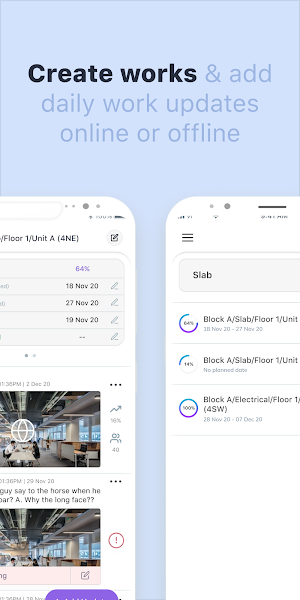
- Create ‘N' number of projects and “Add Daily Work Updates” under them.
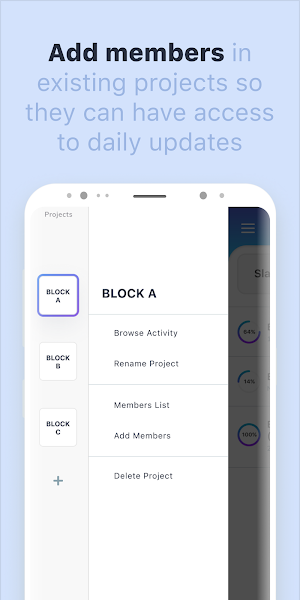
- Backup, assign and share projects to your entire team members like Owners, Project managers, Contractors, Site engineers, and supervisors
- Track all your project issues in one place.
- Maintain daily on-site work progress with deadlines.
- A picture is worth a thousand words! Upload project progress images in "360° Panorama" or image format to see your project progress through images.
- Helps in keeping a record of construction projects and clients will get a clearer insight into what happened on site
- Simple design and specifically designed for those in the construction field industry.
All in all, the Buildworks app works like a site diary. The app guides you through regular construction activity directly from your mobile phone. It makes it easy to keep records of your work progress or issues. You can support each site work progress & issues with photographic evidence.
• Buildworks revolutionizes construction project management by blending traditional methods with cutting-edge technology, ensuring efficiency and flexibility.
- Key Features:
• Comprehensive Project Management: Track and manage every aspect of your construction projects with ease.
• Staff Management: Efficiently organize staff schedules, payroll, and performance, all within the app.
• Material Tracking: Keep an eye on inventory, deliveries, and usage with real-time updates.
• AI-Powered Assistance: ChatGPT integration offers smart querying and decision support, enhancing your management capabilities.
• Collaborative Workspaces: Share updates, progress, and documents seamlessly within your team.
• Customizable Reporting: Generate and share detailed reports tailored to your project needs.
• Serverless Architecture & Syncing: Enjoy the added flexibility of working offline with local data storage and the option to sync online for backup and collaboration.
- User Experience:
• A user-friendly interface designed for construction professionals, offering both offline accessibility and online collaboration options.
- Security & Reliability:
• Your data is safeguarded with advanced encryption, whether you're working online or offline.
- Support & Updates:
• Continuous updates and dedicated support to ensure a smooth and effective user experience.
- Conclusion:
• Whether you're onsite or in the office, Buildworks is your go-to solution for managing construction projects with efficiency and ease.
More Info -
- Create ‘N' number of projects and “Add Daily Work Updates” under them.
- Backup, assign and share projects to your entire team members like Owners, Project managers, Contractors, Site engineers, and supervisors
- Track all your project issues in one place.
- Maintain daily on-site work progress with deadlines.
- A picture is worth a thousand words! Upload project progress images in "360° Panorama" or image format to see your project progress through images.
- Helps in keeping a record of construction projects and clients will get a clearer insight into what happened on site
- Simple design and specifically designed for those in the construction field industry.
All in all, the Buildworks app works like a site diary. The app guides you through regular construction activity directly from your mobile phone. It makes it easy to keep records of your work progress or issues. You can support each site work progress & issues with photographic evidence.
What’s new
Version 1.0.0 · Updated November 25, 2023
- Enhanced ChatGPT integration for smarter project insights. - Improved user interface for easier navigation. - Bug fixes and performance improvements.
User reviews

7 years experience
Alternatives to Buildworks-Manage Construction
Looking for apps like Buildworks-Manage Construction? Here are 6 similar Android apps on Google Play. All of them are free to download.




| App | Rating | Price | Installs | Last updated | Compare |
|---|---|---|---|---|---|
| Buildworks-Manage Construction | – | Free | 50+ | Nov 25, 2023 | |
| Samruddhi Agri Business | – | Free | 100+ | – | Compare |
| EG EMS | – | Free | 100+ | Sep 30, 2026 | Compare |
| Ezwinds | – | Free | 10+ | Jul 20, 2026 | Compare |
| OrbAid | – | Free | 50+ | Aug 18, 2026 | Compare |
| Cuentitas | – | Free | 10+ | – | Compare |
| Dolev | – | Free | 5+ | – | Compare |
Similar apps on Google Play
- Samruddhi Agri Business
- EG EMS
- Ezwinds
- OrbAid
- Cuentitas
- Dolev
- e-transit
- Circuit - Knowledge Activated
- ONLINE Sales
- Marsam
- AI Sentinel: Scam Detector
- Sagar Petroleum
- G-HR
- SOE - Sales Operation Employee
- Pembatasan LV Lati
- Caltaqua
- MicroTeciES
- TickTask
- SKC CARE
- VMS SPBNG
- SolarLink
- Dtecty
- Visibility
- Mygeosert by HRweb.ph
- SICON ATIS