

1000Praises_English
mediasoftsln Lifestyle
Smart Android application to read / record and search the praises from bible.
- Rating
- 4.3
- 110 ratings
- Downloads
- 10K+
- on Google Play
- Price
- Free
- No in-app purchases
- Updated
- Feb 10
- 2013 · v1.1
Screenshots



About 1000Praises_English
1000Praises _English - is a smart Android application that helps the people to read / record and search the praises from bible. This application having the below modules and sub modules.
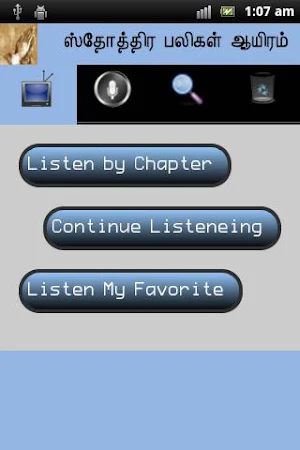
1. Video and Audio
Using this module user can listen and view the praises as a power point presentation. For listening the praise’s user must record their voice on the corresponding praise. To record the praise user can use the 'Record' option. Recorded voice will be store in the external memory.
a) Chapter wise:
Here 1000 praises are separated 50 by 50. So, totally 20 chapters are available in this module. User can select their desired chapter and continue their listening.
b) Continue my Listening:
If application got closed unknowingly or user closed the application and want to continue the option "Video and Audio" later then we can use this option.
c) Show only my Favorite:
If user already select some of the praises are their favorite then they can listen only those praises using this option. User can make praise as Favorite / Un Favorite using the 'Record' module
2. Record / Favorite
Using this module user can record their voice for the praises and play back later using 'Video and Audio' module. Using re-record option user can record their voice with multiple times. The last recorded voice only available with 'Video and Audio' module. Additionally user can make the corresponding praise as their favorite / un-favorite by clicking on start symbol.
a) Chapter wise:
Here 1000 praises are separated 50 by 50. So, totally 20 chapters are available in this module. User can select their desired module and do their record.
b) Continue my Record:
If application got closed unknowingly or user closed the application and want to continue their record later then they can use this option.
c) Show only my Favorite:
If user already select some of the praises are their favorite then they can record only those praises using this option.
3. Search
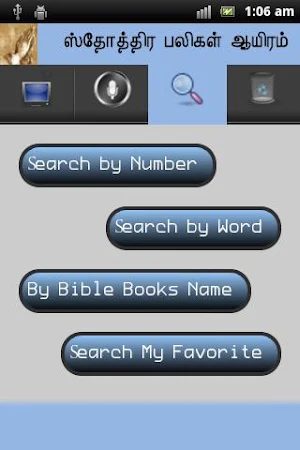
Using this option user can find the required praise by number, word/character, chapter from bible and only their favorites.
a) Search by number:
If user wants to see only the particular index's praise then they can use this option. The index value should be 1 to 1000.
b) Search by Word / Character:
Using the Tamil type writer user can enter the required character / word and get the list of praises which is having the enter character / word.
c) Search by bible books:
In this module all books are listed out. If user wants to know what the praises are available on the particular book then user can use this option.
d) Show only my favorite:
If user already select some of the praises are their favorite then they can list out those praises using this option.
4. Rollback
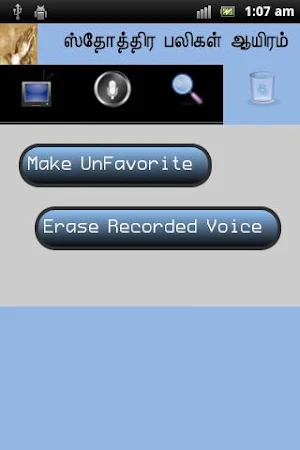
Using this option user can roll back this application.
a) Make it as Un-favorite:
Using this option user can change their favorite praises to un favorite.
b) Remove the recorded voice:
If user wants to remove all the recorded voice from storage then he can use this option.
By clicking the menu button user can get the below three option.
1. Font Settings:
Using this option user can set the font size.
2. Support us:
Use this option user can rate this application. Additionally, if user finds any error on this application then he can send an e-mail to the developer.
3. Help
Using this option user can go through all the functionalists of this application and he can understand the different icons / symbols used in this application and their uses.
Limitations: Memory card is mandatory to record the voice.
1. Video and Audio
Using this module user can listen and view the praises as a power point presentation. For listening the praise’s user must record their voice on the corresponding praise. To record the praise user can use the 'Record' option. Recorded voice will be store in the external memory.
a) Chapter wise:
Here 1000 praises are separated 50 by 50. So, totally 20 chapters are available in this module. User can select their desired chapter and continue their listening.
b) Continue my Listening:
If application got closed unknowingly or user closed the application and want to continue the option "Video and Audio" later then we can use this option.
c) Show only my Favorite:
If user already select some of the praises are their favorite then they can listen only those praises using this option. User can make praise as Favorite / Un Favorite using the 'Record' module
2. Record / Favorite
Using this module user can record their voice for the praises and play back later using 'Video and Audio' module. Using re-record option user can record their voice with multiple times. The last recorded voice only available with 'Video and Audio' module. Additionally user can make the corresponding praise as their favorite / un-favorite by clicking on start symbol.
a) Chapter wise:
Here 1000 praises are separated 50 by 50. So, totally 20 chapters are available in this module. User can select their desired module and do their record.
b) Continue my Record:
If application got closed unknowingly or user closed the application and want to continue their record later then they can use this option.
c) Show only my Favorite:
If user already select some of the praises are their favorite then they can record only those praises using this option.
3. Search
Using this option user can find the required praise by number, word/character, chapter from bible and only their favorites.
a) Search by number:
If user wants to see only the particular index's praise then they can use this option. The index value should be 1 to 1000.
b) Search by Word / Character:
Using the Tamil type writer user can enter the required character / word and get the list of praises which is having the enter character / word.
c) Search by bible books:
In this module all books are listed out. If user wants to know what the praises are available on the particular book then user can use this option.
d) Show only my favorite:
If user already select some of the praises are their favorite then they can list out those praises using this option.
4. Rollback
Using this option user can roll back this application.
a) Make it as Un-favorite:
Using this option user can change their favorite praises to un favorite.
b) Remove the recorded voice:
If user wants to remove all the recorded voice from storage then he can use this option.
By clicking the menu button user can get the below three option.
1. Font Settings:
Using this option user can set the font size.
2. Support us:
Use this option user can rate this application. Additionally, if user finds any error on this application then he can send an e-mail to the developer.
3. Help
Using this option user can go through all the functionalists of this application and he can understand the different icons / symbols used in this application and their uses.
Limitations: Memory card is mandatory to record the voice.
What’s new
Version 1.1 · Updated February 10, 2013
Based on suggestion from users about "1000Praises _Tamil" the below changes are done in this app: 1. Full screen for images to all the modules 2. Added a direct link for rate the application Version 1.1 1. Have added a new folder for recorded voice in secondary memory..
User reviews

Good

Its super to praise god😘
Praise the lord,super
Good
Good
Good app. God bless you. But I don't like the picture of Satan arm wrestling with the Lord. I don't think Satan is any worthy to touch the Lord. If you could remove that picture, it would be great.
Alternatives to 1000Praises_English
Looking for apps like 1000Praises_English? Here are 6 similar Android apps on Google Play. All of them are free to download.




| App | Rating | Price | Installs | Last updated | Compare |
|---|---|---|---|---|---|
| 1000Praises_English | 4.3 / 5 | Free | 10,000+ | Feb 10, 2013 | |
| FRKS Chapels | – | Free | 100+ | Dec 3, 2024 | Compare |
| Adventure quotes | – | Free | 1+ | Sep 7, 2023 | Compare |
| カイロプラクティック仁 公式アプリ | – | Free | 5+ | Oct 21, 2021 | Compare |
| CrazyFit | – | Free | 50+ | May 12, 2023 | Compare |
| The Mighty App | – | Free | 100+ | Oct 13, 2021 | Compare |
| The Retreat Rooms | – | Free | 10+ | Jun 22, 2026 | Compare |
Similar apps on Google Play
- FRKS Chapels
- Adventure quotes
- カイロプラクティック仁 公式アプリ
- CrazyFit
- The Mighty App
- The Retreat Rooms
- aromatherapy & oil recipes
- Desert Spring Church
- Mansaa HomePlus
- Foothills Community Church
- クラミツムエタイジム 公式アプリ
- BRG APTS
- Bayside Aesthetics
- Auric Room
- Money Rain - Cash and Rewards
- PETTAV LLC
- Hairs Plus 公式アプリ
- ヘアーサロンサンペイ 公式アプリ
- Igreja Batista Leão de Judá
- Online Girls Video Chat-Yako
- Ibscoin
- Eco-Home
- Victory Family Church Friona
- Freshmen Barbershop
- Missões Church - Barros Filho