

Omc Platform
360 photo booth Tools
Outdoor LCD Operation and Maintenance Management
- Downloads
- 198+
- on Google Play
- Price
- Free
- No in-app purchases
- Updated
- Feb 11
- 2026 · vWater-20260211.114
Screenshots
About Omc Platform
OMC: Global Outdoor LCD Maintenance Platform, comprising:
System Structure: The OMC system comprises a multi-layered architecture:
Sensors: The bottom layer consists of various sensor devices used to collect environmental data;
Host Computer: Used to acquire sensor data, perform preliminary processing, and then report it to the backend;
Server: Used to receive data uploaded from the host computer, providing customers and maintenance personnel with real-time information on the status of terminal devices;
Mobile Terminal: Used by administrators to query/control device status via mobile devices;
Sensor Data Acquisition: Device terminals collect sensor data through the control board. Sensor data includes: temperature sensor, humidity sensor, smoke sensor, water immersion sensor, and collision sensor. Sensors include: tilt sensors, door opening sensors, and front-panel wind speed sensors;
Host Computer: Sensor data communicates with the host computer motherboard via a UART serial port. The host computer system may be Android or Windows. The host computer sends a data request to the control board every 10 seconds, and the control board sends the current sensor data to the host computer (Android or Windows system);
Service Backend: The service backend receives terminal data, processes and statistically analyzes it, and provides it to backend administrators for equipment inspection and monitoring. It allows for remote control, remote settings, and equipment management, including user and permission registration and management; and statistical processing of equipment alarms.
Mobile Terminal: Mobile devices access backend data through the backend interface, enabling data querying, remote control, remote settings, user management, and equipment management of terminal devices.
Download OMC Mobile Version: Log in to omc.mwexk.com (domestic) or omc.marveltechgroup.com (international) and click to download the Android APP. Or scan the QR code to download.
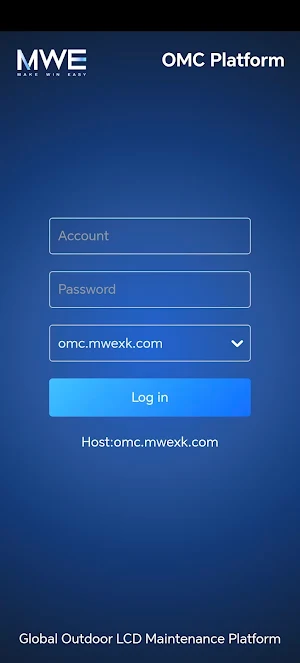
Account Login: Enter your username and password to log in. Usernames and passwords are added and configured by the administrator; self-registration is not currently available.
Server Selection: The default server for international users is omc.marveltechgroup.com, and the default server for Chinese users is omc.mwexk.com. If you are using a self-hosted server, you can click "Custom Server" to configure your server address. Which server to choose depends on which server your account was created on and which server your device is running on.
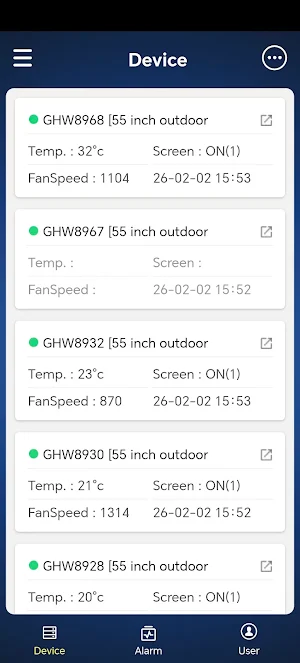
Device List: After logging in, the system displays the user's device list and basic device information: device temperature, screen on/off status, fan speed, data update time, etc. Click the arrow icon on the right to access the device data information page.
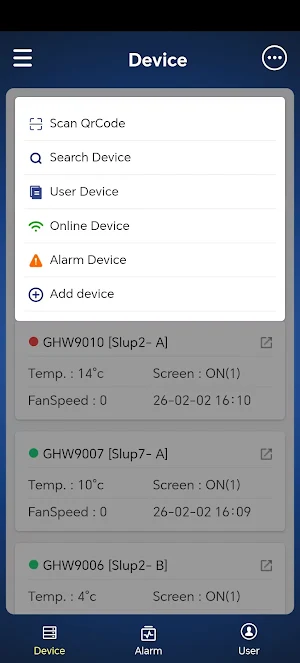
Device Function Menu: On the device homepage, click the three-dot menu button in the upper right corner to display the device function menu, including: Scan QR Code, Device Search, User Devices, Online Devices, Alarm Devices, Add Device, Logout, etc.
System Structure: The OMC system comprises a multi-layered architecture:
Sensors: The bottom layer consists of various sensor devices used to collect environmental data;
Host Computer: Used to acquire sensor data, perform preliminary processing, and then report it to the backend;
Server: Used to receive data uploaded from the host computer, providing customers and maintenance personnel with real-time information on the status of terminal devices;
Mobile Terminal: Used by administrators to query/control device status via mobile devices;
Sensor Data Acquisition: Device terminals collect sensor data through the control board. Sensor data includes: temperature sensor, humidity sensor, smoke sensor, water immersion sensor, and collision sensor. Sensors include: tilt sensors, door opening sensors, and front-panel wind speed sensors;
Host Computer: Sensor data communicates with the host computer motherboard via a UART serial port. The host computer system may be Android or Windows. The host computer sends a data request to the control board every 10 seconds, and the control board sends the current sensor data to the host computer (Android or Windows system);
Service Backend: The service backend receives terminal data, processes and statistically analyzes it, and provides it to backend administrators for equipment inspection and monitoring. It allows for remote control, remote settings, and equipment management, including user and permission registration and management; and statistical processing of equipment alarms.
Mobile Terminal: Mobile devices access backend data through the backend interface, enabling data querying, remote control, remote settings, user management, and equipment management of terminal devices.
Download OMC Mobile Version: Log in to omc.mwexk.com (domestic) or omc.marveltechgroup.com (international) and click to download the Android APP. Or scan the QR code to download.
Account Login: Enter your username and password to log in. Usernames and passwords are added and configured by the administrator; self-registration is not currently available.
Server Selection: The default server for international users is omc.marveltechgroup.com, and the default server for Chinese users is omc.mwexk.com. If you are using a self-hosted server, you can click "Custom Server" to configure your server address. Which server to choose depends on which server your account was created on and which server your device is running on.
Device List: After logging in, the system displays the user's device list and basic device information: device temperature, screen on/off status, fan speed, data update time, etc. Click the arrow icon on the right to access the device data information page.
Device Function Menu: On the device homepage, click the three-dot menu button in the upper right corner to display the device function menu, including: Scan QR Code, Device Search, User Devices, Online Devices, Alarm Devices, Add Device, Logout, etc.
Alternatives to Omc Platform
Looking for apps like Omc Platform? Here are 3 similar Android apps on Google Play. The highest rated is ChackTok -Photobooth Event App (4.4/5), and all 3 are free to download.


| App | Rating | Price | Installs | Last updated | Compare |
|---|---|---|---|---|---|
| Omc Platform | – | Free | 100+ | Feb 11, 2026 | |
| ChackTok -Photobooth Event App | 4.4 / 5 | Free | 100,000+ | Feb 27, 2026 | Compare |
| MWE Calendar | – | Free | 100+ | Aug 25, 2026 | Compare |
| ChackTok 3D | – | Free | 100+ | Nov 19, 2025 | Compare |
Compare Omc Platform with the top alternatives: ratings, updates, ASO score and keyword gaps →