

Magic Signage CMS
%EB%A7%A4%EC%A7%81%ED%88%B4%EC%8A%A4 Magictools Business
Magic Signage CMS is a professional signage content management system app that allows you to manage digital signage content easily and efficiently.
- Downloads
- 114+
- on Google Play
- Price
- Free
- No in-app purchases
- Updated
- Aug 30
- 2026 · v1.2
Screenshots


About Magic Signage CMS
Magic Signage CMS is a professional CMS (Content Management System) app that allows you to manage digital signage content easily and efficiently.
[Key Features]
■ Intuitive Program Editor
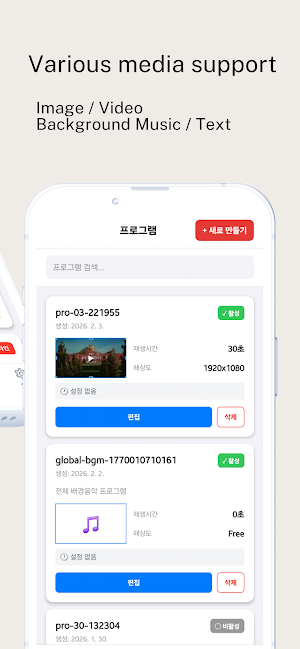
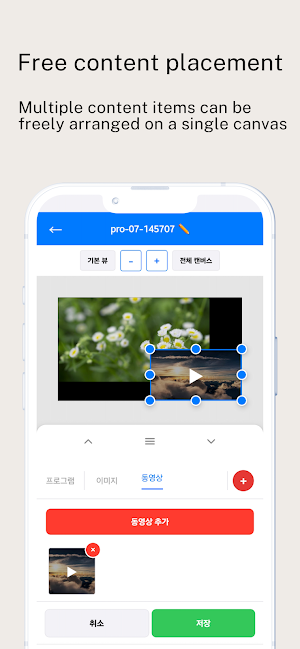
You can easily create digital signage programs using various media, such as images and videos. It supports various resolutions including FHD and 4K, and allows you to select landscape, portrait, or square modes.
■ Real-time Device Management
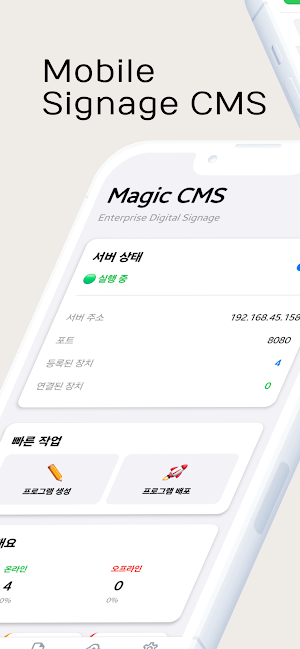
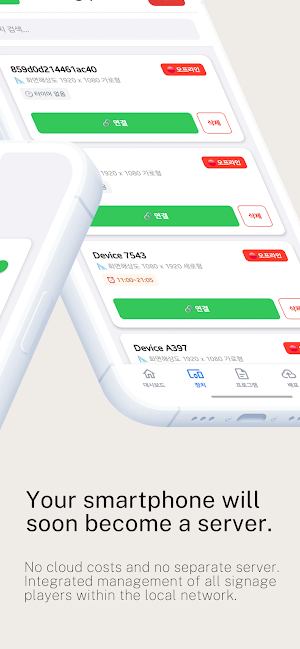
You can monitor and manage digital signage devices connected to your local network in real time. You can handle device status checks, program distribution, and timer scheduling all in one place.
■ QR Code Device Registration
You can easily register new digital signage devices by scanning a QR code. Manual IP registration is also supported.
■ Media Library
You can systematically manage images and videos and utilize them in your programs. You can add files by taking photos directly from the device or selecting them from the gallery.
■ Program Distribution
You can distribute your created programs to multiple devices simultaneously. Large media files are transmitted quickly thanks to stable file transfer based on WebSocket.
■ Secure Operation Based on Local Network
All data is stored locally, ensuring secure operation without the need for external servers. It operates independently on the same WiFi network without an internet connection.
■ Multilingual Support
Supports 7 languages, including Korean, English, Spanish, Chinese, Japanese, Thai, and Vietnamese.
[Usage Environment]
- Communicates with digital signage devices within the same WiFi network.
- Operates independently on the local network without an internet connection.
- Optimized for Android devices.
[Required Permissions]
- Camera: Device registration via QR code scanning
- Photos/Media: Selection of images/videos for program creation
- WiFi/Network: Local network communication with digital signage devices
- Notifications: Receive important notifications, such as program deployment completion
Manage your digital signage content smarter with Magic Signage CMS!
[Key Features]
■ Intuitive Program Editor
You can easily create digital signage programs using various media, such as images and videos. It supports various resolutions including FHD and 4K, and allows you to select landscape, portrait, or square modes.
■ Real-time Device Management
You can monitor and manage digital signage devices connected to your local network in real time. You can handle device status checks, program distribution, and timer scheduling all in one place.
■ QR Code Device Registration
You can easily register new digital signage devices by scanning a QR code. Manual IP registration is also supported.
■ Media Library
You can systematically manage images and videos and utilize them in your programs. You can add files by taking photos directly from the device or selecting them from the gallery.
■ Program Distribution
You can distribute your created programs to multiple devices simultaneously. Large media files are transmitted quickly thanks to stable file transfer based on WebSocket.
■ Secure Operation Based on Local Network
All data is stored locally, ensuring secure operation without the need for external servers. It operates independently on the same WiFi network without an internet connection.
■ Multilingual Support
Supports 7 languages, including Korean, English, Spanish, Chinese, Japanese, Thai, and Vietnamese.
[Usage Environment]
- Communicates with digital signage devices within the same WiFi network.
- Operates independently on the local network without an internet connection.
- Optimized for Android devices.
[Required Permissions]
- Camera: Device registration via QR code scanning
- Photos/Media: Selection of images/videos for program creation
- WiFi/Network: Local network communication with digital signage devices
- Notifications: Receive important notifications, such as program deployment completion
Manage your digital signage content smarter with Magic Signage CMS!
What’s new
Version 1.2 · Updated August 30, 2026
Fixed an issue where content element thumbnails could not be scrolled horizontally
Alternatives to Magic Signage CMS
Looking for apps like Magic Signage CMS? Here are 4 similar Android apps on Google Play. The highest rated is Choolaah Ordering (4.8/5), and all 4 are free to download.




| App | Rating | Price | Installs | Last updated | Compare |
|---|---|---|---|---|---|
| Magic Signage CMS | – | Free | 100+ | Aug 30, 2026 | |
| ParkUsher: Find Parking Easily | 4.1 / 5 | Free | 50,000+ | Sep 24, 2026 | Compare |
| FITEQ | – | Free | 5,000+ | Sep 10, 2026 | Compare |
| Choolaah Ordering | 4.8 / 5 | Free | 10,000+ | Sep 21, 2026 | Compare |
| EcoNet | 4.0 / 5 | Free | 100,000+ | Aug 13, 2026 | Compare |
Compare Magic Signage CMS with the top alternatives: ratings, updates, ASO score and keyword gaps →