
AI Photo Enhancer: Unblur HD
Dope Capybara Play Photography In-app purchases Contains ads
Unblur image, enhance photos & restore old shots with on-device AI. No account.
- Downloads
- 292+
- on Google Play
- Price
- Free
- In-app purchases
- Updated
- Oct 1
- 2026 · v1.5.13
Screenshots


About AI Photo Enhancer: Unblur HD
WHAT ZURIVA DOES
• AI Auto — balanced one-tap enhancement: contrast, color and detail in a single pass
• AI Sharpen — recover lost detail, fix blurry and out-of-focus shots, bring out crisp textures
• AI HDR — balanced highlights and shadows for rich, dynamic photos
• AI Portrait — skin smoothing and face detail that keeps you looking like you
• AI Color Boost — colorize black and white and sepia photos: the AI predicts natural, lifelike color for them. Faded color shots get their vibrance back instead
• AI Restore 4× — neural upscale enlarges small, pixelated, low-res pictures to clean HD
• Unblur Photo — unblur images and sharpen shaky, soft, out-of-focus shots
• Restore Old Photo — bring faded, low-res vintage shots back to life
• Object Eraser — brush over unwanted objects, people or clutter and watch them vanish, right on your device
• Remove Background — one-tap subject cutout to a clean transparent PNG
• Background Replace — swap any backdrop for a color, gradient or your own photo
• Cartoonify — turn any portrait into 3D Toon, Anime, Hand-drawn, Sketch or Art
FULL AI PHOTO EDITOR
Beyond one-tap enhance, Zuriva ships a complete photo editor: 48 cinematic & film color filters, adjust (brightness, contrast, saturation, warmth, exposure, vignette, sharpness, grain), interactive crop & rotate, effects, frames, text overlays, cutout, background replace and portrait retouch.
WHY ZURIVA
• 100% ON-DEVICE AI — your photos never leave your phone, ever
• NO ACCOUNT — no sign-up, no email, no cloud. Install and enhance
• WORKS OFFLINE — the AI runs locally, enhance anywhere
• ONE TAP — pro-grade results in seconds, no editing skills required
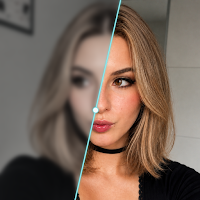
• BEFORE / AFTER SLIDER — see exactly what AI changed, every time
• HISTORY — every result is saved with its original, browse and restore anytime
• PROFESSIONAL OUTPUT — no warped faces, no muddy artifacts, no fake details
• PORTRAIT-FRIENDLY — faces stay faithful, not airbrushed plastic
PERFECT FOR
• Old family photos — bring memories back to life
• Black and white photos — colorize vintage B&W shots with natural color
• Blurry & low-light shots — unblur and brighten in a tap
• Social posts — Instagram, TikTok, Reels-ready in seconds
• Profile pics & selfies — studio quality without a studio
• Product & marketplace photos — cut out the subject or clean the background
• Real estate, food, travel — make every picture pop
• Small or pixelated images — upscale to sharp HD
• Scanned documents — sharper, easier to read
FREE & PREMIUM
Use Zuriva free every day. Go Premium for unlimited enhancements, every AI mode, and no ads. Start with a 3-day free trial — cancel anytime in Google Play.
FAQ
• Do my photos get uploaded? No — every enhancement runs on your device, nothing is sent to a server.
• Do I need an account? No sign-up, no email, no login.
• Does it work offline? Yes — the AI runs locally, with or without internet.
• Is it free? Yes, enhance free every day; Premium unlocks unlimited use and all tools.
PRIVACY FIRST
Everything runs on your device. No account, no uploads — your photos and your data stay yours. We don't sell your data. Read the full privacy policy at dopecapybara.com.
Designed for people who want their photos to look as good as the moment felt. Download free to enhance photos and restore photos — your first result is ready in under 30 seconds.
What’s new
Version 1.5.13 · Updated October 1, 2026
v1.5.13 • Models on your phone: every AI model with its size and your free space, ready to download before you go offline • Compare at 100%: the before/after slider zooms to the most telling spot, faces first • A more compact home screen, and a Premium screen that fits without scrolling • Coming back from the photo picker or a share no longer shows an ad • The editor is translated into 13 more languages
Alternatives to AI Photo Enhancer: Unblur HD
Looking for apps like AI Photo Enhancer: Unblur HD? Here are 6 similar Android apps on Google Play. All of them are free to download.
-
Jestem: Learn Polish Words
-
Color Lines 98: Clay Puzzle
-
Geography Quiz: Maps & Flags
-
Crop Video Editor: Trim & Cut
-
Math Riddles & Logic Puzzles
-
English Vocabulary Size Test
| App | Rating | Price | Installs | Last updated | Compare |
|---|---|---|---|---|---|
| AI Photo Enhancer: Unblur HD | – | Free | 100+ | Oct 1, 2026 | |
| Jestem: Learn Polish Words | – | Free | 10+ | – | Compare |
| Color Lines 98: Clay Puzzle | – | Free | 10+ | Nov 4, 2026 | Compare |
| Geography Quiz: Maps & Flags | – | Free | 100+ | – | Compare |
| Crop Video Editor: Trim & Cut | – | Free | 1,000+ | Oct 14, 2026 | Compare |
| Math Riddles & Logic Puzzles | – | Free | 500+ | – | Compare |
| English Vocabulary Size Test | – | Free | 10,000+ | Oct 31, 2026 | Compare |