

F Downloader
Tools Contains ads
Download videos from F
- Downloads
- 10K+
- on Google Play
- Price
- Free
- No in-app purchases
- Updated
- Sep 12
- 2026 · v1.2.7-pro
Screenshots
About F Downloader
F Downloader helps you download any video clips very fast from F using part splitting mechanics, the same as some downloaders on PC.
Allowing resume stopped/error downloads if the link is still available.
Main screen features:
1. Download List Page: listing all added downloads, with different status: Queued, Downloading, Downloaded, Stopped, Error.
Sort downloads by Name, Date or Progress with Ascending or Descending order.
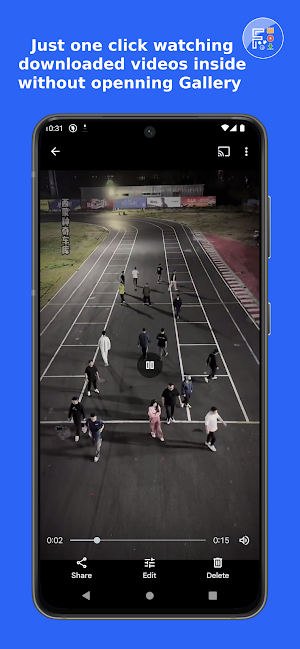
2. Downloaded Detail Page: to see full details of a download, it also has a preview frame to check the thumbnail if the download is video type, make it easy for users to open the right downloaded one and see what it contains.
3. F Tab: Add video downloading from F, with no watermark.
4. Statistics tab: to collect all report on your downloads over time.
5. Settings Tab: configure downloads including concurrent downloads and concurrent threads. Light/Dark themes supported.
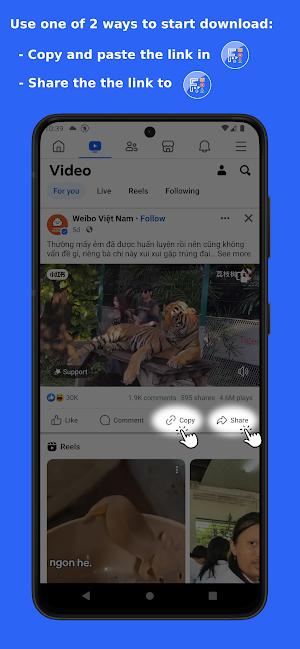
You can use one of the following ways to begin a new download from any web/app sources:
1. Open F Downloader, press + and input the direct download URL manually to begin.
2. Open browsers (Chrome, Opera, Firefox, …) or F app, share the video clips, choose F Downloader in the app chooser popup and let it do the rest. The F's video clips will be downloaded very fast with no watermark logo on the them.
No features need purchases in the app, they are completely free. F Downloader will never have intrusive full-screen ads after each action, as in other applications, but just the open time ad and a smooth, un-annoy ad banner at the bottom.
We never collect any personal data, and the only permission we need is to write to storage permission for only devices below android 10.
App is still in heavy development, any issues or suggestions please contact me via email [email protected]. I will reply and make app fixes/modification as soon as possible.
Thank you for using this application :D
Allowing resume stopped/error downloads if the link is still available.
Main screen features:
1. Download List Page: listing all added downloads, with different status: Queued, Downloading, Downloaded, Stopped, Error.
Sort downloads by Name, Date or Progress with Ascending or Descending order.
2. Downloaded Detail Page: to see full details of a download, it also has a preview frame to check the thumbnail if the download is video type, make it easy for users to open the right downloaded one and see what it contains.
3. F Tab: Add video downloading from F, with no watermark.
4. Statistics tab: to collect all report on your downloads over time.
5. Settings Tab: configure downloads including concurrent downloads and concurrent threads. Light/Dark themes supported.
You can use one of the following ways to begin a new download from any web/app sources:
1. Open F Downloader, press + and input the direct download URL manually to begin.
2. Open browsers (Chrome, Opera, Firefox, …) or F app, share the video clips, choose F Downloader in the app chooser popup and let it do the rest. The F's video clips will be downloaded very fast with no watermark logo on the them.
No features need purchases in the app, they are completely free. F Downloader will never have intrusive full-screen ads after each action, as in other applications, but just the open time ad and a smooth, un-annoy ad banner at the bottom.
We never collect any personal data, and the only permission we need is to write to storage permission for only devices below android 10.
App is still in heavy development, any issues or suggestions please contact me via email [email protected]. I will reply and make app fixes/modification as soon as possible.
Thank you for using this application :D
What’s new
Version 1.2.7-pro · Updated September 12, 2026
• Improved reliability when opening shared Facebook videos and returning to the app. • Download-limit warnings now explain how to adjust Settings and keep the warning visible until you dismiss it.
Alternatives to F Downloader
Looking for apps like F Downloader? Here are 6 similar Android apps on Google Play. The highest rated is My2N (4.6/5), and 5 of the 6 are free to download.
-
BeenVerified Background Search 4.3
-
Save Status - Download Status 4.5
-
MyNewEarth
-
My2N 4.6
-
Valamar 4.6
-
edjing PRO - Music DJ mixer 3.7
| App | Rating | Price | Installs | Last updated | Compare |
|---|---|---|---|---|---|
| F Downloader | – | Free | 10,000+ | Sep 12, 2026 | |
| BeenVerified Background Search | 4.3 / 5 | Free | 1,000,000+ | Oct 21, 2026 | Compare |
| Save Status - Download Status | 4.5 / 5 | Free | 10,000,000+ | Nov 4, 2025 | Compare |
| MyNewEarth | – | Free | 100+ | Oct 16, 2026 | Compare |
| My2N | 4.6 / 5 | Free | 100,000+ | Oct 8, 2026 | Compare |
| Valamar | 4.6 / 5 | Free | 100,000+ | Oct 19, 2026 | Compare |
| edjing PRO - Music DJ mixer | 3.7 / 5 | 5.99 USD | 100,000+ | Sep 9, 2026 | Compare |
Compare F Downloader with the top alternatives: ratings, updates, ASO score and keyword gaps →