
Classic Words Plus
Lulo Apps Word
The number one word game! With smart AI and built-in definitions
- Rating
- 4.5
- 9.7K ratings
- Downloads
- 164K+
- on Google Play
- Price
- $9.90
- No in-app purchases
- Updated
- May 28
- 2025 · v2.10.4-Plus
Screenshots
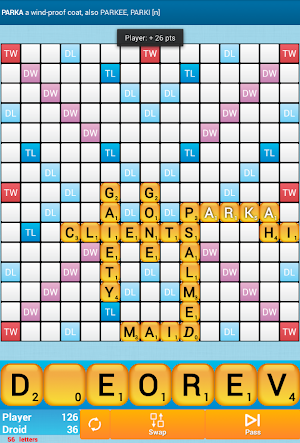
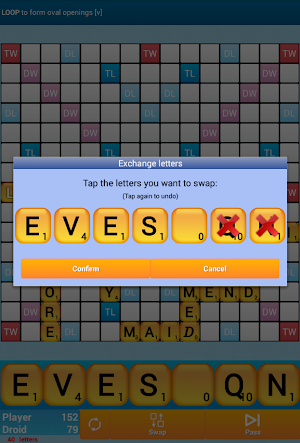
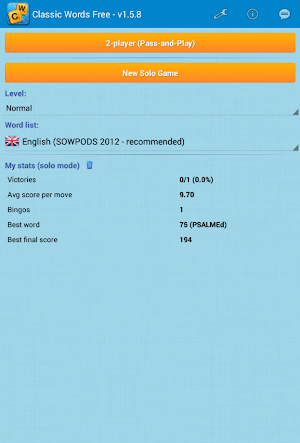


About Classic Words Plus
Classic Words is the number one word game to play against your smartphone or tablet (solitaire mode).
★ Classic Words Plus exclusive features ★
• Pass-and-Play mode for 2 players
• Ad-free experience
• Preview your score before validating a move
Enrich your vocabulary thanks to the built-in word definitions!
6 difficulty levels and many languages are supported: English, Spanish, French, Italian, German, Dutch and Polish.
Tired of stumbling across cheaters or waiting hours for your opponent's next move on multiplayer word games?
Try out Classic Words Solo for instant fun, no matter if you are a beginner in crossword games or a tournament player!
Choose the skill level of the computer (from beginner to expert), pick a word list (English word lists include TWL and SOWPODS official lexicons), and use your strategy skills and vocabulary to try and defeat the Droid.
Classic Words gameplay is classical to crosswords board games: create and place words on the board and boost your score by placing letters on the high scoring Double Letter, Double Word, Triple Letter and Triple Word squares.
Use all 7 letters from your rack to play a Bingo and get a 50 points bonus.
This game is a great time killer for all fans of board games and strategy games. It is also an educational game that will allow kids (and adults) to improve their spelling and vocabulary.
Thanks to the fast reactivity and variable skill of the computer and quality word lists, Classic Words is used by many enthusiasts to play quick training matches and learn new words from the computer's moves.
Unlike with multiplayer board games where some dishonest players use anagram solvers, there is no cheating possible when playing solitaire... Letters and blanks are always picked randomly, and the computer's artificial intelligence does not have more information than you do.
Only your tactics and creativity can make the difference...
Will you play strategically enough to outwit the computer and its extensive vocabulary?
☆ Features ☆
• 6 levels of difficulty
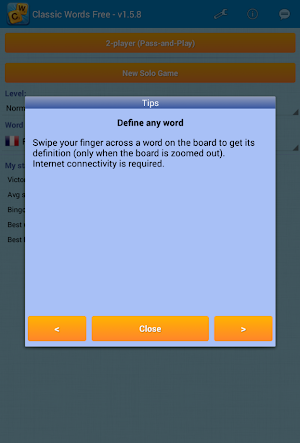
• Display the definition of words by swiping them
• Supports offline play
• Quit and resume game whenever you want
• Shake to shuffle
• Languages and dictionaries supported:
- English
- SOWPODS 2015 (Official English tournament list)
- TWL 2014 (Official list)
- German (with support of Umlauts, and Ezset to be replaced by two 'S')
- French (Official list used in tournaments)
- Italian
- Spanish
- Dutch
- Polish
• Distribution of letters and points is adapted to the language
★ Classic Words Plus exclusive features ★
• Pass-and-Play mode for 2 players
• Ad-free experience
• Preview your score before validating a move
Enrich your vocabulary thanks to the built-in word definitions!
6 difficulty levels and many languages are supported: English, Spanish, French, Italian, German, Dutch and Polish.
Tired of stumbling across cheaters or waiting hours for your opponent's next move on multiplayer word games?
Try out Classic Words Solo for instant fun, no matter if you are a beginner in crossword games or a tournament player!
Choose the skill level of the computer (from beginner to expert), pick a word list (English word lists include TWL and SOWPODS official lexicons), and use your strategy skills and vocabulary to try and defeat the Droid.
Classic Words gameplay is classical to crosswords board games: create and place words on the board and boost your score by placing letters on the high scoring Double Letter, Double Word, Triple Letter and Triple Word squares.
Use all 7 letters from your rack to play a Bingo and get a 50 points bonus.
This game is a great time killer for all fans of board games and strategy games. It is also an educational game that will allow kids (and adults) to improve their spelling and vocabulary.
Thanks to the fast reactivity and variable skill of the computer and quality word lists, Classic Words is used by many enthusiasts to play quick training matches and learn new words from the computer's moves.
Unlike with multiplayer board games where some dishonest players use anagram solvers, there is no cheating possible when playing solitaire... Letters and blanks are always picked randomly, and the computer's artificial intelligence does not have more information than you do.
Only your tactics and creativity can make the difference...
Will you play strategically enough to outwit the computer and its extensive vocabulary?
☆ Features ☆
• 6 levels of difficulty
• Display the definition of words by swiping them
• Supports offline play
• Quit and resume game whenever you want
• Shake to shuffle
• Languages and dictionaries supported:
- English
- SOWPODS 2015 (Official English tournament list)
- TWL 2014 (Official list)
- German (with support of Umlauts, and Ezset to be replaced by two 'S')
- French (Official list used in tournaments)
- Italian
- Spanish
- Dutch
- Polish
• Distribution of letters and points is adapted to the language
What’s new
Version 2.10.4-Plus · Updated May 28, 2025
We’ve refreshed the main English word list (SOWPODS)! New additions include contemporary terms such as COVID, BOTOX, GUAC, PALEO, MPOX, VAXX, JANKY, DOXX... Minor improvements in design and animations.
User reviews

Time killing excellence

Great app

Great fun and a challenge!

Definitely worth buying premium version. (no ads)

Still a great diversion

Fun
Frequently asked questions
What is Classic Words Plus?
Classic Words Plus is a word game that can be played against your smartphone or tablet in solitaire mode. It offers exclusive features such as Pass-and-Play mode for 2 players, an ad-free experience, and the ability to preview your score before validating a move.
What languages are supported in Classic Words Plus?
Classic Words Plus supports many languages, including English, Spanish, French, Italian, German, Dutch, and Polish.
What skill levels are available in Classic Words Plus?
Classic Words Plus offers 6 difficulty levels, allowing players to choose the skill level of the computer opponent from beginner to expert.
How does Classic Words gameplay work?
In Classic Words, players create and place words on the board to boost their score. They can strategically place letters on high-scoring squares such as Double Letter, Double Word, Triple Letter, and Triple Word. Using all 7 letters from their rack to play a Bingo earns a 50-point bonus.
What are the features of Classic Words?
Some of the features of Classic Words include 6 levels of difficulty, the ability to display word definitions by swiping them, offline play support, the ability to quit and resume the game at any time, the option to shake to shuffle letters, and support for multiple languages and dictionaries.
Can Classic Words be played offline?
Yes, Classic Words supports offline play, allowing players to enjoy the game even without an internet connection.
Is Classic Words an educational game?
Yes, Classic Words is an educational game that can help improve spelling and vocabulary skills for both kids and adults.
Can I cheat in Classic Words?
Unlike multiplayer word games where cheating is possible with anagram solvers, there is no cheating possible when playing solitaire in Classic Words. Letters and blanks are always picked randomly, and the computer opponent's artificial intelligence does not have more information than you do.
How can Classic Words help me learn new words?
Classic Words, with its fast reactivity and variable skill of the computer opponent, is often used by enthusiasts to play quick training matches and learn new words from the computer's moves. It can help expand your vocabulary through gameplay.
Are the letters and points distribution adapted to each language?
Yes, in Classic Words, the distribution of letters and points is adapted to the language being played. Each language has its own specific letter distribution and point values.
Alternatives to Classic Words Plus
Looking for apps like Classic Words Plus? Here are 6 similar Android apps on Google Play. The highest rated is Wordfeud Premium (4.8/5), and 5 of the 6 are free to download.
-
Wordfeud Premium 4.8
-
Word Domination 4.1
-
Crosswords With Friends 3.8
-
Scrabble® GO-Classic Word Game 3.9
-
Word Bingo - Fun Word Games 4.7
-
Boggle With Friends: Word Game 3.6
| App | Rating | Price | Installs | Last updated | Compare |
|---|---|---|---|---|---|
| Classic Words Plus | 4.5 / 5 | $9.90 | 100,000+ | May 28, 2025 | |
| Wordfeud Premium | 4.8 / 5 | 4.99 USD | 500,000+ | Sep 21, 2026 | Compare |
| Word Domination | 4.1 / 5 | Free | 10,000,000+ | – | Compare |
| Crosswords With Friends | 3.8 / 5 | Free | 1,000,000+ | Oct 20, 2026 | Compare |
| Scrabble® GO-Classic Word Game | 3.9 / 5 | Free | 10,000,000+ | Oct 22, 2026 | Compare |
| Word Bingo - Fun Word Games | 4.7 / 5 | Free | 1,000,000+ | – | Compare |
| Boggle With Friends: Word Game | 3.6 / 5 | Free | 1,000,000+ | – | Compare |
Compare Classic Words Plus with the top alternatives: ratings, updates, ASO score and keyword gaps →
Similar apps on Google Play
- Wordfeud Premium
- Word Domination
- Crosswords With Friends
- Scrabble® GO-Classic Word Game
- Word Bingo - Fun Word Games
- Boggle With Friends: Word Game
- Words with Friends Word Puzzle
- Word Crack
- Word Jumble Champion
- Words With Friends Crosswords
- Word chain reaction - Wordchy
- Wordsmyth - Boggle, relaxed.
- Word Wars - Word Game
- Word Board
- Word Blitz
- Mystery Word Puzzle
- Crossword Online: Word Cup
- Puzzly Words - word guess game
- Word Wager - Match 3 Word Game
- Word Buddies - Fun Puzzle Game
- Word Hike -Inventive Crossword
- Word Town: Search, find & crus
- Word Dice. Word Search Game.
- Word Madness
- Wordzee! - Social Word Game
- Word Tower Crosswords
- Wordy - Unlimited Word Puzzles
- Astro Words