

Shellora
ludeveloper Personalization In-app purchases
Terminal-style Android launcher with commands, themes, apps, and local tools.
- Rating
- 4.2
- 28 ratings
- Downloads
- 873+
- on Google Play
- Price
- Free
- In-app purchases
- Updated
- Aug 13
- 2026 · v1.0.9
Screenshots


About Shellora
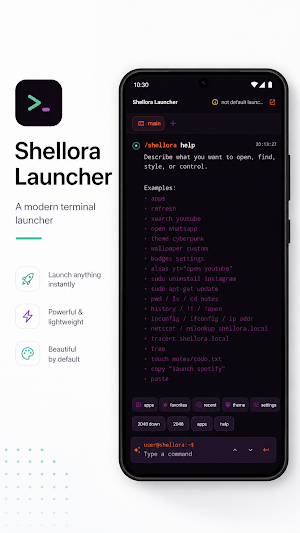
Shellora turns your Android home screen into a modern terminal-inspired
launcher. Search apps, open favorites, run useful launcher commands, switch
themes, and keep your workflow fast with a clean command interface.
Shellora is built for people who like terminals, keyboards, and focused tools,
but it remains practical as a daily launcher. It lists launchable apps locally,
supports fuzzy search, favorites, recents, command history, tabs, custom
backgrounds, orientation preferences, and a polished terminal UI.
Optional features stay under your control. Notification badges can be enabled
manually through Android Notification Access, double tap lock can be enabled
manually through Device Admin, and app uninstall always uses Android's official
confirmation screen.
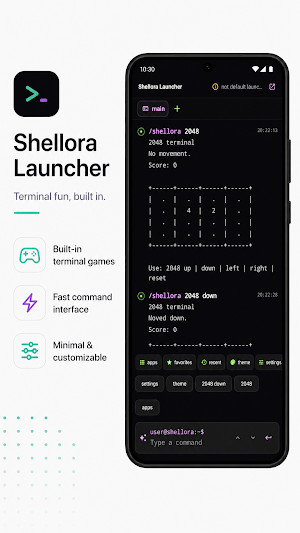
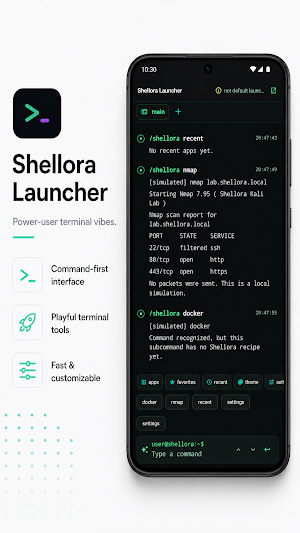
Shellora also includes safe local simulations and terminal easter eggs such as
chess, invaders, 2048, fortune, cowsay, and visual command demos. These are
local-only experiences: no network scanning, root access, overlays, tracking,
or analytics.
Key features:
- Real Android home launcher
- App search, favorites, recents, and app actions
- Modern terminal-inspired interface
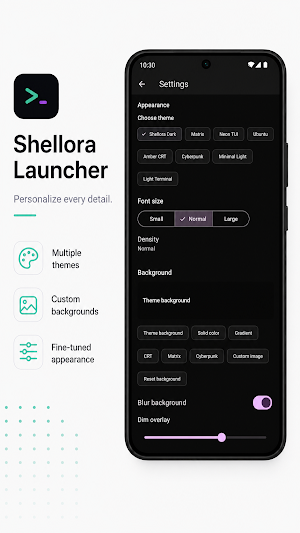
- Themes, font size, and custom backgrounds
- Terminal commands, aliases, history, and tabs
- Optional notification badges
- Optional double tap to lock
- Optional Shellora Pro unlock for premium visual extras
- Local-only privacy model
launcher. Search apps, open favorites, run useful launcher commands, switch
themes, and keep your workflow fast with a clean command interface.
Shellora is built for people who like terminals, keyboards, and focused tools,
but it remains practical as a daily launcher. It lists launchable apps locally,
supports fuzzy search, favorites, recents, command history, tabs, custom
backgrounds, orientation preferences, and a polished terminal UI.
Optional features stay under your control. Notification badges can be enabled
manually through Android Notification Access, double tap lock can be enabled
manually through Device Admin, and app uninstall always uses Android's official
confirmation screen.
Shellora also includes safe local simulations and terminal easter eggs such as
chess, invaders, 2048, fortune, cowsay, and visual command demos. These are
local-only experiences: no network scanning, root access, overlays, tracking,
or analytics.
Key features:
- Real Android home launcher
- App search, favorites, recents, and app actions
- Modern terminal-inspired interface
- Themes, font size, and custom backgrounds
- Terminal commands, aliases, history, and tabs
- Optional notification badges
- Optional double tap to lock
- Optional Shellora Pro unlock for premium visual extras
- Local-only privacy model
What’s new
Version 1.0.9 · Updated August 13, 2026
Version 1.0.9: update focused on optimization, stability and bug fixes. Internal improvements have been applied so Shellora behaves more consistently on Android, with compatibility adjustments and small fixes for daily use.
Alternatives to Shellora
Looking for apps like Shellora? Here are 5 similar Android apps on Google Play. The highest rated is N3D Launcher (3.3/5), and all 5 are free to download.





| App | Rating | Price | Installs | Last updated | Compare |
|---|---|---|---|---|---|
| Shellora | 4.2 / 5 | Free | 500+ | Aug 13, 2026 | |
| N3D Launcher | 3.3 / 5 | Free | 10,000+ | – | Compare |
| GCube Launcher | – | Free | 100+ | – | Compare |
| Velora Launcher | – | Free | 1,000+ | Aug 20, 2026 | Compare |
| NextGenUI | – | Free | 500+ | Aug 13, 2026 | Compare |
| Deducciones de la renta | – | Free | 10+ | May 4, 2026 | Compare |
Compare Shellora with the top alternatives: ratings, updates, ASO score and keyword gaps →