OS Launcher 26 - Home Screen
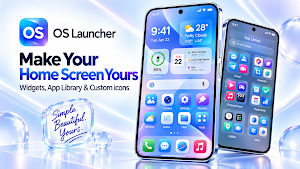
✨ OS Launcher with Home Screen, widgets, App Library, themes & custom icons
About OS Launcher 26 - Home Screen
✨ OS Launcher 26 - Home Screen
Give your Android phone a cleaner, more modern, and more personalized Home Screen with OS Launcher 26.
Enjoy an OS-style launcher experience with smart app organization, useful widgets, themes, wallpapers, custom icons, folders, Hide Apps, App Lock, notification badges, and quick search.
🏠 MODERN OS-STYLE HOME SCREEN
Create a clean and intuitive Home Screen designed for everyday use.
Arrange apps, create folders, add widgets, and customize your layout to match your style. OS Launcher 26 helps keep everything organized and easy to access.
📚 SMART APP LIBRARY
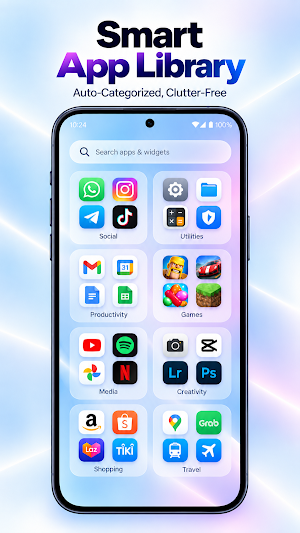
Keep your Home Screen clutter-free with App Library.
Access and manage your apps in one organized place without displaying everything on the Home Screen. Find what you need quickly while keeping your layout clean.
🧩 HOME SCREEN WIDGETS
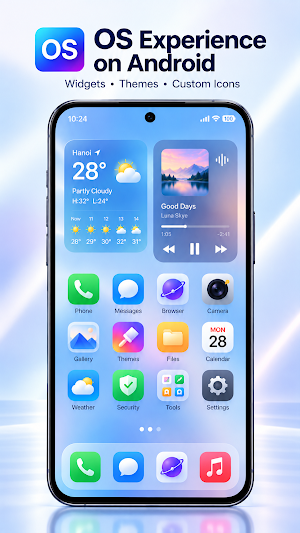
Add useful widgets and view important information at a glance.
Available widgets may include:
☀️ Weather
🕐 Clock
📅 Calendar
🔋 Battery
👤 Contacts
🖼️ Photos
🎵 Music
✨ And more
Arrange widgets to create a Home Screen that works for you.
🖼️ THEMES & WALLPAPERS
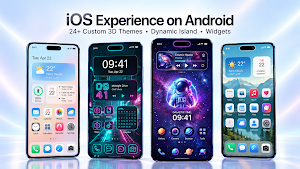
Refresh your phone with different themes and wallpapers.
Choose a new look in just a few steps and customize your screen to match your mood and style.
🎨 CUSTOM ICONS & APP LABELS
Personalize your apps with custom icons and editable labels.
🎨 Change app icons
✏️ Rename app labels
🖼️ Match icons with themes and wallpapers
✨ Create your own Home Screen style
📁 APP FOLDERS
Group related apps into folders for faster access and better organization.
Create folders for social apps, games, productivity, entertainment, and more.
🔒 HIDE APPS
Hide selected apps from the Home Screen and App Library for added privacy and a cleaner layout.
Manage hidden apps directly from the launcher settings.
🔐 APP LOCK
Help protect private or sensitive apps with App Lock.
Use supported device security options to restrict access to selected apps. Availability may depend on your device and Android version.
🔔 NOTIFICATION BADGES
See notification badges on app icons so you can quickly identify apps with new alerts or updates.
🔍 QUICK SEARCH
Search for apps and widgets directly from the launcher and open what you need in seconds.
🌍 MULTIPLE LANGUAGES
Use OS Launcher 26 in your preferred language with built-in multilingual support.
⚙️ EASY TO SET UP
Get started in a few simple steps:
1️⃣ Install OS Launcher 26
2️⃣ Set it as your default Home Screen
3️⃣ Choose a wallpaper or theme
4️⃣ Add widgets and organize your apps
5️⃣ Customize icons, folders, and your layout
⭐ WHY CHOOSE OS LAUNCHER 26?
OS Launcher 26 is designed for Android users who want a clean, modern, and customizable launcher experience.
✨ Modern OS-style launcher
🏠 Clean Home Screen
📚 Smart App Library
🧩 Useful widgets
🖼️ Themes & wallpapers
🎨 Custom app icons
✏️ Editable app labels
📁 App folders
🔒 Hide Apps
🔐 App Lock
🔔 Notification badges
🔍 Quick app search
🌍 Multiple language support
Make your Android Home Screen more organized, personalized, and convenient for everyday use.
📱 SYSTEM REQUIREMENT
Android 8.0 or later.
ℹ️ NOTE
Some themes, wallpapers, icon packs, or customization content may require watching optional rewarded ads or completing in-app steps to unlock.
Feature availability and appearance may vary depending on device model, Android version, and system compatibility.
Similar Apps

Dynamic Fitness Texas
Fitness App

Lumina Wallpapers
Your one-stop hub for finding beautiful wallpapers!

AIO Launcher
All you need on a single home screen

Color Launcher, cool themes
Color Launcher is a cool and powerful launcher to make your mobile life colorful
ADW Launcher 2
ADW Launcher 2, beyond tweaking your android desktop
Pie Launcher version 2026
Pie Launcher is inspired by Android launcher, adding many useful feature

