
All Document Reader
AymanA Productivity Contains ads
All-in-one document reader.
- Downloads
- 5K+
- on Google Play
- Price
- Free
- No in-app purchases
- Updated
- Apr 21
- 2026 · v1.1.3
Screenshots


About All Document Reader
All Document Reader – One App for All Files
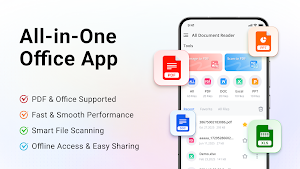
Want to open all file formats on your phone with just ONE app, anytime and anywhere?
Try All Document Reader — a powerful all-in-one file viewer and document manager that supports all major Office formats. Easily read, organize, and manage your files including PDF, DOC, DOCX, XLS, XLSX, PPT, and more — all in one place.
It automatically scans your device and neatly organizes files into categories, making it fast and easy to find what you need.
📚 Smart Document Management
• Organized Folder View – Browse files by type (PDF, Word, Excel, PPT, etc.)
• All Files in One Place – Quickly access all documents in a single list
• Favorites – Mark important files for instant access
• Powerful Search – Find files in seconds
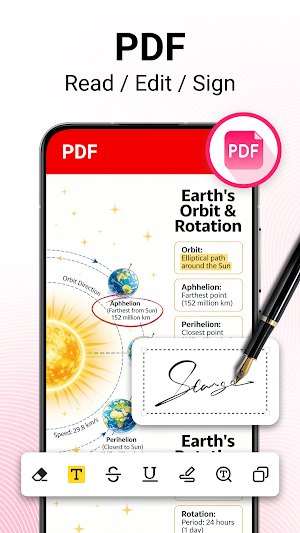
📄 PDF Reader
• Instantly open and view PDF files
• Smooth zoom in/out for better reading
• Jump directly to any page
• Share PDFs with one tap
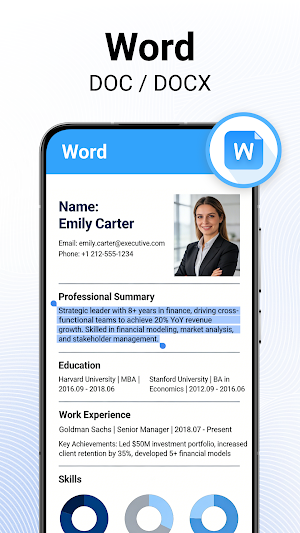
📝 Word Viewer (DOC/DOCX)
• Fast and accurate document viewing
• Clean and simple reading interface
• Automatically lists all Word files on your device
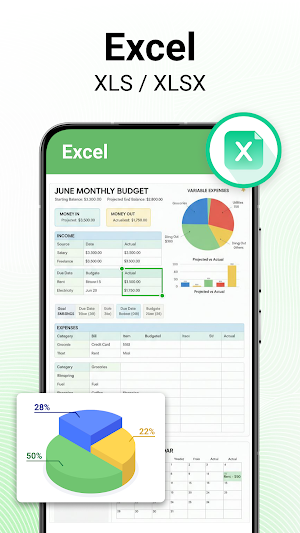
📊 Excel Viewer (XLS/XLSX)
• Open spreadsheets quickly and smoothly
• View charts and data clearly
• Perfect for reports and data management
📽️ PPT Viewer (PPT/PPTX)
• High-quality presentation viewing
• Stable and fast performance
• Ideal for work, study, and quick reviews
🔄 PDF Tools
• Image to PDF – Convert JPG, PNG, and more into PDFs
• PDF to Image – Save PDF pages as images
• One-Tap Sharing – Share converted files instantly
🖊️ Edit PDF Easily
• Full-text search
• File merging
• Drawing & annotation tools
⚡ Key Features
✔ Simple & user-friendly interface
✔ Lightweight and fast (small app size)
✔ Sort by name, size, date, and more
✔ Works offline — no internet needed
✔ Rename, delete, and share files
🚀 Coming Soon
• More formats (ZIP, RAR, HTML, XML, etc.)
• Document editing & creation
• Dark mode
🎯 Why Choose All Document Reader?
No more switching between apps. No more “unsupported format” errors.
Just one smart app to handle all your documents efficiently — perfect for students, professionals, and everyday use.
📥 Download All Document Reader now and turn your phone into a powerful, portable office!
💬 Feedback & Support
We’re constantly improving the app. If you have any suggestions, feel free to contact us at: [email protected]
Want to open all file formats on your phone with just ONE app, anytime and anywhere?
Try All Document Reader — a powerful all-in-one file viewer and document manager that supports all major Office formats. Easily read, organize, and manage your files including PDF, DOC, DOCX, XLS, XLSX, PPT, and more — all in one place.
It automatically scans your device and neatly organizes files into categories, making it fast and easy to find what you need.
📚 Smart Document Management
• Organized Folder View – Browse files by type (PDF, Word, Excel, PPT, etc.)
• All Files in One Place – Quickly access all documents in a single list
• Favorites – Mark important files for instant access
• Powerful Search – Find files in seconds
📄 PDF Reader
• Instantly open and view PDF files
• Smooth zoom in/out for better reading
• Jump directly to any page
• Share PDFs with one tap
📝 Word Viewer (DOC/DOCX)
• Fast and accurate document viewing
• Clean and simple reading interface
• Automatically lists all Word files on your device
📊 Excel Viewer (XLS/XLSX)
• Open spreadsheets quickly and smoothly
• View charts and data clearly
• Perfect for reports and data management
📽️ PPT Viewer (PPT/PPTX)
• High-quality presentation viewing
• Stable and fast performance
• Ideal for work, study, and quick reviews
🔄 PDF Tools
• Image to PDF – Convert JPG, PNG, and more into PDFs
• PDF to Image – Save PDF pages as images
• One-Tap Sharing – Share converted files instantly
🖊️ Edit PDF Easily
• Full-text search
• File merging
• Drawing & annotation tools
⚡ Key Features
✔ Simple & user-friendly interface
✔ Lightweight and fast (small app size)
✔ Sort by name, size, date, and more
✔ Works offline — no internet needed
✔ Rename, delete, and share files
🚀 Coming Soon
• More formats (ZIP, RAR, HTML, XML, etc.)
• Document editing & creation
• Dark mode
🎯 Why Choose All Document Reader?
No more switching between apps. No more “unsupported format” errors.
Just one smart app to handle all your documents efficiently — perfect for students, professionals, and everyday use.
📥 Download All Document Reader now and turn your phone into a powerful, portable office!
💬 Feedback & Support
We’re constantly improving the app. If you have any suggestions, feel free to contact us at: [email protected]
Alternatives to All Document Reader
Looking for apps like All Document Reader? Here are 3 similar Android apps on Google Play. The highest rated is All PDF Reader (3.9/5), and all 3 are free to download.

| App | Rating | Price | Installs | Last updated | Compare |
|---|---|---|---|---|---|
| All Document Reader | – | Free | 5,000+ | Apr 21, 2026 | |
| All PDF Reader | 3.9 / 5 | Free | 100,000+ | May 8, 2026 | Compare |
| QR Code Master | – | Free | 100+ | Feb 15, 2026 | Compare |
| Abu Elwafa Market | – | Free | 10+ | – | Compare |