

Lifelong Projector
Tools
Control your projector over Bluetooth — remote, touchpad, voice & air mouse
- Downloads
- 1K+
- on Google Play
- Price
- Free
- No in-app purchases
- Updated
- Aug 21
- 2026 · v1.0.5
Screenshots


About Lifelong Projector
Lifelong Projector Remote
This Lifelong Projector app currently supports the Lightbeam model (LLPJH20) only. Support for other projector models is coming soon.
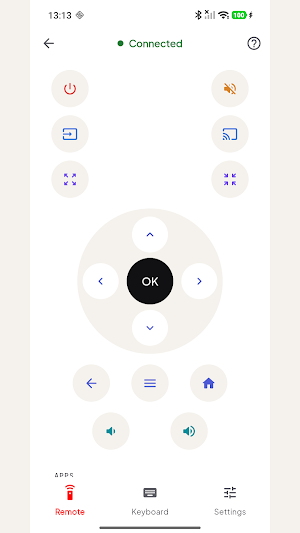
Turn your phone into a convenient Bluetooth remote for your compatible Lifelong projector. Pair using Bluetooth Low Energy (BLE) and control your projector directly from your phone—no additional hardware required.
Whether you're watching a movie, giving a presentation, or adjusting your projector settings, enjoy quick and convenient control without reaching for the physical remote.
KEY FEATURES
Complete Remote Control
• Power on/off
• Change input source and Cast
• D-pad with OK, Back, Home, and Menu
• Volume controls and Mute
• Zoom and Focus adjustment
• Blank Screen, Bluetooth Speaker mode, and Shutdown
Quick App Shortcuts
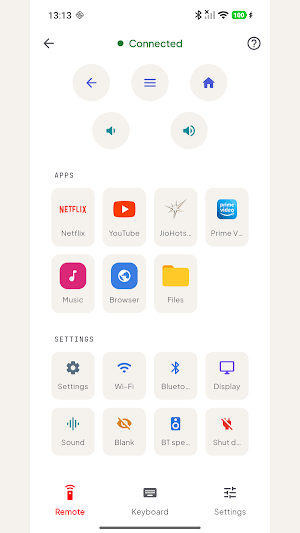
Launch supported apps with a single tap, including:
• Netflix
• YouTube
• JioHotstar
• Prime Video
• Music
• Browser
• Files
Available shortcuts may vary depending on your projector model and software version.
Easy Navigation
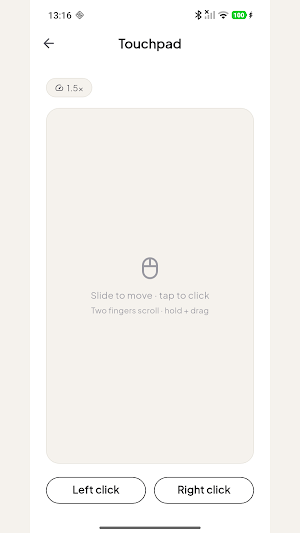
• Touchpad: Navigate with intuitive swipes and taps.
• Air Mouse: Control the on-screen pointer using your phone's motion sensors.
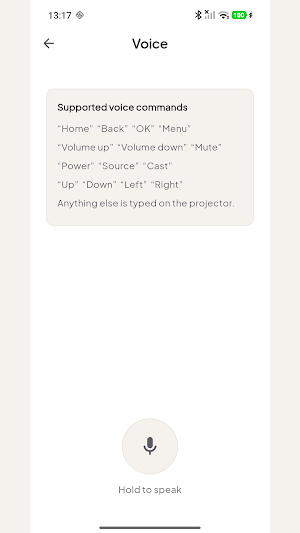
• Voice Commands: Use your voice to perform supported actions.
• Keyboard: Enter text, search queries, and passwords using your phone.
Quick Settings Access
Open commonly used projector settings such as:
• Wi-Fi
• Bluetooth
• Display
• Sound
DESIGNED FOR CONVENIENCE
• Discover compatible projectors over Bluetooth.
• Fast and reliable Bluetooth Low Energy (BLE) connection.
• Automatically reconnects when possible after a temporary disconnection.
• Clean and easy-to-use interface.
PERMISSIONS
Bluetooth
Required to discover, pair with, and communicate with compatible projectors.
Microphone
Used only when you choose to use voice commands.
COMPATIBILITY
This app is designed for compatible Lifelong projectors with Bluetooth Low Energy (BLE) support. Available features, app shortcuts, and controls may vary depending on the projector model and firmware version.
This Lifelong Projector app currently supports the Lightbeam model (LLPJH20) only. Support for other projector models is coming soon.
Turn your phone into a convenient Bluetooth remote for your compatible Lifelong projector. Pair using Bluetooth Low Energy (BLE) and control your projector directly from your phone—no additional hardware required.
Whether you're watching a movie, giving a presentation, or adjusting your projector settings, enjoy quick and convenient control without reaching for the physical remote.
KEY FEATURES
Complete Remote Control
• Power on/off
• Change input source and Cast
• D-pad with OK, Back, Home, and Menu
• Volume controls and Mute
• Zoom and Focus adjustment
• Blank Screen, Bluetooth Speaker mode, and Shutdown
Quick App Shortcuts
Launch supported apps with a single tap, including:
• Netflix
• YouTube
• JioHotstar
• Prime Video
• Music
• Browser
• Files
Available shortcuts may vary depending on your projector model and software version.
Easy Navigation
• Touchpad: Navigate with intuitive swipes and taps.
• Air Mouse: Control the on-screen pointer using your phone's motion sensors.
• Voice Commands: Use your voice to perform supported actions.
• Keyboard: Enter text, search queries, and passwords using your phone.
Quick Settings Access
Open commonly used projector settings such as:
• Wi-Fi
• Bluetooth
• Display
• Sound
DESIGNED FOR CONVENIENCE
• Discover compatible projectors over Bluetooth.
• Fast and reliable Bluetooth Low Energy (BLE) connection.
• Automatically reconnects when possible after a temporary disconnection.
• Clean and easy-to-use interface.
PERMISSIONS
Bluetooth
Required to discover, pair with, and communicate with compatible projectors.
Microphone
Used only when you choose to use voice commands.
COMPATIBILITY
This app is designed for compatible Lifelong projectors with Bluetooth Low Energy (BLE) support. Available features, app shortcuts, and controls may vary depending on the projector model and firmware version.
User reviews

Amazing, working very nice and don't required physical remote

Love that I can handle my projector configurations right from my phone. Adjusting the volume is smooth. It doesn't require any annoying account sign ups, which is a huge plus..

Really useful this app, the app connected quickly with my projector and the controls are simple and responsive. Great alternative to a physical remote.

This is an amazing app for the projector remote, it's working very smoothly as compared to the projector remote.

The app works great. the bug fixes are done by lifelong team regularly. It is a good alternative for remote.

I can use my phone as Bluetooth remote for the projector from up to 20 meters away..This app is exceptionally well designed & the user interface is clean & morden
Alternatives to Lifelong Projector
Looking for apps like Lifelong Projector? Here are 3 similar Android apps on Google Play. The highest rated is IFSTA Instructor 9 (3.9/5), and all 3 are free to download.



| App | Rating | Price | Installs | Last updated | Compare |
|---|---|---|---|---|---|
| Lifelong Projector | – | Free | 1,000+ | Aug 21, 2026 | |
| Vive Now | 2.6 / 5 | Free | 5,000+ | Jan 29, 2026 | Compare |
| IFSTA Instructor 9 | 3.9 / 5 | Free | 5,000+ | Oct 31, 2025 | Compare |
| Jostle | 3.2 / 5 | Free | 50,000+ | Mar 24, 2026 | Compare |
Compare Lifelong Projector with the top alternatives: ratings, updates, ASO score and keyword gaps →