
NanoVeer
levi DONG Tools In-app purchases
Mock GPS location for developers and QA. Verify it actually works, on device
- Downloads
- 30+
- on Google Play
- Price
- Free
- In-app purchases
- Updated
- Aug 13
- 2026 · v1.0
Screenshots


About NanoVeer
WHAT IT DOES
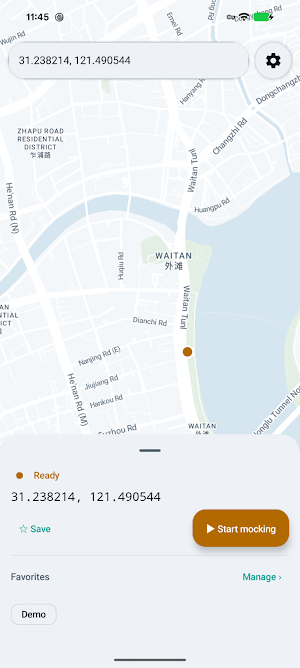
• Teleport — long-press the map to pick a point, or paste coordinates copied from anywhere
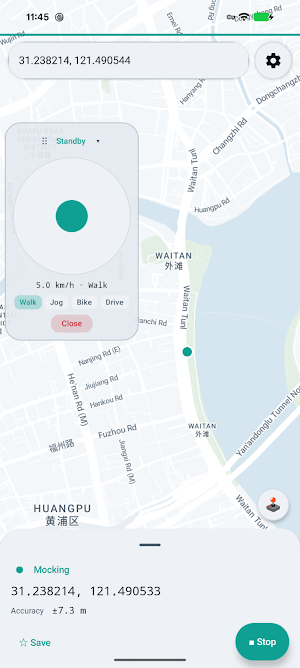
• Joystick — a floating on-screen stick that keeps working while you are inside another app
• Favorites — save the places you test against, organise them into folders
• Home screen widget — status at a glance, one-tap start/stop
• Automation — trigger from Tasker, MacroDroid or adb (off by default, token protected; Pro)
WHAT MAKES IT DIFFERENT
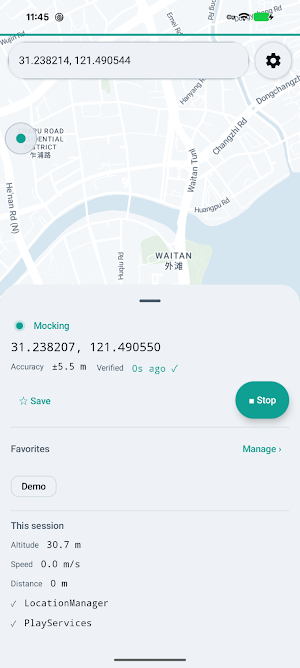
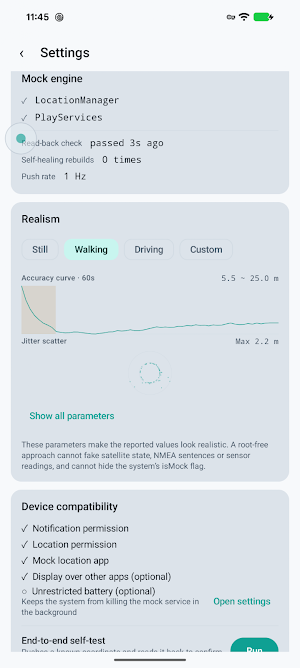
• End-to-end self-test. Most mock location tools leave you guessing whether it worked. NanoVeer pushes a known coordinate, reads it back through an independent path and tells you plainly: accepted, with the measured deviation.
• Injection health monitoring. The reported position is verified against the system periodically. If the real provider overrides it, the channel is rebuilt automatically.
• Realistic output. Accuracy converges from a poor cold-start value the way a real GPS fix does. Position jitter, altitude drift and speed smoothing are all tunable, with a live preview of every parameter.
• Dual injection channels — the system LocationManager and Google Play services fused provider. If one is unavailable the other keeps running instead of failing outright.
FREE AND PRO
The free version is a complete tool on its own: unlimited teleports, the floating joystick, the end-to-end self-test and injection self-healing, dual injection channels, the 2×2 widget and both themes, plus 8 favorite slots you can organise into folders and three realism presets.
NanoVeer Pro is a one-time purchase — no subscription, no ads, no account:
• Unlimited favorites
• Custom realism — 8 parameters, each with a live preview
• Automation interface (Tasker / MacroDroid / adb)
• 4×2 widget with accuracy trend and quick teleport
• Custom joystick speed
• Favorites import / export
The self-test and the self-healing stay free forever. They are about whether the result is correct, and correctness is not something to charge for.
REQUIREMENTS
Android 13 or newer. You must select NanoVeer under Developer options → Select mock location app. The app guides you through this step and verifies it for you.
HONEST LIMITATIONS
Android marks every simulated location with an isMock flag, and NanoVeer does not hide it. Apps that check for it will know the location is simulated. Satellite status, NMEA sentences and motion sensors cannot be simulated without root, and this app does not attempt to. If you need to defeat an anti-spoofing check, this is not the tool.
PRIVACY
NanoVeer has no server of its own: no account, no analytics, no advertising. Your saved places and settings never leave the device. The map itself is drawn by Google's Maps SDK, which contacts Google to fetch map imagery — see the privacy policy for details.
RESPONSIBLE USE
This is a testing tool. Do not use it to falsify attendance records, commit insurance or financial fraud, mislead people about where you are, or breach the terms of service of other applications. Doing so may be unlawful in your jurisdiction.
What’s new
Version 1.0 · Updated August 13, 2026
First release. NanoVeer is a mock location tool for developers and QA engineers. • Teleport: long-press the map or paste coordinates • Floating joystick that keeps working inside other apps • End-to-end self-test: pushes a known coordinate and reads it back to confirm the system accepted it • Injection health monitoring with automatic recovery • Home screen widget, light and dark themes Android's isMock flag cannot be hidden without root. This app makes no anti-detection claims.
Alternatives to NanoVeer
Looking for apps like NanoVeer? Here are 6 similar Android apps on Google Play. The highest rated is MYCPE ONE (4.4/5), and all 6 are free to download.
-
PDK Access by ProdataKey 2.4
-
MYCPE ONE 4.4
-
EcoNet 4.1
-
Pocket Prep IT & Cybersecurity 4.2
-
Rheem EcoNet 4.0
-
Rite Aid Pharmacy 3.5
| App | Rating | Price | Installs | Last updated | Compare |
|---|---|---|---|---|---|
| NanoVeer | – | Free | 10+ | Aug 13, 2026 | |
| PDK Access by ProdataKey | 2.4 / 5 | Free | 100,000+ | Oct 20, 2026 | Compare |
| MYCPE ONE | 4.4 / 5 | Free | 1,000+ | Oct 28, 2026 | Compare |
| EcoNet | 4.1 / 5 | Free | 100,000+ | Aug 13, 2026 | Compare |
| Pocket Prep IT & Cybersecurity | 4.2 / 5 | Free | 100,000+ | Oct 27, 2026 | Compare |
| Rheem EcoNet | 4.0 / 5 | Free | 100,000+ | Aug 13, 2026 | Compare |
| Rite Aid Pharmacy | 3.5 / 5 | Free | 1,000,000+ | Aug 19, 2025 | Compare |
Compare NanoVeer with the top alternatives: ratings, updates, ASO score and keyword gaps →