

Leica Zeno Connect
Leica Geosystems AG Productivity
Use Leica Smart Antennas to improve the GPS accuracy of your mobile device.
- Rating
- 4.4
- 40 ratings
- Downloads
- 5K+
- on Google Play
- Price
- Free
- No in-app purchases
- Updated
- Dec 14
- 2020 · v3.3
Screenshots


About Leica Zeno Connect
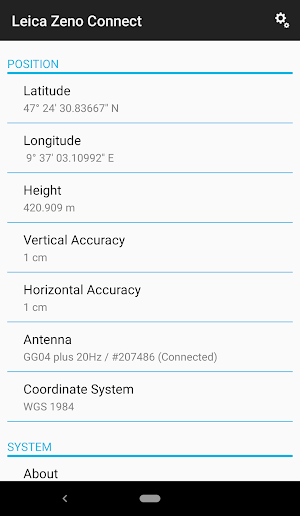
Leica Zeno Connect for Android brings the power of Leica GNSS smart antennas to your mobile device. Simply connect and configure your antenna via Bluetooth and start using your favourite data capture app. Collecting high accuracy geospatial data on your smartphone or tablet has never been easier.
EASY SETUP
Zeno Connect automatically streams the GNSS position from your Leica smart antenna into any location aware Android app.
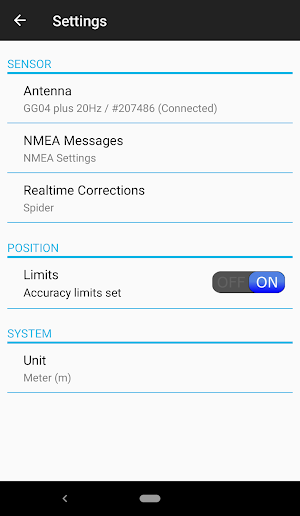
• Simply pair your antenna via Bluetooth in the Zeno Connect settings menu.
• After opening a location aware app, the position will automatically stream from the antenna when a GNSS fix is available.
EVERYTHING AT YOUR FINGERTIPS
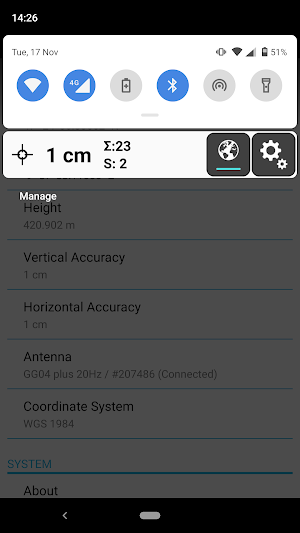
Zeno Connect has a clean and simple to use interface that will not obstruct any other apps that you have open.
• The Zeno Connect toolbar is always available in the Android notification drawer.
• View current GNSS accuracy and satellite status.
• Connect or disconnect from GNSS correction services.
ENABLING HIGH ACCURACY
Zeno Connect supports GNSS correction services to achieve accuracies in the field of up to a centimetre.
• Create and manage RTK profiles.
• Connect to built-in SBAS and Spot correction services.
• Auto connect to RTK once setup for ease of use.
• Wide range of real-time protocols supported.
SUPPORT OF ORTHOMETRIC HEIGHT THROUGH GEOID FILES
• In addition to ellipsoidal height, Zeno Connect outputs orthometric height.
• Select a suitable Geoid directly from the cloud or add a local Geoid file stored on your mobile device.
• Utilise orthometric heights in your data collection software.
• Wide range of real-time protocols supported.
System Requirements
• Android version 6 or above
• Android location services must be active on the device
Don’t have a GNSS antenna? Read more about Leica Geosystem’s range of GNSS smart antennas here: http://leica-geosystems.com/products/gis-collectors/smart-antennas
EASY SETUP
Zeno Connect automatically streams the GNSS position from your Leica smart antenna into any location aware Android app.
• Simply pair your antenna via Bluetooth in the Zeno Connect settings menu.
• After opening a location aware app, the position will automatically stream from the antenna when a GNSS fix is available.
EVERYTHING AT YOUR FINGERTIPS
Zeno Connect has a clean and simple to use interface that will not obstruct any other apps that you have open.
• The Zeno Connect toolbar is always available in the Android notification drawer.
• View current GNSS accuracy and satellite status.
• Connect or disconnect from GNSS correction services.
ENABLING HIGH ACCURACY
Zeno Connect supports GNSS correction services to achieve accuracies in the field of up to a centimetre.
• Create and manage RTK profiles.
• Connect to built-in SBAS and Spot correction services.
• Auto connect to RTK once setup for ease of use.
• Wide range of real-time protocols supported.
SUPPORT OF ORTHOMETRIC HEIGHT THROUGH GEOID FILES
• In addition to ellipsoidal height, Zeno Connect outputs orthometric height.
• Select a suitable Geoid directly from the cloud or add a local Geoid file stored on your mobile device.
• Utilise orthometric heights in your data collection software.
• Wide range of real-time protocols supported.
System Requirements
• Android version 6 or above
• Android location services must be active on the device
Don’t have a GNSS antenna? Read more about Leica Geosystem’s range of GNSS smart antennas here: http://leica-geosystems.com/products/gis-collectors/smart-antennas
What’s new
Version 3.3 · Updated December 14, 2020
Minor fixes -5Hz and 10Hz GGA messages work correctly for FLX100 when using languages that use a comma for decimal symbols. -Coordinate system menu loads correctly on Android 11 devices.
User reviews

Very useful.

I like it but need the following: Ability to load points as shape file Graphically display the current location with go to point

Work with GPS Leica Power Antenna GNSS MNA950 GG?
Alternatives to Leica Zeno Connect
Looking for apps like Leica Zeno Connect? Here are 6 similar Android apps on Google Play. The highest rated is Leica DISTO™ Plan (3.8/5), and all 6 are free to download.
-
Leica DISTO™ Plan 3.8
-
Leica Cyclone FIELD 360 3.4
-
BLK Live
-
Leica DISTO™ transfer BT LE 2.8
-
BLK2GO Live
-
Leica DX Field Shield
| App | Rating | Price | Installs | Last updated | Compare |
|---|---|---|---|---|---|
| Leica Zeno Connect | 4.4 / 5 | Free | 5,000+ | Dec 14, 2020 | |
| Leica DISTO™ Plan | 3.8 / 5 | Free | 500,000+ | Oct 2, 2026 | Compare |
| Leica Cyclone FIELD 360 | 3.4 / 5 | Free | 10,000+ | Feb 3, 2026 | Compare |
| BLK Live | – | Free | 5,000+ | Jul 19, 2025 | Compare |
| Leica DISTO™ transfer BT LE | 2.8 / 5 | Free | 50,000+ | – | Compare |
| BLK2GO Live | – | Free | 5,000+ | Nov 22, 2023 | Compare |
| Leica DX Field Shield | – | Free | 1,000+ | Aug 7, 2024 | Compare |
Compare Leica Zeno Connect with the top alternatives: ratings, updates, ASO score and keyword gaps →