
AR Drawing: Trace & Sketch
App Launcher Studio Art & Design Contains ads
Trace & sketch anything with AR camera. Learn to draw step by step!
- Downloads
- 1K+
- on Google Play
- Price
- Free
- No in-app purchases
- Updated
- Aug 1
- 2026 · v1.0.4
Screenshots
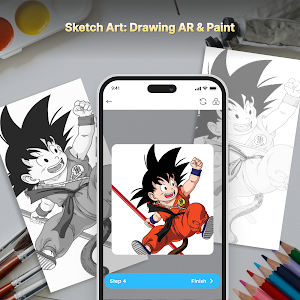
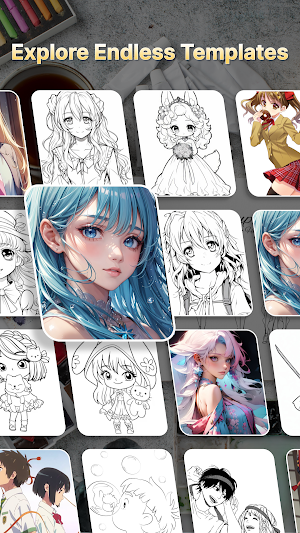
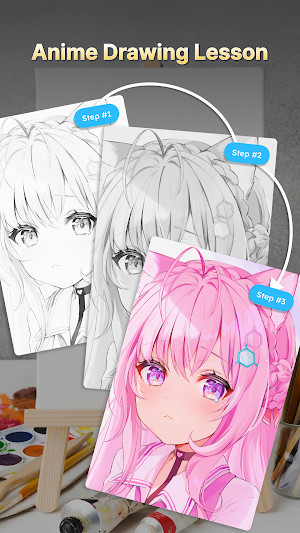
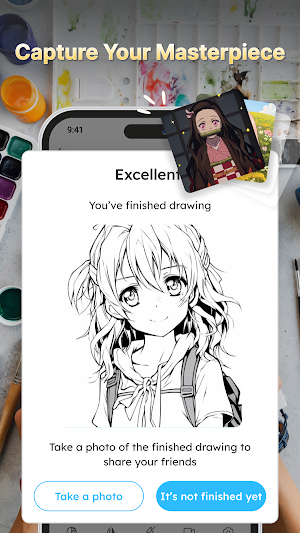

About AR Drawing: Trace & Sketch
Turn your phone into a magic drawing tool! AR Drawing lets you trace, sketch, and animate any image using augmented reality — no drawing skills required.
Just place your phone over paper, point it at any drawing on the screen, and follow the lines with your pencil. Anyone can create amazing artwork in minutes!
✏️ AR TRACE TO DRAW
Project any image onto your paper through the camera and trace it line by line. Perfect for beginners, kids, and artists who want a quick, accurate sketch.
🖼️ THOUSANDS OF DRAWINGS
Browse a huge library of images sorted by category — animals, cartoons, anime, flowers, cars, superheroes and more. New content added regularly.
📷 SKETCH FROM YOUR OWN PHOTOS
Import any photo from your gallery and convert it into an easy-to-trace sketch outline. Draw your friends, pets, and favorite moments.
🅰️ DRAW TEXT & LETTERS
Trace names, quotes, and lettering with dozens of fonts. Great for calligraphy, posters, and hand-lettering practice.
🎬 CREATE ANIMATIONS
Bring your drawings to life! Build frame-by-frame animations and export them to share.
📚 STEP-BY-STEP LESSONS
Learn how to draw with guided, easy-to-follow lessons that build your skills one stroke at a time.
⭐ SAVE & SHARE
Keep your creations in your personal gallery, mark favorites, and share your artwork with friends and social media.
WHY YOU'LL LOVE AR DRAWING
• No experience needed — trace and succeed on your first try
• Fun for all ages — kids and adults
• Works with any pencil, pen, or marker
• Huge, growing library of drawings
• Learn real drawing skills over time
HOW IT WORKS
1. Pick an image or import your own photo
2. Place a sheet of paper on a flat surface
3. Point your camera at the paper and lock the image
4. Trace the projected lines — that's it!
Download AR Drawing now and start creating art you'll be proud of!
Tip: Keep your phone steady on a stand for the best tracing results. Good lighting helps the AR overlay stay sharp.
Just place your phone over paper, point it at any drawing on the screen, and follow the lines with your pencil. Anyone can create amazing artwork in minutes!
✏️ AR TRACE TO DRAW
Project any image onto your paper through the camera and trace it line by line. Perfect for beginners, kids, and artists who want a quick, accurate sketch.
🖼️ THOUSANDS OF DRAWINGS
Browse a huge library of images sorted by category — animals, cartoons, anime, flowers, cars, superheroes and more. New content added regularly.
📷 SKETCH FROM YOUR OWN PHOTOS
Import any photo from your gallery and convert it into an easy-to-trace sketch outline. Draw your friends, pets, and favorite moments.
🅰️ DRAW TEXT & LETTERS
Trace names, quotes, and lettering with dozens of fonts. Great for calligraphy, posters, and hand-lettering practice.
🎬 CREATE ANIMATIONS
Bring your drawings to life! Build frame-by-frame animations and export them to share.
📚 STEP-BY-STEP LESSONS
Learn how to draw with guided, easy-to-follow lessons that build your skills one stroke at a time.
⭐ SAVE & SHARE
Keep your creations in your personal gallery, mark favorites, and share your artwork with friends and social media.
WHY YOU'LL LOVE AR DRAWING
• No experience needed — trace and succeed on your first try
• Fun for all ages — kids and adults
• Works with any pencil, pen, or marker
• Huge, growing library of drawings
• Learn real drawing skills over time
HOW IT WORKS
1. Pick an image or import your own photo
2. Place a sheet of paper on a flat surface
3. Point your camera at the paper and lock the image
4. Trace the projected lines — that's it!
Download AR Drawing now and start creating art you'll be proud of!
Tip: Keep your phone steady on a stand for the best tracing results. Good lighting helps the AR overlay stay sharp.
User reviews

best
Alternatives to AR Drawing: Trace & Sketch
Looking for apps like AR Drawing: Trace & Sketch? Here are 6 similar Android apps on Google Play. The highest rated is Pray Bible - Daily Verse&Audio (4.7/5), and all 6 are free to download.
-
AR Draw - Paint and Sketch 4.1
-
Fonty - Draw and Make Fonts 3.2
-
GOGH: Animated Drawings 3.0
-
Sketchar AR Drawing Sketchpad 3.7
-
AR Drawing: Sketch & Paint 4.2
-
Pray Bible - Daily Verse&Audio 4.7
| App | Rating | Price | Installs | Last updated | Compare |
|---|---|---|---|---|---|
| AR Drawing: Trace & Sketch | – | Free | 1,000+ | Aug 1, 2026 | |
| AR Draw - Paint and Sketch | 4.1 / 5 | Free | 50,000+ | Jul 27, 2026 | Compare |
| Fonty - Draw and Make Fonts | 3.2 / 5 | Free | 1,000,000+ | – | Compare |
| GOGH: Animated Drawings | 3.0 / 5 | Free | 10,000+ | Oct 23, 2025 | Compare |
| Sketchar AR Drawing Sketchpad | 3.7 / 5 | Free | 5,000,000+ | Sep 23, 2026 | Compare |
| AR Drawing: Sketch & Paint | 4.2 / 5 | Free | 10,000,000+ | Sep 23, 2026 | Compare |
| Pray Bible - Daily Verse&Audio | 4.7 / 5 | Free | 100,000+ | Sep 30, 2026 | Compare |